![Most Used WordPress Food Menu Plugins for Restaurants [2026]](https://themelooks.com/wp-content/uploads/2026/06/Most-Used-WordPress-Food-Menu-Plugins-for-Restaurants-2026.webp)
An Online Food Menu System is a digital menu that allows restaurants to display their food items online and accept orders through a website. Instead of using paper menus or calling the restaurant, customers can now look at the online food menu, choose their favorite food, and place an order in just a few clicks.
Some popular WordPress food menu plugins used by restaurants in 2026 are RestroFood plugin, FoodBook, Orderable, Food Menu by ThemeHunk, Five Star Restaurant Menu, and FoodMaster. These plugins help restaurants display menus, accept online orders, manage deliveries, and receive payments more easily.
At present, many people prefer ordering food online because it is fast and convenient. An online food menu system helps restaurants serve customers more efficiently, reduce order mistakes, and make ordering food easier for everyone.
Table of Contents
Here is a simple and quick comparison to help understand the differences between popular restaurant menus and ordering systems:
| Platform | Ease of Use | Features | Customization | Best For | Overall Performance |
| RestroFood | Very Easy | Advanced restaurant menu, ordering, & online delivery system | High | All types of restaurants and food businesses | ⭐⭐⭐⭐⭐ |
| FoodBook | Easy | Online ordering, delivery management, WooCommerce integration | High | Small to medium restaurants | ⭐⭐⭐⭐ |
| Orderable | Very Easy | Simple online ordering system | Medium | Small businesses & beginners | ⭐⭐⭐⭐ |
| Food Menu | Easy | Basic digital menu + ordering features | Medium | Small cafés & local shops | ⭐⭐⭐⭐ |
| Five-Star Restaurant Menu | Very Easy | Simple restaurant menu display & ordering | Low-Medium | Beginners & small restaurants | ⭐⭐⭐⭐ |
| FoodMaster | Medium | Online menu & ordering | High | Beginners & small restaurants | ⭐⭐⭐⭐ |
A few years ago, most restaurants used paper menus and took orders over the phone or in person. While this worked, it often caused problems. Staff could write down the wrong order, customers had to wait longer, and busy restaurants sometimes struggled to handle many orders at the same time.
Now, things are different. Most people use smartphones every day and prefer quick, easy ways to order food. This is why the WordPress restaurant menu plugin has become so popular.
An Online Food Menu System makes ordering food simple. Customers can open a website, look at food items, check prices, choose what they want, and place an order in just a few minutes. Some systems even allow customers to pay online using cards, mobile banking, or digital wallets.
These systems also help restaurants work more efficiently. Since orders go directly into the system, there is less chance of mistakes. Staff spend less time taking orders and more time preparing food and helping customers.
Another reason these systems are growing in popularity is contactless service. Many restaurants now use QR codes that customers can scan with their phones. This lets them view the menu instantly without touching a printed menu. It is fast, convenient, and more hygienic.
Because they save time, reduce mistakes, and improve customer experience, online food menu systems have become an important tool for modern restaurants, cafés, food trucks, and other food businesses.
A modern Online Food Menu System helps restaurants create a complete digital menu, take online orders, and manage everything from one place. It improves the customer experience by making food ordering faster, easier, and more organized.
Online Food Menu Systems help restaurants manage orders, menus, and payments in one place while improving customer experience. They make ordering fast, simple, and accurate for dine-in, takeaway, and delivery services. Below are some of the best platforms that offer reliable and feature-rich solutions for different restaurant needs and budgets.
RestroFood plugin is a WordPress plugin that helps restaurants create an online food menu and take orders directly from their website. It is designed for restaurants, cafés, bakeries, food trucks, and other food businesses that want an easy way to manage their menu and customers online.
With the RestroFood WooCommerce plugin, customers can browse food categories, view food photos, read descriptions, check prices, and place orders in just a few clicks. They can choose home delivery, restaurant pickup, or dine-in options depending on what the restaurant offers.
One of the best things about the RestroFood WordPress plugin is that it combines menu management and online ordering in one system. Restaurant owners can update menu items, manage orders, track deliveries, and receive payments from a single dashboard.
The RestroFood food menu plugin also works with WooCommerce, allowing restaurants to accept different payment methods such as credit cards, PayPal, Stripe, Google Pay, and many other payment gateways.
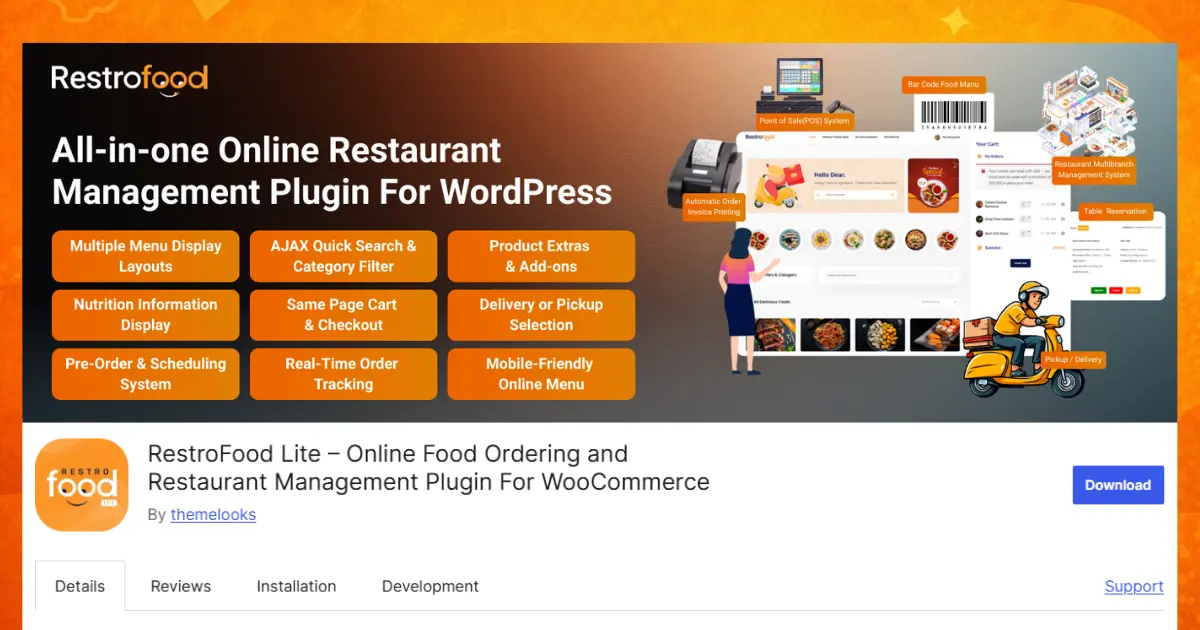
RestroFood WordPress plugin is best for restaurants, cafés, bakeries, food trucks, and cloud kitchens that want an easy online ordering system. It is great for managing menus, orders, and payments in one place.
FoodBook is a WordPress plugin that helps restaurants take food orders online through their website. It turns a normal online shop into a food ordering system.
Customers can look at the menu, see food prices, read descriptions, and choose extra items like cheese, drinks, or sauces. They can order food easily from phones, tablets, or computers.
Restaurant owners can see all orders, update their menu, and receive payments online. It works with WooCommerce, so it also supports many payment options.
Restaurants, cafés, and food businesses that already use WooCommerce and want a powerful, easy-to-manage online ordering system on their website.
Orderable is a WordPress plugin that helps restaurants take food orders quickly and easily. Instead of using a regular online store layout, it creates a special food ordering menu that is simple for customers to use.
Customers can browse food items, add them to their cart, and place an order in just a few clicks. Restaurants can set delivery times, pickup times, and offer extra options such as toppings, sauces, or side dishes. This helps make ordering food faster and more convenient for everyone.
Small restaurants, bakeries, and cafés that want fast ordering.
Food Menu is a plugin designed to display restaurant menus online in a clean and organized way. It focuses on showing food items rather than taking online orders.
Restaurant owners can add food names, photos, prices, and descriptions to help customers learn more about each dish. Customers can easily browse the menu before visiting the restaurant or placing an order. The plugin is simple to use and can be set up in a short time.
Small cafés, food trucks, and bakeries that only need an online menu.
Five-Star Restaurant Menu helps restaurants create a simple and professional-looking menu on their website. It is a good choice for restaurant owners who want an easy way to display their food items online.
Owners can organize foods into categories such as breakfast, lunch, dinner, desserts, and drinks. They can also update menu items and prices whenever needed. The plugin is beginner-friendly and does not require any technical skills to use.
Restaurants that want a simple online menu.
FoodMaster is a powerful restaurant management plugin made for restaurants that receive many orders every day. It helps restaurant owners manage menus, orders, and deliveries from one dashboard.
Customers can order food online, choose delivery or pickup, and track the status of their orders. Restaurant staff can view incoming orders, update order progress, and manage daily operations more efficiently. It is especially useful for larger or busier restaurants that need better order management.
Busy restaurants or large food businesses that need advanced management.
Restaurants have used traditional ordering methods for many years. In this system, customers read a printed menu, tell their order to a staff member, and wait while the order is passed to the kitchen. Although this method works, it can sometimes lead to mistakes, longer waiting times, and extra work for restaurant staff.
An Online Food Menu System makes the process much easier. Customers can view the menu online, choose their food, customize their order, and place it directly through the restaurant’s website. The order is automatically sent to the restaurant, reducing errors and saving time.
| Feature | Online Food Menu System | Traditional Restaurant Methods |
| Menu Updates | Menu items, prices, and availability can be updated instantly. | Menus must be reprinted whenever changes are needed. |
| Ordering Process | Customers place orders online in a few clicks. | Staff must take orders manually. |
| Order Accuracy | Orders go directly to the restaurant system, reducing mistakes. | Miscommunication can sometimes cause order errors. |
| Customer Convenience | Customers can browse menus and order from anywhere. | Customers usually need to visit or call the restaurant. |
| Food Information | Can display photos, descriptions, reviews, and delivery times. | Limited space for detailed information. |
| Payment Options | Supports online payments and digital wallets. | Payments are often handled separately. |
| Business Management | Orders, menus, deliveries, and payments can be managed from one dashboard. | Staff often manage different tasks manually. |
An Online Food Menu System is easy for both restaurant owners and customers to use.
First, the restaurant adds all of its food items to a digital dashboard. This includes the food name, price, description, photo, and category. For example, foods can be grouped into categories such as breakfast, lunch, dinner, drinks, desserts, or special offers.
After setting up the menu, the system creates a website link or QR code. Customers can either visit the website or scan the QR code with their smartphone camera.
Once they open the menu, they can browse different food items, read descriptions, view pictures, and add items to their cart. After choosing their food, they simply place the order and select a payment method.
The order is then sent directly to the restaurant’s dashboard or kitchen screen. Restaurant staff can see the order immediately and begin preparing the food. This process is much faster than taking orders manually and helps reduce mistakes.
Because everything happens automatically, customers receive faster service, and restaurants can handle more orders with less effort.
After comparing all the popular WordPress food menu plugins, RestroFood Plugin stands out as the most complete solution for restaurants in 2026.
While plugins like FoodBook, Orderable, Food Menu, Five-Star Restaurant Menu, and FoodMaster each offer useful features, RestroFood combines almost everything a modern restaurant needs in one platform.
With the RestroFood WooCommerce plugin, restaurants can create a full digital menu, accept online orders, manage deliveries, receive online payments, track orders, offer food add-ons, display preparation and delivery times, and manage everything from a single dashboard.
It is suitable for small cafés, food trucks, bakeries, cloud kitchens, and large restaurants alike. The plugin is also beginner-friendly, mobile-responsive, and works smoothly with WooCommerce and popular WordPress page builders.
If you only need a simple menu display, plugins like Food Menu or Five-Star Restaurant Menu may be enough. If you already use WooCommerce and want basic food ordering, FoodBook or Orderable can be good options.
However, for restaurants looking for an all-in-one solution that combines online food menu management, online ordering, payments, delivery management, and customer convenience, the RestroFood plugin is the strongest overall choice among the compared plugins.
All the plugins in this list can help restaurants build an online food menu, but they are not the same. Some are made only for showing menus, while others focus on simple ordering or basic management.
Food Menu and Five-Star Restaurant Menu are good for displaying food items in a clean way. Orderable and FoodBook add easy ordering features for small restaurants. FoodMaster is better for busy places that need stronger order control.
Still, the RestroFood WordPress plugin gives the most complete solution. It brings menu building, online orders, payments, delivery, and tracking together in one system. It is easy to use and works well for all types of food businesses.
An online food menu system is a digital platform that allows restaurants to display their food items on a website. Customers can view the menu, check prices, and place orders without using paper menus or calling the restaurant.
It helps restaurants manage everything in one place, including menus, orders, and sometimes payments. This reduces manual work, saves time, and improves order accuracy.
Customers only need a smartphone, tablet, or computer with internet access. They can open the website, browse food items, and place an order easily.
Most online menus show food names, prices, images, descriptions, preparation time, and sometimes customer ratings or reviews.
Yes, many systems allow customers to add extras like toppings, sauces, or side items, and also choose quantity based on their needs.
Once a customer places an order, it is sent automatically to the restaurant’s dashboard or order system so staff can start preparing it quickly.
Yes, they can be used by small cafés, food trucks, bakeries, and large restaurants because they are flexible and easy to manage.
They are popular because they make ordering faster, reduce mistakes, support digital payments, and improve the overall customer experience.
Still Have Questions?
Our FAQs cover the most common questions about RestroFood. If you need personalized advice or have a unique query, our team is ready to help. Contact us!

Mohammad Nur Alam is a Technical Content Writer at ThemeLooks Ltd., specializing in WordPress, SaaS, SEO, and web development. He writes practical tutorials, product reviews, and technical guides that help users make the most of WordPress tools and plugins. Passionate about digital marketing and emerging technologies, he enjoys creating helpful content and staying up to date with the latest industry trends.





 ChatGPT
 Grok
Grok Claude
 Perplexity
 Google AI


