What Is DAdmin? A Bootstrap Admin Dashboard Template Overview
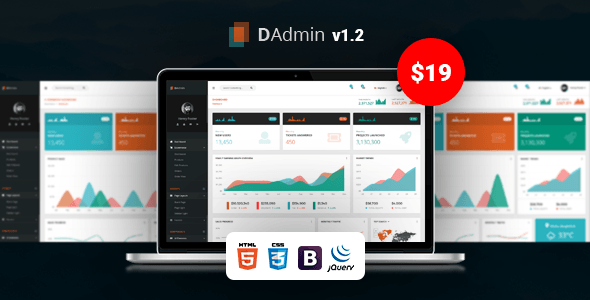
DAdmin is a responsive Bootstrap Admin Dashboard Template built to power the backend panel of almost any software, script, or web application. It’s an HTML5 admin template based on the latest stable Bootstrap 4.1.x framework, giving you a clean, fully responsive dashboard UI without starting from scratch. Whether you’re wiring up a SaaS product, a CRM, or an internal business tool, DAdmin gives you the pages, apps, and components most admin panels need, backed by well-sorted documentation so your team can customize it without guesswork.
DAdmin Quick Specs: Key Details at a Glance
| Detail |
Value |
| Framework |
Bootstrap 4.x |
| File Types Included |
HTML Files, CSS Files, JS Files |
| Layout |
Responsive |
| Columns |
4+ |
| High Resolution |
Yes |
| Compatible Browsers |
IE11, Firefox, Safari, Opera, Chrome, Edge |
| Documentation |
Well Documented |
What Features Are Included in the DAdmin Bootstrap Admin Template?
- Bootstrap 4 Framework: DAdmin is built entirely on Bootstrap 4.1.x, so your development team gets a stable, widely supported foundation with predictable grid behavior and components, no fighting an outdated or unfamiliar framework.
- Fully Responsive Pages: Every page in this Responsive Admin Dashboard adapts cleanly to desktops, tablets, and phones, so whoever is managing your backend can do it from any device without a broken layout getting in the way.
- Clean Design: The interface favors clarity over clutter, which means less onboarding time for new admins and staff, and a dashboard that stays easy to scan even as you add more data and modules.
- Vector Maps Included: Built-in vector maps let you display location-based data regional sales, user distribution, service coverage directly inside your admin panel without sourcing a separate mapping library.
- Retina Ready: Icons and graphics stay sharp on high-density displays, so the dashboard looks polished on modern laptops and monitors instead of appearing blurry or dated.
- 800+ Google Fonts: A huge font library is bundled in, giving you the freedom to match your admin panel’s typography to your brand without hunting for and licensing fonts separately.
- Font Awesome Icons: A full icon set is included out of the box, so buttons, menus, and status indicators are visually clear from day one, with no need to source icons on your own.
- W3C Validated Code: The underlying markup is validated against W3C standards, which means fewer rendering surprises and a codebase that’s easier for developers to maintain and extend over time.
- Modern Cross Browser Support: DAdmin renders consistently across IE11, Firefox, Safari, Opera, Chrome, and Edge, so you’re not stuck troubleshooting layout bugs for specific browsers your users happen to run.
- In-Depth Documentation: A well-sorted documentation set walks through the template’s structure, so developers on your team can find what they need and get the admin panel live faster.
- Mailbox, Calendar, Contacts, Note, and Todo List Apps: Five ready-made mini apps are built in, so common backend needs like internal messaging, scheduling, contact management, note-taking, and task tracking are covered without extra development work.
- Extra Pages (Pricing Table, Profile, Invoice, Auth Screens, Error Pages, Maintenance & Coming Soon): Beyond the core dashboard, DAdmin ships with the supporting pages almost every admin panel eventually needs, from login and password recovery screens to invoices and custom error pages, so you’re not building them from zero later.
Why Choose DAdmin Over Other Bootstrap Admin Panel Templates?
DAdmin earns its place among Bootstrap admin panel templates by pairing a genuinely clean, responsive Bootstrap 4 build with a deep set of ready-made apps and pages, W3C-validated code, and thorough documentation so teams spend less time patching a template and more time building their actual product.
Built for Real Software, Not Just Demos
With Mailbox, Calendar, Contacts, Note, and Todo List apps already wired into the layout, DAdmin functions less like a static mockup and more like a working starting point for a real admin panel, CRM, or SaaS backend.
Development-Friendly Code Quality
- W3C validated HTML for fewer cross-browser surprises
- Built on stable Bootstrap 4.1.x rather than a bleeding-edge or unsupported version
- In-depth documentation to shorten onboarding for new developers
Complete Out of the Box
Between the core dashboard, the five apps, and the full set of extra pages pricing, profile, invoice, auth screens, error pages, and maintenance/coming-soon pages most projects won’t need to design additional admin views from scratch.
What Is DAdmin Best Used For? (Use Cases & Ideal Websites)
DAdmin is best used as the admin dashboard layer for software products, SaaS platforms, and business tools that need a responsive, ready-to-customize backend panel rather than a public-facing website theme.
- SaaS Products: The included apps and extra pages (invoice, pricing table, profile) map closely to what a subscription-based software backend typically needs.
- CRM & Business Management Tools: Built-in Contacts, Note, and Todo List apps make DAdmin a natural fit for teams managing customer relationships and internal workflows.
- Analytics & Business Dashboards: The vector maps and clean, data-friendly layout suit projects that need to present regional or business performance data clearly.
- Internal Company Tools: The Mailbox and Calendar apps make DAdmin a solid base for internal staff portals where scheduling and messaging matter.
- Any Software/Script Requiring a Login-Gated Panel: With Login, Register, Forgot Password, and Lock Screen pages included, DAdmin is set up to handle authenticated admin access right away.
Frequently Asked Questions (FAQs)
Is DAdmin compatible with all major browsers?
Yes. DAdmin supports IE11, Firefox, Safari, Opera, Chrome, and Edge, so your admin panel will render consistently no matter which browser your team or clients use daily.
Does DAdmin work on mobile devices and tablets?
Yes, DAdmin is fully responsive. Every page, including the built-in apps and extra pages, adapts to smaller screens so admins can manage the dashboard from any device.
What version of Bootstrap does DAdmin use?
DAdmin is built on Bootstrap 4.1.x, a stable release of the Bootstrap 4 framework, giving developers a familiar, well-supported grid and component system to work with.
Does DAdmin include any built-in mini apps?
Yes. DAdmin ships with five ready-made apps: Mailbox, Calendar, Contacts, Note, and Todo List, so common admin panel functions are already in place.
Are login and error pages included?
Yes. DAdmin includes Login, Register, Forgot Password, and Lock Screen pages, plus 404, 500, Maintenance, and Coming Soon pages for handling access and edge cases.
Is documentation provided with DAdmin?
Yes, DAdmin includes in-depth, well-sorted documentation covering the template’s structure, intended to help developers customize and extend it without guesswork.



Michael R.
DAdmin is an excellent Bootstrap Admin Dashboard Template. The layout is clean, responsive, and very easy to customize for our SaaS project.
Sarah W.
We were looking for a professional Bootstrap Admin Template and DAdmin delivered exactly what we needed. The documentation saved us a lot of development time.
David K.
DAdmin is a solid HTML Admin Template with a modern interface. Everything works smoothly across different browsers.
Jennifer C.
I used DAdmin as the backend for a CRM system. The responsive dashboard and ready-made pages helped us launch much faster.
Thomas G.
This Responsive Admin Dashboard looks great on desktop and mobile devices. Customization was straightforward thanks to the organized code.
Emily H.
DAdmin is one of the best Bootstrap Dashboard Templates I’ve purchased. The built-in apps are actually useful instead of being simple placeholders.
Kevin B.
Very happy with this Admin Dashboard Template. The Mailbox, Calendar, and Todo features were perfect for our internal management tool.
Olivia M.
DAdmin has a professional Admin UI Template with clean typography and responsive layouts. Highly recommended for web applications.
Brian T.
I built a Software Admin Template using DAdmin. The Bootstrap 4 foundation made development much easier.
Amanda S.
The Dashboard UI Template is clean and lightweight. DAdmin helped our team finish an admin portal ahead of schedule.
Daniel L.
DAdmin is a dependable Responsive Admin Template. The HTML structure is well organized and easy to extend.
Jessica P.
Excellent Bootstrap 4 Admin Template with beautiful pages and useful authentication screens. Great value for developers.
Richard E.
DAdmin worked perfectly for our analytics dashboard. The vector maps and responsive design made it easy to present business data.
Melissa J.
I compared several Bootstrap Admin Panel options before choosing DAdmin. It had the best combination of features and clean design.
Patrick N.
DAdmin is a flexible HTML Dashboard Template that fits almost any business application. The documentation is easy to follow.
Laura F.
The Admin Dashboard HTML code is clean and W3C validated. We integrated it into our project without any issues.
Jason C.
DAdmin is a fantastic Responsive Dashboard Template for SaaS products. Everything from login pages to invoices is already included.
Rachel D.
Very polished Bootstrap HTML Template. DAdmin helped us build a professional admin interface with minimal effort.
Steven A.
We used DAdmin for a CRM Admin Template and loved the responsive pages. The profile and contacts modules were especially useful.
Nicole W.
DAdmin exceeded my expectations. It is a reliable Bootstrap Dashboard Template with plenty of reusable components.
George H.
The HTML5 Admin Template is fast, responsive, and easy to modify. DAdmin has become our standard backend template.
Anna V.
I appreciate how complete DAdmin is. The Admin Panel Template includes everything we needed without installing extra UI packages.
Mark Y.
DAdmin is one of the cleanest Business Dashboard Templates I’ve worked with. Great responsiveness and excellent code quality.
Rebecca O.
This Bootstrap 4 Dashboard is perfect for business software. The ready-made apps saved us several days of development.
Christopher I.
DAdmin is an outstanding Admin Interface Template with responsive layouts, modern styling, and comprehensive documentation. Definitely worth purchasing.
Jonathan P.
DAdmin made it simple to create a professional Bootstrap Admin Dashboard Template for our client portal. The code quality is impressive.
Sophia L.
After testing several Bootstrap Admin Templates, DAdmin stood out because of its clean design and complete collection of dashboard pages.
Ryan M.
We customized DAdmin into a customer management system. This HTML Admin Template is flexible and easy to maintain.
Grace T.
DAdmin is an excellent Responsive Admin Dashboard. Every page adapts perfectly on tablets and mobile devices.
Ethan B.
The Bootstrap Dashboard Template has everything I need, including authentication pages, invoices, and error screens. Great work.
Victoria H.
DAdmin helped us build a modern Admin Dashboard HTML interface for our internal software without starting from scratch.
Brandon F.
I appreciate how organized this Bootstrap 4 Admin Template is. Even new developers on our team understood the structure quickly.
Natalie G.
DAdmin is a fantastic Dashboard UI Template with a polished appearance. It gave our web application a premium look.
Sean K.
This Responsive Dashboard Template is easy to extend with custom widgets. The Bootstrap framework keeps everything consistent.
Chloe D.
DAdmin worked perfectly as the foundation for our SaaS Admin Template. The ready-made apps reduced development costs.
Henry W.
I like how lightweight DAdmin feels. The HTML5 Admin Template loads quickly and the interface is intuitive.
Isabella N.
The Bootstrap Admin Panel in DAdmin is well designed. Customizing colors and layouts was much easier than expected.
Aaron C.
We used DAdmin for an analytics platform. The clean Business Dashboard Template makes charts and reports easy to read.
Kayla S.
DAdmin is a dependable Web Admin Template with responsive pages and excellent browser compatibility. It worked flawlessly.
Benjamin R.
The Bootstrap HTML Template is structured very well. DAdmin made our backend development process much more efficient.
Lily A.
DAdmin is an outstanding CRM Admin Template. The Contacts, Notes, and Todo apps fit our workflow perfectly.
Nathan J.
If you need a Responsive Admin Template for a business application, DAdmin is a smart choice. It’s clean, modern, and reliable.
Claire E.
DAdmin exceeded our expectations as an Admin Dashboard Template. The included pages and responsive layout made deployment much faster.