
Have you ever clicked on a WordPress blog post and left right away because it was hard to read? Maybe the font was too small, the sentences too long, or the content just boring. This happens when writers forget about readability.
Readability means how easy it is to read and understand your writing. Even if you have great ideas, people won’t stay if your post feels like a wall of text. But if your blog is clear, simple, and fun to follow, readers will stay longer, share your content, and come back for more.
That’s why readability is the secret to creating the perfect blog post. In this article, you’ll learn 5 important tips to improve the readability of WordPress blog posts using simple tricks, handy plugins, and SEO-friendly practices that make your blog shine.
Table of Contents
WordPress Blog Post Readability is how easy it is for someone to read and understand your blog. If your text is clear, with short sentences, simple words, and proper headings, readers can follow it easily. Good readability keeps people interested, helps them learn from your post, and makes them stay longer on your site. Tools like the WordPress Content Editor or readability plugins can check your text and improve your perfect blog post.

Readability shows how easy or hard it is for someone to understand your writing. In a WordPress Blog, it’s very important because many readers use phones or small screens. The readability of WordPress Blog posts depends on your words, paragraph structure, and font choice. You can check it using tools like the readability score WordPress function in plugins like Yoast SEO, or the Flesch reading ease WordPress blog test. A higher score means your blog is easier to read, keeps readers engaged, and helps make your perfect blog post enjoyable and clear for everyone.
In short: If you improve blog readability, you improve everything else about your blog’s performance.
Readability is one of the most important parts of creating a successful WordPress Blog. If your blog posts are hard to read, people will leave, no matter how good your information is. Good readability keeps readers interested, improves engagement, and helps your blog rank better in search engines. Now that you understand why readability matters, let’s explore five practical tips to make your WordPress Blog posts easier and more enjoyable to read.

The first and most important rule is to always write with your audience in mind. Every blog post should start by thinking about who will read it. If you don’t know your readers, your content will miss the mark, no matter how well-written it is.
For example:
One size doesn’t fit all. Matching your writing style to your readers’ needs is key to improving readability in WordPress style.
Example:
Instead of writing: “The utilization of typography may significantly influence user comprehension.”
Write: “The font you pick makes your blog easier or harder to read.”
This small change makes a big difference. Writing for your readers improves engagement and keeps people coming back.

Online readers are not students taking an exam—they are scanning quickly for information. If your content feels like a textbook, most people will leave.
Here’s how to improve the readability of WordPress Blog posts by using simpler words:
Example:
Instead of: “Utilize the plugin to enhance your WordPress SEO performance.”
Write: “Use the plugin to improve your WordPress SEO.”
This approach keeps your content simple but still informative. You don’t need to dumb down your content—just make it easier for readers to understand.

Typography, or the font you choose, directly affects readability. If your text is hard to see, your readers will leave. This is true for desktop screens, tablets, and especially smartphones.
Follow these tips to improve WordPress blog readability:
Fonts are more than just letters on a page—they’re part of your brand. A clean, readable font helps your readers focus on the content instead of struggling to see it.

Long, complex sentences can confuse readers and make your blog posts boring. Shorter sentences improve the content readability score and help your readers understand your points quickly.
Here’s how to make your WordPress Blog posts easier to read:
Example:
Instead of: “Improving readability is one of the most significant yet frequently overlooked aspects of content marketing which, if not considered carefully, may result in reduced engagement and poor search rankings.”
Write: “Readability matters. If your blog is hard to read, people leave. That hurts your SEO.”
Short, simple sentences are easier to read, understand, and remember. They keep your readers engaged and improve your blog’s overall performance.
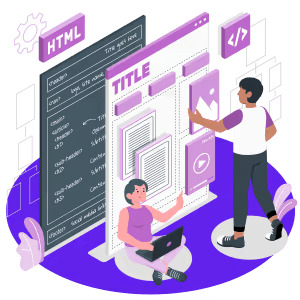
Nobody enjoys reading boring, repetitive text. Adding variety makes your content engaging and helps readers stay longer. Variety comes in many forms—sentence length, structure, images, and examples.
Here’s how to add variety to your WordPress Blog posts:
Example:
The goal is to keep readers entertained while still delivering valuable information. Variety improves readability WordPress style and makes your blog posts memorable.
Beyond the five main tips, here are extra tricks every blogger should know:

| Readability Factor | Impact on User Experience | Impact on SEO |
| Shorter Sentences & Simple Words | Easier to follow, faster to read | Lower bounce rate, better dwell time |
| Proper Fonts & Formatting | Improves scanning and clarity | Better UX signals for ranking |
| Clear Headings & Subheadings | Helps users find info quickly | Improves topical structure for SEO |
| Readability Plugins & Tools | Real-time content checks | Higher quality score in Google |
| Mobile Optimization | Comfortable on small screens | Boosts Core Web Vitals |
Tools like a blog readability checker, WordPress SEO writing assistant, and a WordPress readability plugin make sure you don’t miss these important factors.
Here are some tools to help:
Using these ensures your WordPress readability tips are applied consistently.
Improving your blog isn’t just about writing more content; it’s about writing better content. When you focus on improving the readability of WordPress Blog posts, you make your content easier and more enjoyable for readers. This helps people stay longer on your site, boosts your blog posts for SEO, and builds trust whether you run an Affiliate Blog, WooCommerce Site, or WordPress Landing Page. Clear and professional WordPress tips also help establish your authority in your niche. By applying the 5 important tips—writing for your audience, using simple words, choosing the right font, creating shorter sentences, and adding variety—you’ll notice better engagement, higher reader satisfaction, and stronger search engine performance.
If you’re an enthusiast of WordPress, then you may take a look at 6 Essential Reasons to Use WordPress for Your Website. And also, why you need to avoid nulled WordPress themes and plugins: 9 reasons.
WordPress Blog Post Readability means how easy it is for people to read and understand your blog. Clear sentences, simple words, and headings help make a perfect blog post.
Good readability keeps readers interested, helps them stay longer, share posts, and improves Blog Posts for SEO, even without SEO plugins.
Write for your readers, use simple words, short sentences, proper fonts, and add variety in content.
It measures how easy your blog is to read. Tools like WordPress SEO writing assistant or a WordPress readability plugin can check it.
Fonts like Roboto, Arial, and Open Sans are easy to read. Avoid tiny or fancy fonts that hurt your content readability score.
Yes! Use short sentences, simple words, headings, bullet points, and variety to improve the readability of WordPress Blog posts.
It’s a headline that grabs attention and encourages people to click. Using it makes your Affiliate Blog or WooCommerce Site more engaging.
Break text into small paragraphs, use headings, images, bullets, and keep sentences short for better WordPress readability tips.
It helps you know if your blog is easy to read. Higher scores mean better readability and happier readers.
They let you format posts, add headings, images, and organize content, which improves readability and overall blog performance.
Clear content makes visitors trust your site more, improves conversions, and helps your products sell.
Use Social Media Marketing Tips to share easy-to-read posts, check after Content Migration to WordPress, and Block IP Address in WordPress to remove spam readers.
Just fill up the contact form to get a free consultancy from our expert. We would be happy to answer you.ThemeLooks – YouTube – Facebook – Linkedin – Twitter
