10+ years · 15,000+ happy customers
936+ trusted clients · 99% satisfaction

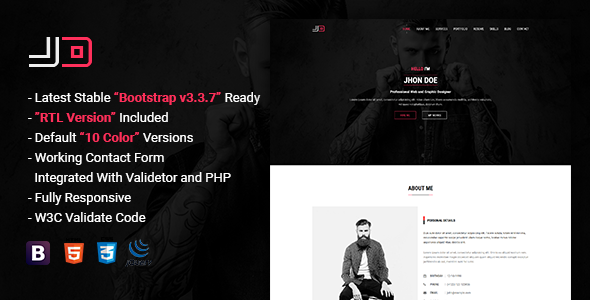
JD is a responsive resume website template built as a personal vCard for showcasing your skills, experience, and portfolio in one clean, single-page site. It’s an HTML5 template based on Bootstrap 3.3.7, designed for developers, designers, freelancers, and other professionals who want an online resume that’s more engaging than a static PDF. JD ships with 10 default color schemes, Google Fonts, FontAwesome icons, and a working PHP contact form, all wrapped in a fully responsive, retina-ready, cross-browser layout with W3C validated code.
| Detail | Value |
| Framework | Bootstrap 3.3.7 |
| File Type | HTML5 |
| Responsive Design | Yes, fully responsive across desktop, tablet, and mobile |
| Display Quality | Retina ready |
| Color Schemes | 10 default color schemes included |
| Typography | Google Fonts |
| Icons | FontAwesome |
| Browser Support | Modern cross-browser support |
| Code Standard | W3C validated |
| Contact Form | Working PHP contact form with validation |
| Documentation | Included, well-sorted for easy editing |
JD (Multipurpose Personal Portfolio Template) stands out among resume HTML templates because it combines a minimalist, distraction-free design with genuinely functional extras a working contact form, retina-ready visuals, and W3C-validated code all wrapped in a layout that’s easy to customize even without coding experience.
Built for Real Career Use, Not Just Looks
Many templates focus purely on visual style. JD balances aesthetics with practical career tools, like an integrated contact form, so your resume site actually helps people reach you rather than just looking good.
Easy to Customize
Reliable Across Devices and Browsers
Between the fully responsive layout, retina-ready graphics, and modern cross-browser support, JD is built to look the same whether it’s opened on a laptop in a corporate office or a phone on the subway.
Clean, Trustworthy Code
W3C validated code isn’t just a technical checkbox, it signals a well-built site, which can support better performance and easier long-term maintenance compared to templates with messy, unvalidated markup.
JD is best used as a personal vCard, online resume, or portfolio website for individuals who want a single, polished page to represent their professional identity, particularly developers, designers, freelancers, and job seekers.
Is JD mobile-friendly?
Yes. JD is fully responsive and built on Bootstrap 3.3.7, so it automatically adapts its layout for phones, tablets, and desktops without any extra setup.
Can I change the color scheme?
Yes. JD includes 10 default color schemes, so you can quickly switch the look of your resume site to match your personal brand.
Does JD include a working contact form?
Yes. JD comes with a PHP contact form that includes built-in validation, letting visitors message you directly from your resume site without setup hassles.
Will my resume site look sharp on high-resolution screens?
Yes. JD is retina-ready, so images, icons, and text stay crisp and clear on high-density displays like modern phones and laptops.
Is JD suitable for non-developers?
Yes. JD includes well-sorted documentation, making it easy to update your details, swap colors, and edit content even without deep coding experience.
Does JD work across different web browsers?
Yes. JD offers modern cross-browser support, so your resume displays correctly whether visitors use Chrome, Firefox, Safari, or other major browsers.
MFolio $10 – Porta $18 – CVIT $22 – FolioCase $25 – TheGraphy $17
Only logged in customers who have purchased this product may leave a review.


Benjamin King
JD is a professional Resume Website Template with clean design, responsive performance, and excellent documentation. Highly recommended.
Lauren Young
Google Fonts, FontAwesome icons, and multiple color schemes make this Resume Website Template incredibly flexible.
Matthew Hall
The mobile responsiveness is outstanding. Recruiters can easily browse my online resume from any device.
Sophia Green
Perfect for freelancers looking for a professional CV Website Template. The contact form works flawlessly.
Andrew Scott
Reliable Resume HTML Template with W3C validated code and excellent browser compatibility. Very satisfied.
Rachel Walker
The minimalist layout keeps the focus on my skills and experience. This Resume Website Template is worth every dollar.
Christopher Lewis
I needed an online resume quickly for job applications, and JD delivered exactly what I needed. Excellent quality.
Jessica Moore
I built my personal vCard website in one afternoon. Everything is well documented and easy to edit.
Daniel Harris
Very clean Resume HTML Template with well-organized code. The PHP contact form worked immediately after setup.
Olivia Thompson
The responsive design and retina-ready layout make this CV Website Template look amazing on mobile and desktop.
James Robinson
A perfect Resume Website Template for developers and freelancers. JD showcases projects and experience beautifully.
Emily Carter
The 10 built-in color schemes are fantastic. I customized my resume website without touching much code. Highly recommended JD.
David Wilson
JD is one of the best Resume HTML Templates I’ve used. The Bootstrap framework and working contact form make it ideal for professionals.
Sarah Mitchell
This JD CV Website Template looks modern and works perfectly on every device. The documentation is easy to follow, making customization simple.
Michael Anderson
Excellent Resume Website Template! JD clean design, responsive layout, and easy customization helped me create a professional online resume in just a few hours.