
The 5 best WordPress plugins for pre-order and scheduling are Foodbook, RestroFood, Orderable, GloriaFood, and WPCafe. Each lets customers select a future delivery or pickup date and lets restaurant owners pick-up van orders by time slot, business hours, or kitchen capacity. The right choice depends on whether you need a full restaurant management system, a simple WooCommerce add-on, or a free entry-level tool.
Table of Contents
The table below compares all 5 plugins on the features that matter most for pre-order and scheduling: platform, order caps, multi-location support, and pricing model.
| Feature | Foodbook | Orderable | GloriaFood | RestroFood | WPCafe |
| Built on WooCommerce | Yes | Yes | No | Yes | (add-on) |
| Future-date pre-order | Yes | Yes | Yes | Yes | Yes |
| Order caps per time slot | (add-on) | Yes | (add-on) | Yes | No |
| Multi-branch scheduling | No | No | No | Yes | No |
| Built-in POS | No | No | No | Yes | No |
| One-time purchase (no SaaS fee) | (add-on) | (add-on) | Yes (free core) | Yes | (add-on) |
Foodbook,WPCafe, and Orderable all handle future-date pre-orders reliably, but only Orderable and RestroFood cap orders per time slot, which matters most for kitchens running near capacity during peak hours. RestroFood is the only plugin in this group that adds multi-branch scheduling and a built-in POS, which makes it the stronger fit for restaurants managing more than 1 location instead of a single storefront.
A pre-order and scheduling system lets customers place food orders ahead of time for a specific future date, while giving the restaurant control over how many orders each time slot can absorb. Without this control, kitchens receive orders in real time with no visibility into upcoming volume, which causes missed pickup windows and rushed prep during peak hours.
Restaurant operators running catering, holiday menus, or high-volume lunch service run into the same problem: walk-in order volume is unpredictable, but kitchen capacity is fixed. A scheduling layer converts unpredictable demand into a queue the kitchen can plan against. Most restaurant operators don’t realize this is a staffing problem as much as a software problem, once orders are spread across visible time slots, the same kitchen staff can handle noticeably higher volume without added stress on service.
Choosing the right pre-order and scheduling plugin helps restaurants accept future orders, organize kitchen workflows, and avoid busy-time overload. In this guide, we compare the five best WordPress plugins for pre-order and scheduling systems, including their key features, scheduling options, and ideal use cases, so you can find the best solution for your WooCommerce restaurant website.
The 5 plugins below cover the range from lightweight WooCommerce add-ons to complete restaurant management systems.
FoodBook is a WooCommerce-based online food ordering plugin for WordPress that helps restaurants manage digital menus, online ordering, delivery, pickup, and scheduled pre-orders from one system. It is designed for restaurants that want a complete ordering solution without installing multiple WooCommerce extensions. FoodBook also includes features such as order tracking, delivery management, invoice printing, and branch-based order handling, making it suitable for both small restaurants and growing food businesses.
Pre-Order Feature: FoodBook allows customers to place orders in advance by selecting a future delivery or pickup date and time during checkout. Scheduled orders are saved for the selected date, helping restaurant staff prepare meals ahead of time and manage customer expectations more efficiently.
Scheduling Feature: Restaurant owners can configure business hours, delivery schedules, delivery zones, branch availability, and order time settings to control when customers can place orders. If the restaurant is closed or ordering is unavailable, FoodBook informs customers and only accepts orders during the configured operating hours. This helps restaurants organize kitchen operations and maintain a smooth ordering process.
Best For: FoodBook is ideal for restaurants that want an all-in-one WooCommerce food ordering plugin with menu management, delivery and pickup options, scheduled pre-orders, order tracking, and restaurant management features in a single solution.
RestroFood, a WooCommerce-based restaurant management plugin for WordPress, handles pre-order and scheduling as part of a broader system that also covers point of sale, delivery dispatch, and multi-branch operations. RestroFood’s pre-order feature lets customers choose a future date and a specific time slot, and it caps the number of orders per slot so the kitchen never receives more volume than it can prepare.
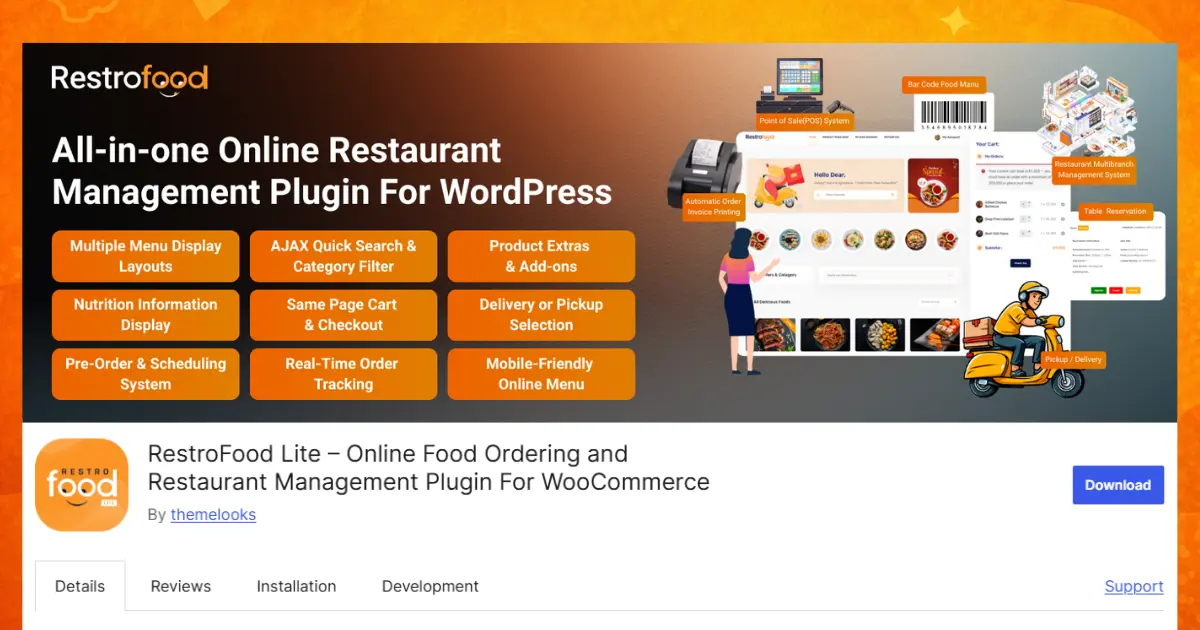
Running a restaurant is much easier when you know what orders are coming before customers arrive. Instead of getting too many orders at the same time, your team can prepare food step by step. This saves time, reduces mistakes, and helps customers receive fresh meals on time.
The RestroFood Pre-Order and Order Scheduling System gives restaurants an easy way to accept orders for a future date and time. Customers can choose when they want their food, while restaurant owners can organize their kitchen more efficiently. Whether you manage a small café or a restaurant with several branches, RestroFood helps keep every order organized.
The RestroFood Pre-Order System allows customers to place their orders before they actually need the food. Instead of ordering only for immediate delivery or pickup, they can select a future date and time that works best for them.
For example, a customer planning a birthday party tomorrow can order food today. Another customer may want lunch delivered at exactly 1:00 PM during their office break. They can schedule everything in advance, and the restaurant already knows what needs to be prepared.
This feature helps both customers and restaurant owners. Customers enjoy peace of mind because they know their order has already been placed. Restaurant staff can also prepare ingredients, organize cooking schedules, and avoid last-minute pressure.
Because everything is planned ahead, the kitchen works more smoothly and customers receive better service.
The Order Scheduling System gives customers the freedom to choose not only the day but also the exact time they want their order.
Instead of receiving every order immediately, restaurants can spread orders throughout the day. This creates a better workflow for the kitchen and delivery team.
For example, a customer may choose
Friday at 12:30 PM
Saturday at 6:00 PM
Sunday at 7:30 PM
The restaurant receives the selected schedule and prepares the meal at the right time. Delivery drivers or pickup staff also know when the order should be ready.
This simple scheduling system helps restaurants stay organized even during busy weekends or holidays.
One of the biggest challenges for restaurants is handling many orders at the same time. If too many customers choose the same delivery time, the kitchen becomes crowded, food preparation slows down, and mistakes become more likely.
RestroFood solves this problem by helping restaurant owners plan their workload before cooking even begins.
Since orders are scheduled in advance, chefs know exactly what needs to be prepared throughout the day. They can prepare ingredients earlier, organize cooking stations, and manage staff more effectively.
This creates a calmer kitchen where everyone can focus on making quality food instead of rushing through large numbers of unexpected orders.
A simple pre-order form only asks customers to choose a future date. While this sounds useful, it can still create problems.
Imagine 40 customers all choose 7:00 PM on Friday evening. If there is no limit, every one of those orders enters the kitchen at once. Even a skilled team may struggle to prepare everything on time.
RestroFood improves this by using time slot capacity management. Restaurant owners can decide how many orders each time slot can accept. For example, they may allow only 15 orders between 7:00 PM and 7:30 PM. Once that limit is reached, the system automatically closes that time slot.
Customers will then choose another available time instead of adding even more pressure to an already busy kitchen.
Instead of facing unexpected rushes, the restaurant works at a comfortable and manageable pace.
The scheduling system automatically checks every available time slot.
If a slot still has space, customers can book it without any problem. Once the maximum number of orders has been reached, that slot is no longer available for new bookings.
Customers only see the remaining available times, making the ordering process simple and clear.
There is no need for restaurant staff to manually close busy hours or contact customers to reschedule orders. Everything happens automatically inside the system.
Many restaurants operate more than one location. Each branch often has different kitchen sizes, staff numbers, and customer demand.
RestroFood allows every branch to manage its own schedule independently.
For example, a downtown branch with a smaller kitchen may accept fewer orders every 30 minutes. A larger suburban branch with more staff can accept more orders during the same period.
This flexibility allows every location to work according to its own capacity instead of following one shared schedule.
Restaurants often change their opening hours during holidays, festivals, or special events.
With RestroFood, restaurant owners can update schedules for each branch whenever needed.
If a branch will be closed on a holiday, customers simply cannot book orders for that day. If the restaurant plans shorter business hours, only those available time slots will appear.
This prevents confusion and helps customers choose valid ordering times.
Scheduled orders also make delivery much easier.
Drivers know which orders need to leave the restaurant and when they should arrive. Pickup customers also receive food closer to their chosen time.
Instead of many deliveries leaving at once, orders are spread throughout the day according to the selected schedule.
This reduces waiting time and helps deliveries arrive more accurately.
Customers appreciate having more control over their orders. Instead of worrying about placing an order at the last minute, they can choose a future date and time that fits their plans.
Whether someone is preparing for a family dinner, office lunch, birthday celebration, or weekend gathering, they can reserve their meal in advance with confidence.
Customers also enjoy seeing only available time slots, so they know the restaurant can prepare their food properly.
RestroFood combines pre-ordering, scheduling, capacity management, and multi-branch support in one complete restaurant management solution.
Rather than simply collecting future orders, it helps restaurants control kitchen workload, organize deliveries, and maintain food quality during busy periods.
Restaurants can avoid overcrowded schedules, improve staff efficiency, and provide a smoother ordering experience for every customer.
From small local cafés to growing restaurant chains, RestroFood makes future order management simple, organized, and reliable.
If you want your restaurant to stay organized, reduce rush-hour pressure, and give customers the convenience of ordering ahead, the RestroFood Pre-Order and Order Scheduling System is a smart solution that helps both your team and your customers every day.
Orderable is best for restaurants that want a clean, mobile-friendly checkout built directly on top of WooCommerce, without a separate ordering interface layered over the existing store.
Pre-order feature: Customers schedule orders weeks in advance through the standard WooCommerce checkout, which keeps the ordering flow familiar for stores already using WooCommerce for retail or merchandise alongside food.
Scheduling feature: Specific time slots control exactly how many orders the kitchen can handle at once, similar in concept to RestroFood’s slot caps but scoped to single-location WooCommerce stores rather than multi-branch operations.
Orderable fits restaurants that already run WooCommerce and want pre-order scheduling added as an extension, rather than restaurants that need POS, delivery dispatch, or multi-branch reporting in the same system.
GloriaFood is a free WordPress restaurant ordering plugin that adds delivery, pickup, and table reservation ordering to a site, with scheduled future orders included in the free tier. It’s widely used by independent restaurants because the core ordering widget installs without a paid license, and revenue comes instead from optional add-ons like a branded mobile app or SMS notifications.
Pre-order feature: Customers pick a future date and time during checkout, and the order appears on a separate dashboard tab so kitchen staff can distinguish same-day orders from advance orders.
Scheduling feature: Operating hours and blackout dates are set in the dashboard, and the ordering widget hides unavailable time slots from the customer-facing menu automatically.
GloriaFood works well as a low-cost entry point for restaurants testing online ordering for the first time. Restaurants that outgrow single-location ordering, or that need POS and staff role management in the same system, typically move to a full WooCommerce-based plugin once volume increases.
WPCafe is best for Elementor users who need both food menus and table reservations in the same plugin, since it builds directly on the Elementor page builder rather than requiring a separate theme.
Pre-order feature: Customers select future dates for their meals during checkout, which works for catering orders and advance meal planning without a separate reservation form.
Scheduling feature: Store owners set business hours, break times, and holiday dates, and the plugin blocks ordering outside those windows automatically.
Restaurants already building their site in Elementor gain the most from WPCafe, since menu, ordering, and reservation modules share the same builder interface. Teams on a different builder or a custom theme typically find less value here, since the plugin’s design tools assume an Elementor-based site.
Choosing the right pre-order and scheduling plugin is not only about finding the one with the most features. The best plugin is the one that matches the size of your restaurant and the way you work every day. A small café and a large restaurant chain have different needs, so it is important to pick a solution that fits your business.
If you own a small restaurant or café and are just starting online food ordering, you probably do not need advanced tools like multi-branch management or a built-in point-of-sale (POS) system. A simple plugin that lets customers place orders in advance and choose a delivery or pickup time may be all you need.
FoodBook
FoodBook is a good choice if you want an all-in-one online food ordering plugin with menu management, online ordering, delivery, pickup, and pre-order features. It gives you everything you need in one plugin, so you do not have to install several extra extensions to build your restaurant ordering system.
RestroFood
If you manage several restaurant locations or expect your business to grow, RestroFood is a better option. It includes advanced features such as a built-in POS system, multi-branch management, order scheduling, and automatic order limits for each time slot. This helps every branch manage its own orders without overloading the kitchen, making it a great solution for busy restaurants and restaurant chains.
Orderable
If your restaurant already uses WooCommerce and you simply want to add pre-order and scheduling without changing your current checkout process, Orderable is worth considering. It works with your existing WooCommerce store and allows customers to choose future delivery or pickup times while keeping the checkout experience familiar.
GloriaFood
If you are trying online food ordering for the first time and want a free solution, GloriaFood is a great place to start. It offers basic pre-order and scheduling features at no cost, making it suitable for small restaurants that want to test online ordering before investing in more advanced software.
WPCafe
If your website is built with Elementor, WPCafe can be the right choice. It combines food ordering, pre-order scheduling, and table reservation features inside the Elementor builder, making it easy to manage everything from one place without using a different website builder.
Before making your final decision, think about your restaurant’s current needs as well as your future plans. If you expect your business to grow, choosing a plugin that can handle more customers, additional locations, and advanced scheduling features can save you time and money later. The right plugin will help you accept future orders, organize your kitchen, improve customer satisfaction, and keep your restaurant running smoothly every day.
The right pre-order and scheduling plugin can make your restaurant faster, more organized, and easier to manage. Whether you run a small café or a large restaurant with multiple branches, choosing a plugin that fits your needs will help you serve customers better. FoodBook, RestroFood, Orderable, GloriaFood and WPCafe all offer useful features, but each is designed for different types of restaurants. If you need advanced scheduling, automatic time slot limits, multi-branch management, and a built-in POS, RestroFood is the most complete solution. Compare the features carefully and choose the plugin that will help your restaurant grow while providing a smooth and reliable ordering experience.
A pre-order system lets customers place a food order for a future date instead of immediate pickup or delivery. The kitchen sees the order in advance, which allows prep staff to plan ingredient use and staffing around confirmed volume rather than reacting to walk-in demand.
No, standard WordPress has no built-in ordering or scheduling logic. A restaurant plugin like RestroFood, WPCafe, or GloriaFood adds the checkout fields, time slot logic, and kitchen-facing order queue needed to run a scheduled ordering system.
Foodbook, Orderable, and RestroFood all build directly on WooCommerce, so an existing WooCommerce store is required. GloriaFood runs independently of WooCommerce, and WPCafe works as an Elementor-based add-on rather than a WooCommerce extension.
A time slot cap sets a maximum number of orders per window, for example 10 orders per 15-minute slot. Once a slot reaches that cap, the checkout hides it from new customers and routes them to the next open slot, which keeps prep volume inside what the kitchen can handle.
The core ordering widget, including pickup, delivery, and scheduled pre-orders, has no license fee. GloriaFood generates revenue through optional paid add-ons, such as a branded mobile app or SMS order alerts, rather than through a required monthly subscription for basic ordering.
RestroFood is the only plugin in this comparison built for multi-branch operations. It applies separate business hours, holiday calendars, and order caps per location from a single WordPress dashboard, which the other 4 plugins handle only through separate installs per site.
Foodbook, RestroFood, GloriaFood and WPCafe all support pickup and delivery scheduling in the same checkout flow. Orderable focuses primarily on pickup and delivery timing within a standard WooCommerce cart rather than adding a separate delivery zone management layer.
Our FAQs cover the most common questions about ThemeLooks. If you need personalized advice or have a unique query, our team is ready to help. Contact us!
Mohammad Nur Alam is a Technical Content Writer at ThemeLooks Ltd., specializing in WordPress, SaaS, SEO, and web development. He writes practical tutorials, product reviews, and technical guides that help users make the most of WordPress tools and plugins. Passionate about digital marketing and emerging technologies, he enjoys creating helpful content and staying up to date with the latest industry trends.
