
The 5 best WooCommerce plugins for a restaurant food ordering system in 2026 are FoodBook, RestroFood, FoodMaster, Orderable, and WPCafe. Each plugin turns a standard WooCommerce store into a working restaurant ordering system, but they differ sharply in scope- some handle only online orders, while others manage delivery, point of sale (POS), table reservations, and multi-branch operations from one dashboard. The right choice depends on how many locations you run and whether you need in-house order management alongside online ordering.
Table of Contents
The table below compares each plugin against the operational features restaurants ask about most: POS, delivery management, multi-branch support, reservations, and pricing model.
| Feature | FoodBook | RestroFood | FoodMaster | Orderable | WPCafe |
| Online ordering (delivery/pickup) | Yes | Yes | Yes | Yes | Yes |
| Built-in POS | No | Yes | Yes | No | (add-on) |
| Multi-branch management | No | Yes | Yes | No | Yes |
| Table reservation system | No | Yes | (QR ordering only) | No | (QR ordering only) |
| Delivery zone/fee management | (basic) | Yes | Yes | No | (basic) |
| Dedicated mobile apps | No | Yes | No | No | No |
| One-time purchase model | Yes | Yes(free + Pro tiers) | No (annual) | (free + annual Pro) | (free + annual Pro) |
This comparison shows that FoodBook and Orderable cover the online-ordering layer well but leave POS, reservations, and multi-branch management to separate plugins. RestroFood and FoodMaster cover the widest operational scope, but RestroFood is the only plugin in this group pairing that scope with dedicated customer and management mobile apps – a feature most competitors in this category do not offer.
A default WooCommerce installation sells physical products; it does not understand restaurant orders, kitchen timing, or delivery zones without a dedicated plugin. WooCommerce treats a burger and a bookshelf the same way as a product with a price and a quantity. Restaurant owners who try to run food ordering on unmodified WooCommerce hit the same 3 walls: no order-type distinction between dine-in, delivery, and pickup; no delivery zone or fee logic; and no kitchen-facing order screen.
Most restaurant operators do not realize this gap until their first busy weekend, when orders for 6:00 PM delivery slots start arriving mixed in with same-day pickup orders and nobody can tell which is which. In practice, the difference between a generic e-commerce plugin and a restaurant-specific one comes down to order-type logic the ability to tag every order as dine-in, delivery, or pickup and route it accordingly. That single feature separates a workable restaurant system from a WooCommerce store that happens to sell food.
This gap is why dedicated restaurant ordering plugins exist. Each of the 5 plugins below solves it differently, and the sections that follow break down exactly how.
The right WooCommerce food ordering plugin can help you accept online orders, manage deliveries, and improve your restaurant’s workflow. Below, we’ve reviewed the 5 best WooCommerce plugins for food ordering systems to help you choose the one that best fits your restaurant’s needs.
FoodBook is a WordPress food ordering plugin, sold through CodeCanyon, that gives a single restaurant a complete online ordering system out of the box. It ships as FoodBook Lite, a standalone system rather than a WooCommerce add-on, and covers menu display, cart, checkout, and order status tracking for one restaurant location.
FoodBook works best for a single-location restaurant that wants ordering functionality without adopting WooCommerce as the underlying commerce layer. Because it is a one-time CodeCanyon purchase, it appeals to owners who want to avoid recurring software fees for a simple, single-restaurant setup.
FoodBook Lite does not natively include POS, multi-branch management, or driver dispatch. Restaurant owners running more than 1 location, or wanting a physical POS terminal for in-house orders, need a companion plugin, which is exactly the gap RestroFood was built to close.
RestroFood is a WooCommerce-based restaurant management plugin for WordPress that runs online ordering, POS, delivery, table reservations, and multi-branch operations from a single WordPress installation. Unlike FoodBook’s standalone approach, RestroFood builds directly on top of WooCommerce, which means it inherits WooCommerce’s product catalog, payment gateways, and extension ecosystem instead of replacing them.
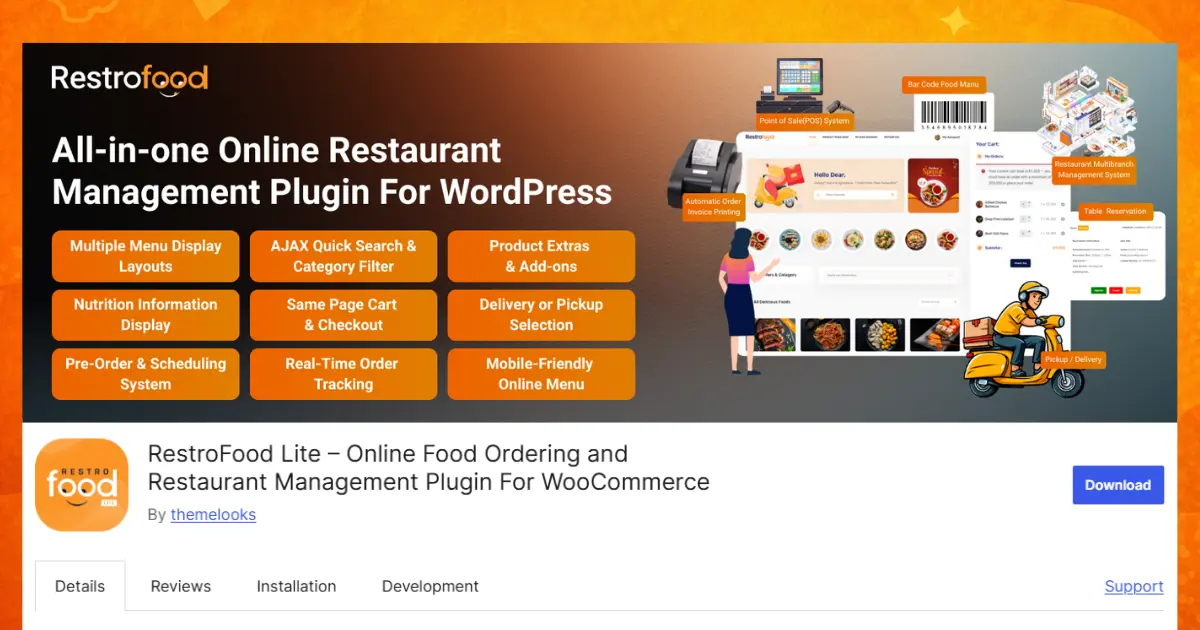
Most of these features address the exact gaps that force single-purpose plugins like FoodBook into multi-plugin setups. A restaurant using RestroFood processes an in-house order through the built-in POS, takes a delivery order through the same dashboard, and manages a table reservation all without installing a separate reservation plugin, a separate POS plugin, and a separate delivery plugin on top of the base ordering system.
A cloud kitchen operating 3 virtual brands from 1 physical kitchen needs separate menus, separate delivery zones, and separate order dashboards for each brand but only 1 kitchen to fulfill all of them. RestroFood’s multi-branch structure lets the operator configure each virtual brand as its own branch, with its own menu and delivery settings, while still tracking every order from a single WordPress installation. Running the same setup with 3 disconnected plugins would mean logging into 3 separate dashboards during peak dinner hours, which is where most order mix-ups happen.
RestroFood offers a free version alongside paid Pro plans; see thefull RestroFood pricing breakdown for current tiers, and the Free vs Pro comparison if you are deciding which tier your order volume actually requires. Because RestroFood is a WordPress plugin rather than a hosted SaaS ordering platform, restaurants pay once for the license instead of a recurring per-order commission a distinction covered in more depth later in this article.
RestroFood’s ability to replace 4 to 6 separate plugins – ordering, POS, delivery, and reservations – with 1 connected system is its clearest advantage over both FoodBook and the other plugins on this list. You can preview the full dashboard on the live RestroFood demo before committing to a plan.
FoodMaster is a WooCommerce food ordering plugin built around a Kitchen Display System (KDS) and built-in POS, aimed at high-volume kitchens that need automated order routing to the kitchen line. Its standout capability is direct, automated receipt printing the moment an order comes in, removing the manual step of a staff member reading an order screen and writing it onto a paper ticket.
FoodMaster suits high-volume restaurants, cloud kitchens, and multi-branch operations where kitchen speed during peak hours matters more than front-end customization. Pricing starts at around $499 per year, positioning it as a premium option compared to the other plugins on this list.
Orderable is a WooCommerce ordering plugin focused on a fast, app-like checkout experience rather than back-of-house operations like POS or kitchen displays. It strips the ordering flow down to a distraction-free checkout, which keeps cart abandonment low on mobile devices where most delivery orders now originate.
Orderable works best for small-to-medium restaurants, cafes, and bakeries prioritizing a clean customer-facing ordering experience over multi-branch or POS functionality. Restaurants that later need delivery zone management, a physical POS, or table reservations will need to add separate plugins alongside it.
WPCafe is a WooCommerce restaurant ordering plugin built to integrate directly with the Elementor page builder, giving restaurant owners drag-and-drop control over menu layout. Its QR code scanning for dine-in orders and live order tracking make it a fit for restaurants that already build their site in Elementor and want ordering functionality without leaving that workflow.
WPCafe suits restaurants deeply invested in Elementor as their page-building tool and looking for the lowest-cost entry point into multi-branch ordering on this list. Restaurants using a different page builder, or no page builder at all, gain less from its core differentiator.
Choosing between these 5 plugins comes down to 3 questions: how many locations you operate, whether you need a physical POS, and whether your ordering volume justifies a per-year license fee. Work through the following steps in order.
A WooCommerce-based ordering plugin runs on a restaurant’s own WordPress installation, while a SaaS ordering platform runs on the vendor’s servers and typically charges a per-order commission. This distinction affects both cost and control. A restaurant on a WooCommerce plugin owns its customer data, order history, and menu content outright, and can move hosting providers without losing that data. A restaurant on a commission-based SaaS platform pays a percentage of every order indefinitely, and that data often stays inside the vendor’s system.
For a restaurant processing 500 delivery orders a month at an average ticket of $25, a 15% commission SaaS platform costs roughly $1,875 per month in fees alone – compared to a 1-time or annual license fee for a WooCommerce plugin covering the same order volume. This is why WooCommerce restaurant plugins have gained ground among independent restaurants and small chains looking to keep more margin on delivery orders.
WooCommerce’s extension ecosystem adds a second advantage: a restaurant can add loyalty programs, email marketing, or accounting integrations from the broader WooCommerce marketplace without waiting for its restaurant plugin vendor to build that feature natively.
Restaurant ordering technology is shifting in 2 directions this year that affect which plugin makes sense for a growing restaurant.
Restaurants evaluating a new plugin in 2026 should weigh how actively each vendor is shipping these capabilities, not just the feature list at time of purchase.
Restaurants choosing a WooCommerce food ordering plugin in 2026 are really choosing how many separate systems they want to run. FoodBook and Orderable handle online ordering well for a single location but leave POS, reservations, and delivery management to other tools. FoodMaster and WPCafe add pieces of that operational layer. RestroFood is currently the only plugin among the 5 combining ordering, POS, delivery, reservations, and multi-branch management with dedicated mobile apps in one WooCommerce-based system which is why it replaces the most separate tools for restaurants that have outgrown a single-purpose plugin.
RestroFood is the best overall WooCommerce plugin for restaurants needing more than basic online ordering, since it combines ordering, POS, delivery management, and table reservations in 1 system. FoodBook remains a strong standalone choice for a single restaurant that only needs online ordering without WooCommerce.
No, a default WordPress and WooCommerce installation cannot handle restaurant-specific logic like order-type routing or delivery zones on its own. A dedicated plugin such as RestroFood or FoodBook adds this restaurant-specific layer on top of the base platform.
Yes, RestroFood is built as a WooCommerce extension, so it requires an active WooCommerce installation. This lets it reuse WooCommerce’s existing product catalog and payment gateway setup instead of creating a separate one.
No, FoodBook operates as a standalone WordPress food ordering system rather than a WooCommerce extension. Restaurants already invested in the WooCommerce ecosystem for other store functions typically find a WooCommerce-native plugin like RestroFood a closer fit.
RestroFood offers a free version with paid Pro tiers priced competitively against annual-fee competitors; see the current RestroFood pricing for exact tiers. FoodMaster starts at around $499 per year, positioning it as a higher-cost option aimed at high-volume kitchens.
RestroFood’s multi-branch structure is best suited to cloud kitchens, since it lets one physical kitchen manage separate menus, delivery zones, and order dashboards for each virtual brand from a single WordPress installation. FoodMaster also supports multi-branch setups but is more focused on Kitchen Display System functionality than brand-level separation.
Not if you use RestroFood, since it includes a native table reservation system alongside online ordering. Restaurants using FoodBook, Orderable, or FoodMaster typically need a separate reservation plugin, since none of the 3 include this natively at the time of writing.
Our FAQs cover the most common questions about ThemeLooks. If you need personalized advice or have a unique query, our team is ready to help. Contact us!
Mohammad Nur Alam is a Technical Content Writer at ThemeLooks Ltd., specializing in WordPress, SaaS, SEO, and web development. He writes practical tutorials, product reviews, and technical guides that help users make the most of WordPress tools and plugins. Passionate about digital marketing and emerging technologies, he enjoys creating helpful content and staying up to date with the latest industry trends.
