Table of Contents
Third-party delivery apps can make online ordering easier, but restaurants often want more control over their orders, delivery, and customer experience. RestroFood provides a direct WordPress ordering solution that brings these essential tools together in one place.
With features like delivery zone control, pickup and delivery scheduling, driver management, and real-time order tracking, RestroFood helps restaurants build their own online ordering system and reduce reliance on marketplace platforms.
In this guide, you’ll discover how RestroFood can help replace Uber Eats and DoorDash while giving your restaurant greater control over online orders and delivery.
Restaurants can take more control of online orders by accepting them directly through their own websites instead of depending heavily on external delivery platforms. A WordPress food ordering plugin makes this possible by helping restaurants manage orders, customers, delivery, and the overall ordering experience from one place.
In this guide, we’ll compare 5 Best WordPress Plugins to Replace Uber Eats and DoorDash. The list includes RestroFood, which stands out with features such as online ordering, delivery management, real-time order tracking, scheduling, and multi-branch support.
Most restaurants that rely only on Uber Eats and DoorDash hand over customer data, order history, and 15–30% of every ticket to the marketplace, with no way to build a direct relationship with the diner who just ordered. A WordPress ordering plugin fixes this by putting the storefront, the checkout, and the delivery workflow back on a website the restaurant owns.
Experts recommend a few trusted plugins for this switch: RestroFood, FoodBook, WPCafe, RestroPress, and Orderable.
RestroFood stands out as the best pick because it combines zip-code and distance-based delivery zones with real-time order tracking and a dedicated delivery-driver dashboard in a single WooCommerce plugin, so orders that used to route through a third-party app now flow straight to the kitchen. Restaurant owners already running independent delivery operations on WordPress trust it to replace the marketplace layer entirely.
Third-party delivery marketplaces charge a recurring commission on every order, typically in the 15–30% range according to industry reporting on delivery-app fee structures, and that cost comes out of the restaurant’s margin on every single ticket, not just new customers. Restaurants that build a direct ordering channel instead pay a one-time or subscription cost for a plugin, then keep the full order value.
The commission fee is only part of the problem. Marketplaces also own the customer relationship: the diner’s email, order history, and delivery address stay in the app’s database, not the restaurant’s. A restaurant that wants repeat customers, loyalty offers, or its own delivery fleet needs a system it controls. The 5 plugins below solve this by moving ordering, delivery, and customer data onto the restaurant’s own WordPress site.
Restaurants no longer have to depend entirely on third-party delivery apps to accept online orders. With the right WordPress plugin, you can create a branded ordering system, manage delivery and pickup, and keep more control over your customer relationships and revenue. Below, we’ll look at 5 of the best WordPress plugins to replace Uber Eats and DoorDash, comparing their key features and what type of restaurant each plugin is best suited for.
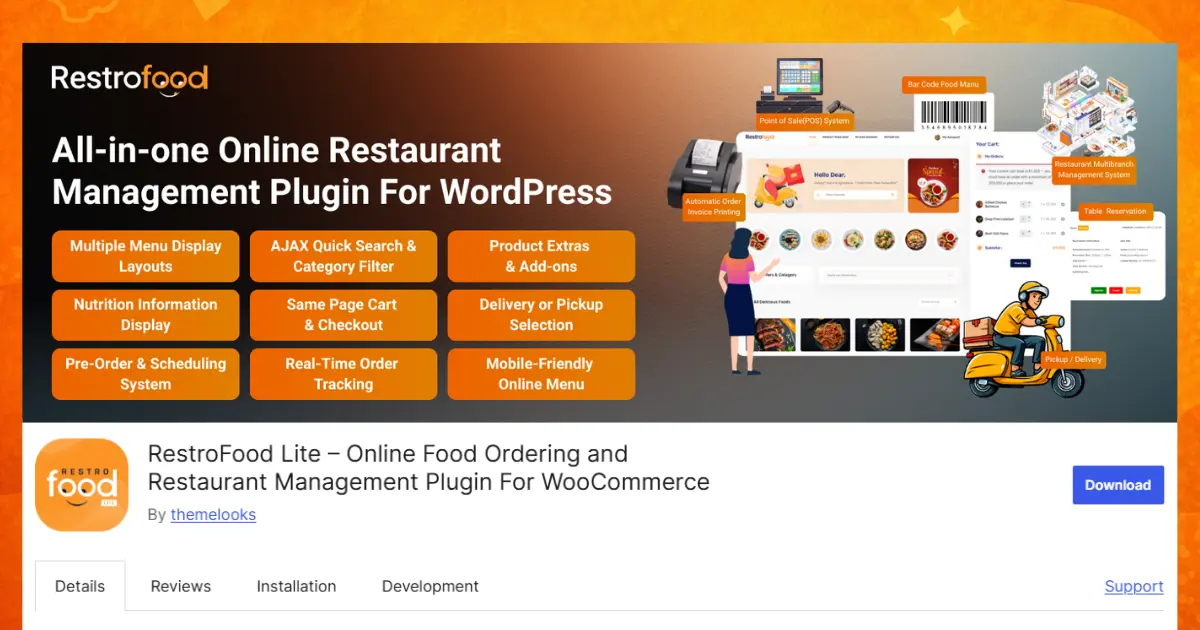
RestroFood is a WooCommerce-based restaurant management plugin that replaces Uber Eats and DoorDash with a fully owned WordPress ordering system, letting a restaurant take direct orders, manage its own delivery, and keep the full order value without marketplace commissions. It combines ordering, delivery zone control, and driver management in one plugin, so a restaurant isn’t stitching together separate tools to cover what a single marketplace app used to handle.
Key Features:
Delivery zone and availability
Delivery and pickup order types
Scheduling and time slots
Delivery fees and driver management
Best for: Independent restaurants and cloud kitchens that want to run delivery and pickup entirely on their own website instead of splitting orders across marketplace apps.
Pricing:
RestroFood offers flexible pricing for restaurants of different sizes and needs.
Whether you’re starting with basic online ordering or need advanced features for a growing restaurant, RestroFood offers a plan to match your needs.
FoodBook is a WordPress food ordering plugin built for restaurants that want a branded menu and checkout page without relying on a delivery marketplace. It positions itself as a lightweight alternative for restaurants moving their first orders off third-party apps, making it a reasonable starting point for a restaurant that hasn’t built any direct-ordering infrastructure yet.
WPCafe is a WooCommerce restaurant ordering plugin focused on menu presentation and a fast checkout flow, aimed at cafes and small restaurants replacing marketplace ordering with a direct website. Its focus stays narrower than RestroFood’s, which suits a restaurant that mainly needs a clean ordering page rather than a full delivery-management system.
RestroPress is a WordPress restaurant ordering plugin built around a customizable online menu and checkout, marketed as a direct-ordering alternative to third-party delivery apps. Its drag-and-drop approach to the menu makes it a fit for restaurants that update their menu often and want that process to stay simple.
Orderable is a WooCommerce food ordering plugin that adds delivery and pickup scheduling to a WordPress store, built for restaurants that want a straightforward order form without a full restaurant-management system layered on top. It works best for a restaurant that only needs the ordering piece and plans to handle delivery logistics separately.
The 5 plugins above solve the same core problem moving orders off Uber Eats and DoorDash but they fit different restaurant setups. The table below compares each plugin’s best-fit use case against how it directly helps decrease delivery charges for both the restaurant and the customer.
| Plugin | Best For | How It Helps Replace Uber Eats and DoorDash |
| 🏆 RestroFood | Restaurants and cloud kitchens replacing Uber Eats and DoorDash entirely | Adds a custom delivery fee in the core plugin, offers free shipping once an order reaches a set amount, and removes the 15–30% per-order commission a marketplace would otherwise charge; the separate Multi-delivery Fees add-on layers on kilometer-based and zip-code-wise fee tiers for restaurants that want distance-based pricing |
| FoodBook | Restaurants building their first branded ordering page | Removes the marketplace commission on every order by taking payment directly, though delivery-fee rules stay basic without zone-based pricing |
| WPCafe | Cafes and small restaurants needing a fast checkout | Cuts marketplace commission costs the same way, with a flat or simple delivery fee rather than distance- or zone-based pricing |
| RestroPress | Restaurants wanting a custom-branded menu builder | Sets delivery fees by zone or distance, letting nearby customers pay less than customers farther out |
| Orderable | Restaurants wanting a simple order form without a full management system | Removes per-order marketplace commission, with delivery-area restrictions rather than tiered, distance-based fee pricing |
🏆 RestroFood is the only plugin on this list that can waive the delivery fee entirely above a set order amount in the core plugin, with an optional add-on for distance- or zip-code-based fee tiers, so it comes closest to matching and often beating what a marketplace charges per delivery. The other 4 plugins support Commission Free Food Ordering by removing marketplace commissions, but offer less built-in control over how delivery fees scale with distance.
“Best” depends on how much of the delivery operation a restaurant wants to run itself, but for restaurants replacing a marketplace app entirely, a few things separate RestroFood 🏆 from the other 4 plugins on this list.
All-in-one convenience. RestroFood covers ordering, delivery zones, and driver tracking in one plugin, so a restaurant doesn’t need to stitch together a menu plugin, a separate delivery-zone tool, and a third add-on for order tracking.
Built for restaurant delivery workflows, not generic e-commerce. Zip-code delivery, distance restrictions, and a dedicated delivery-driver admin panel are built around how food delivery actually runs, not adapted from a general WooCommerce shipping setup.
WooCommerce-native and theme-friendly. RestroFood works with Elementor, Gutenberg, WPBakery, and other page builders that support shortcodes, so a restaurant keeps its existing WordPress theme instead of rebuilding the site to add ordering.
Active development. Regular free updates keep the plugin compatible with current WordPress and WooCommerce versions, which matters for a system handling live orders every day.
Most of the plugins on this list handle one piece of the marketplace-replacement job well a menu builder, a checkout form, a delivery-zone setting but leave the rest to separate tools or manual work. RestroFood is built to cover ordering, delivery zones, and driver management together, so a restaurant replacing Uber Eats and DoorDash isn’t left assembling the missing pieces. Restaurants weighing the switch are worth taking a look at RestroFood’s delivery system to see how the pieces fit together.
Marketplace apps charge a commission on every order, typically in the 15–30% range, and that fee comes out of the ticket regardless of how thin the restaurant’s margin already is. A WordPress ordering plugin replaces that recurring commission with a one-time or subscription cost, so more of each sale stays with the restaurant.
Yes, a WooCommerce restaurant plugin like RestroFood lets a restaurant take orders directly through its own website, with no per-order commission to a marketplace. The restaurant pays for the plugin itself, then keeps the full value of every order placed.
No, RestroFood includes an Order Tracking System that gives customers real-time updates on the delivery driver and vehicle, matching the live tracking marketplace apps provide. The restaurant keeps that experience without paying a marketplace to run it.
Customers who already know the restaurant can order directly from its website, and the restaurant keeps their contact and order history for repeat marketing. Marketplace apps still work as a separate discovery channel; leaving them for direct orders and keeping them for new-customer discovery are not mutually exclusive.
Yes, RestroFood’s Simple Restaurant Delivery Area Management setting lets a restaurant offer Delivery and Pickup, Only Delivery, or Only Pickup from the same order flow. Customers choose the option that fits them at checkout, without the restaurant running separate systems for each.
RestroFood’s Delivery Man Admin Panel gives drivers their own dashboard to view orders, check delivery details, and track progress, replacing the driver-facing app a marketplace would otherwise provide. Combined with the Customer Address Directions Map, drivers get routing information directly from the restaurant’s own system.
RestroFood ships with theme and demo data included, so a restaurant imports the demo setup and adjusts menu items and delivery zones rather than building the ordering flow from scratch. Well-documented setup steps and support for common page builders keep the initial setup within reach of a non-technical owner.
Our FAQs cover the most common questions about ThemeLooks. If you need personalized advice or have a unique query, our team is ready to help. Contact us!

Mohammad Nur Alam is a Technical Content Writer at ThemeLooks Ltd., specializing in WordPress, SaaS, SEO, and web development. He writes practical tutorials, product reviews, and technical guides that help users make the most of WordPress tools and plugins. Passionate about digital marketing and emerging technologies, he enjoys creating helpful content and staying up to date with the latest industry trends.





 ChatGPT
 Grok
Grok Claude
 Perplexity
 Google AI


