
Table of Contents
The best WordPress restaurant plugin depends on the features your business needs. RestroFood is the strongest overall choice because it combines online ordering, POS system, multi-branch management, delivery tracking, table reservations, and 0% commission in one plugin. This means you can manage your entire restaurant from a single dashboard.
Experts recommend plugins like RestroFood, FoodBook, WPCafe, Orderable, RestroPress, and Five-Star Restaurant Menu for WordPress restaurants.
Among them, RestroFood is the top choice because it lets customers order, customize, and check out on one page. It also offers delivery and pickup scheduling, multi-branch management, and real-time order tracking. With 4,000+ restaurants already using RestroFood, it is a trusted solution for businesses that want to grow with a complete restaurant management system.
The best WordPress restaurant plugins in 2026 are RestroFood, FoodBook, WPCafe, Orderable, RestroPress, and Five Star Restaurant Reservations. RestroFood ranks first because it runs online ordering, a point of sale (POS) system, multi-branch management, and delivery tracking from one WooCommerce plugin. This guide compares real features from each plugin, so you can pick the right fit for your restaurant.
A basic WordPress theme cannot take food orders, assign delivery drivers, or print kitchen tickets. A restaurant plugin adds these tools directly to your website, so orders flow from the customer’s screen to your kitchen without a phone call in between.
Most restaurant owners start with a simple menu page and a phone number for orders. This works fine for a handful of orders a day. Once daily orders pass 20 to 30, missed calls and handwritten tickets start costing real money.
According to the National Restaurant Association’s 2024 State of the Restaurant Industry report, off-premises orders delivery and takeout combined now make up a large share of total restaurant sales. Restaurants without a structured online ordering system lose these orders to competitors who have one. A restaurant plugin fixes this gap by moving ordering, kitchen routing, and delivery assignment into a single dashboard.
Most restaurant operators do not realize how much staff time a plugin saves until they track it. Replacing phone orders with an online menu alone often cuts order-taking time by 5 to 10 minutes per shift, since staff no longer repeat menu items or write tickets by hand.
Choosing a plugin gets easier when the core features sit side by side. The table below compares all 6 plugins in this guide across the features restaurant owners ask about most: ordering, POS, multi-branch support, delivery tracking, table reservation, and commission fees.
| Feature | RestroFood | FoodBook | WPCafe | Orderable | RestroPress | Five Star Reservations |
| Online ordering | Yes | Yes | Yes | Yes | Yes | No |
| POS | Yes | Yes | No | No | No | No |
| Multi-branch management | Yes | No | Yes | No | No | No |
| Delivery tracking | Yes | Partial | Partial | Partial | Partial | No |
| Table reservation | Yes | Yes | Yes | No | No | Yes |
| Commission on orders | 0% | 0% | 0% | 0% | 0% | N/A |
| Needs WooCommerce | Yes | Yes | Yes | Yes | No | Yes |
RestroFood is the only plugin with a “Yes” across ordering, POS, and delivery tracking at the same time. Most other plugins cover 1 or 2 categories well and leave the rest to manual work or a separate paid tool, which adds setup time and ongoing cost. FoodBook covers ordering and basic reservation needs well, which is why they hold the second and third spots on this list.
Choosing the right WordPress restaurant plugin can make it easier to accept online orders, manage reservations, handle deliveries, and grow your business. Some plugins focus only on food ordering or table booking, while others provide complete restaurant management with POS, multi-branch support, and delivery tools. Below, we’ve compared six of the best WordPress plugins for restaurant to help you find the one that best fits your restaurant’s needs.
RestroFood is the best and most used WooCommerce-based WordPress restaurant plugin that handles online ordering, POS, multi-branch management, and delivery from one dashboard. RestroFood ships with a free theme, so restaurant owners keep full ownership of their website instead of renting space on a SaaS ordering platform.
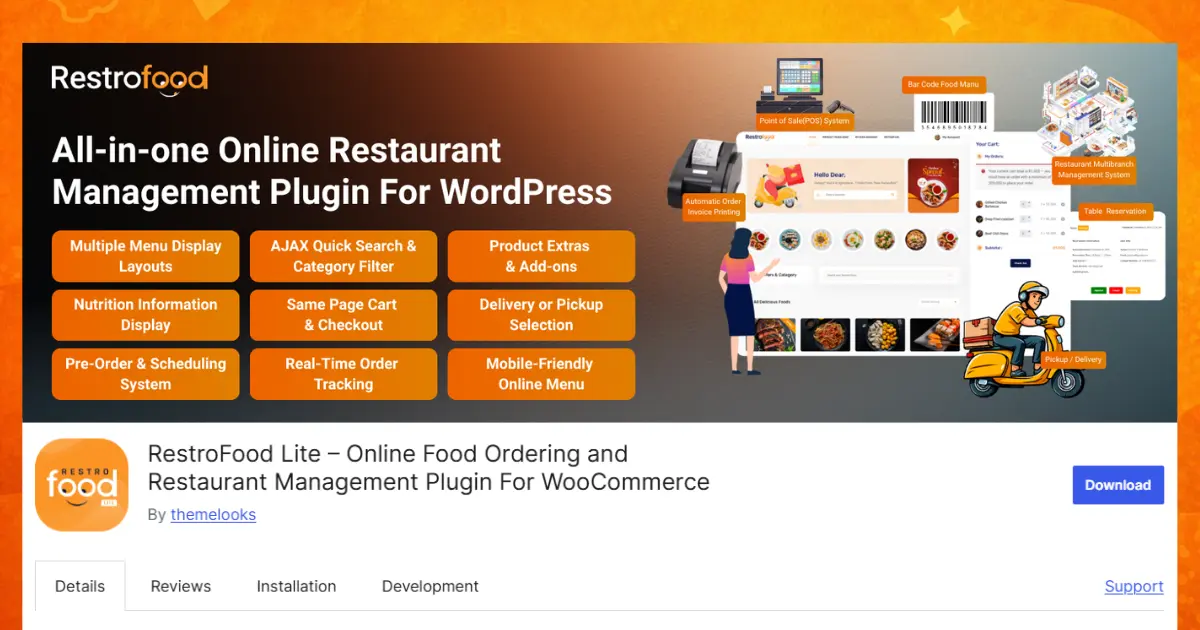
RestroFood ordering system gives customers 6 product display layouts and 3 cart styles: Canvas Model, Footer Fixed, and Beside Products to browse and order without leaving the page they are on. The same-page cart and checkout system lets customers complete an order from any page, which removes the extra clicks that cause cart abandonment on other plugins.
Order Bumps suggest extra items or add-ons at checkout, and the Product Extra Option lets customers build combo meals and see the updated price instantly. Customers can also place a preorder or scheduled order for a future date, with delivery time slots that respect your opening hours, break times, and per-slot order limits. A zip-code-based delivery checker and Google API distance restriction confirm delivery availability before checkout starts.
RestroFood POS system handles counter and dine-in orders through multiple counters, an online-and-offline mode, and a barcode generator for fast product lookup. Staff can hold an order and resume it later without losing items, and POS access control limits which staff members can view or edit specific counters. Every counter order feeds into the same order history and reporting view as online orders, so managers see the full picture in one place.
Restaurants that operate more than 1 location can add unlimited branches from RestroFood multi-branch dashboard. Each branch gets its own product display, working hours, delivery zip codes, pickup times, and delivery distance limit, so a downtown location and a suburban location can run different menus and schedules without conflict. The order transfer system moves an order between branches with 1 click, which matters when a customer orders from the wrong location by mistake.
RestroFood delivery system gives delivery staff their own admin panel to view assigned orders and update status as they complete each stop. Customers see real-time order tracking and get a map with directions generated automatically once an order is placed. The delivery availability checker confirms a customer’s address, zip code, or branch before an order is accepted, which cuts failed deliveries.
For dine-in restaurants, the Table Reservation add-on adds a customizable booking form, unlimited tables, reservation time slots, and automatic email confirmations to customers. The separate In-Restaurant Order add-on lets diners scan a QR code at their table and place an order directly, with the table number shown on the admin order list for the kitchen.
Restaurants that outgrow phone-based ordering see this shift firsthand: staff stop repeating order details over the phone and start managing everything from 1 screen.
FoodBook is a WordPress restaurant plugin built for WooCommerce. It helps restaurants create a beautiful digital menu, accept online food orders, and manage table reservations from one website. With ready-made templates and an easy setup process, you can launch a professional-looking restaurant website without needing coding skills.
Customers can browse your menu, view food images and prices, customize their orders, and complete checkout through WooCommerce. FoodBook also includes a table reservation feature, allowing guests to book a table online before visiting your restaurant. The plugin is mobile-friendly, so customers can order food or make reservations from any device.
FoodBook is a good choice for cafés, bakeries, food trucks, and single-location restaurants that want an attractive online ordering system. However, it does not include advanced features like a built-in POS system, kitchen display, or multi-branch management. If your restaurant expands to multiple locations, you may need extra plugins to manage your growing business.
WPCafe is a WooCommerce-based WordPress restaurant plugin that combines responsive food menus, online ordering, delivery and pickup scheduling, and table reservations in one dashboard. It is best for restaurants that need both online food ordering and dine-in booking on the same website. WordPress.org currently lists WPCafe with 5,000+ active installations and a 4.6-out-of-5-star rating.
Customers can browse more than 34 menu layouts, customize food items, select delivery or pickup time slots, order through table-specific QR codes, and pay using WooCommerce-supported payment gateways. Its reservation system includes single or multiple booking slots, guest-capacity controls, automated email notifications, and visual table selection. WPCafe Pro also supports multiple branches with separate menus, delivery zones, pickup schedules, and reservation capacities.
WPCafe is a strong choice for cafés, takeaways, cloud kitchens, dine-in restaurants, and multi-location food businesses that want online ordering and reservations in one system. However, WooCommerce is required for its online ordering functionality, and some advanced features require the Pro version. Restaurants that only need a basic digital menu or a standalone booking form may prefer a more specialized plugin.
Orderable is a WordPress plugin that improves WooCommerce for restaurants. It replaces the standard WooCommerce shopping experience with a faster and more user-friendly food ordering system. Customers can quickly browse the menu, add items to their cart, and complete checkout with fewer clicks.
The plugin includes customizable menu layouts, delivery and pickup scheduling, checkout tipping, product add-ons, and mobile-friendly ordering. Restaurants can also set available ordering times, helping customers choose the best delivery or pickup slot. Since orders are placed directly through your website, you keep more of your profits without paying third-party commission fees.
Orderable is a great choice for restaurants already using WooCommerce. However, it focuses mainly on online ordering. It does not include built-in features like a POS system, kitchen display screen, or multi-location management. Restaurants with multiple branches usually need additional plugins to manage those operations.
RestroPress is a lightweight WordPress restaurant ordering plugin that works without WooCommerce. This makes it a good option for restaurant owners who want a simple online ordering system with fewer plugins and an easier setup process.
Customers can browse your menu, order food online, and choose delivery or pickup. The plugin is designed to be simple and easy to use, making it suitable for cafés, bakeries, food trucks, cloud kitchens, and small restaurants. Because it does not rely on WooCommerce, your website may load faster and require less maintenance.
RestroPress works well for restaurants with basic ordering needs. However, it offers fewer extensions than WooCommerce-based solutions. If your business later needs advanced features such as POS integration, loyalty programs, kitchen management, or multi-branch support, you may eventually need a more powerful restaurant ordering platform.
Five Star Restaurant Reservations is a WordPress plugin made for restaurants that want customers to reserve tables online. Unlike many restaurant plugins, it focuses only on table booking and does not include online food ordering.
Customers can choose a date, time, number of guests, and submit their reservation through a simple booking form. Restaurant staff can review, approve, update, or cancel reservations from the WordPress dashboard. The plugin also sends automatic confirmation and notification emails, helping both customers and staff stay informed about upcoming bookings.
This plugin is an excellent choice for restaurants that mainly serve dine-in customers and need an easy reservation system. However, because it does not support online food ordering, delivery, or pickup services, restaurants that want a complete online ordering solution will need another plugin. Choosing an all-in-one solution like RestroFood allows restaurants to manage online ordering, table reservations, delivery, pickup, and many other restaurant operations from a single platform.
Not every restaurant needs the same features. Before choosing a WordPress restaurant plugin, think about how your business works today and what you may need in the future.
Restaurants running a single location with simple pickup orders can start with a lighter, free plugin like FoodBook. Restaurants planning to add branches, in-house POS, or delivery tracking within the next year save setup time by starting with a plugin like RestroFood that already covers those needs.
Choosing the right WordPress restaurant plugin depends on how your restaurant operates today and how you plan to grow in the future. If you only need simple online ordering or table reservations, plugins like WPCafe, Orderable, or Five Star Restaurant Reservations may be enough. However, if you want one solution to manage online orders, POS, multiple branches, delivery tracking, and reservations, RestroFood offers the most complete feature set. It helps restaurants save time, reduce manual work, and provide a better experience for customers and staff. Compare the features, think about your business goals, and choose a plugin that can support your restaurant not only today but also as it continues to grow.
RestroFood is the best overall WordPress restaurant plugin because it combines online ordering, POS, multi-branch management, and delivery tracking in 1 system. Most other plugins on this list cover only 1 or 2 of these areas, which means restaurants need extra tools to fill the gaps as they grow.
Yes, RestroFood offers free, commission-free online ordering for WordPress restaurants. It covers basic menu building and order notifications well.
No, the plugins in this guide-RestroFood, FoodBook, WPCafe, Orderable, and RestroPress -all operate on a 0% commission model. This differs from third-party delivery apps like Uber Eats or DoorDash, which typically charge 15% to 30% commission per order.
Yes, plugins like RestroPress run online ordering without WooCommerce installed. Most restaurant plugins, including RestroFood, FoodBook, and Orderable, build on top of WooCommerce instead, which gives access to WooCommerce’s broader payment gateway and extension ecosystem.
A restaurant plugin adds ordering, POS, or reservation functionality to any WordPress theme, while a restaurant theme controls the visual design and layout of the site. FoodBook works as a theme with ordering built in, while RestroFood works as a plugin with its own free theme included.
No, a POS system is only necessary for restaurants taking in-house counter or dine-in orders alongside online orders. Delivery-only or pickup-only restaurants can run on online ordering features alone, without the added POS setup.
Multi-branch management lets 1 WordPress dashboard control several restaurant locations, each with its own menu, hours, and delivery zone. RestroFood’s multi-branch feature adds unlimited branches, branch-specific product display, and an order transfer system for moving orders between locations with 1 click.
Our FAQs cover the most common questions about ThemeLooks. If you need personalized advice or have a unique query, our team is ready to help. Contact us!
Mohammad Nur Alam is a Technical Content Writer at ThemeLooks Ltd., specializing in WordPress, SaaS, SEO, and web development. He writes practical tutorials, product reviews, and technical guides that help users make the most of WordPress tools and plugins. Passionate about digital marketing and emerging technologies, he enjoys creating helpful content and staying up to date with the latest industry trends.
