The best WordPress plugins for in-restaurant ordering system are RestroFood In-Restaurant Order Add-on, Orderable, WPCafe, QR Ordering System by Food, and TablePlus. These plugins let dine-in customers order directly from their table using digital menus, either through a QR code scan or a table-number-based ordering flow with orders flowing directly into the restaurant’s WooCommerce backend.
Table of Contents
Physical menus create delays. A customer sits down, waits for a menu, reads, waits for a server, places the order verbally, and the server carries it to the kitchen. Each handoff is a point where the order can be misheard, delayed, or forgotten.
Digital dine-in ordering removes those handoffs. Customers scan a QR code or enter their table number on a web-based menu, build their order themselves, and submit it. The order appears in the kitchen or admin panel instantly, no server required for the ordering step.
For the restaurant, in-restaurant ordering reduces order errors (no verbal miscommunication), speeds up table turnover, and allows staff to focus on service quality rather than order taking. A 2023 study by TouchBistro found that restaurants using digital table ordering saw a measurable reduction in order errors and faster kitchen start times for each table.
For WordPress restaurants, an in-restaurant ordering plugin connects this dine-in workflow directly to WooCommerce, so all orders, whether online food delivery or dine-in, appear in the same order management view.
Running a restaurant is not only about cooking delicious food. It is also about taking orders quickly, serving customers on time, and avoiding mistakes. When restaurants use paper notes or write orders by hand, errors can happen. A waiter may write the wrong menu item, forget an order, or send it to the wrong table. These small mistakes can make customers unhappy.
The RestroFood In-Restaurant Order Add-on helps solve these problems. It is a free add-on that works with the RestroFood plugin for WooCommerce. It allows restaurants to manage dine-in orders in a simple and organized way. Customers or restaurant staff can place orders by selecting the correct table number, making it much easier to keep every order in the right place.
Whether you own a small café, a family restaurant, or a large restaurant with many branches, this add-on can make your daily work easier. It helps staff save time, improves customer service, and keeps orders organized from the kitchen to the dining table.
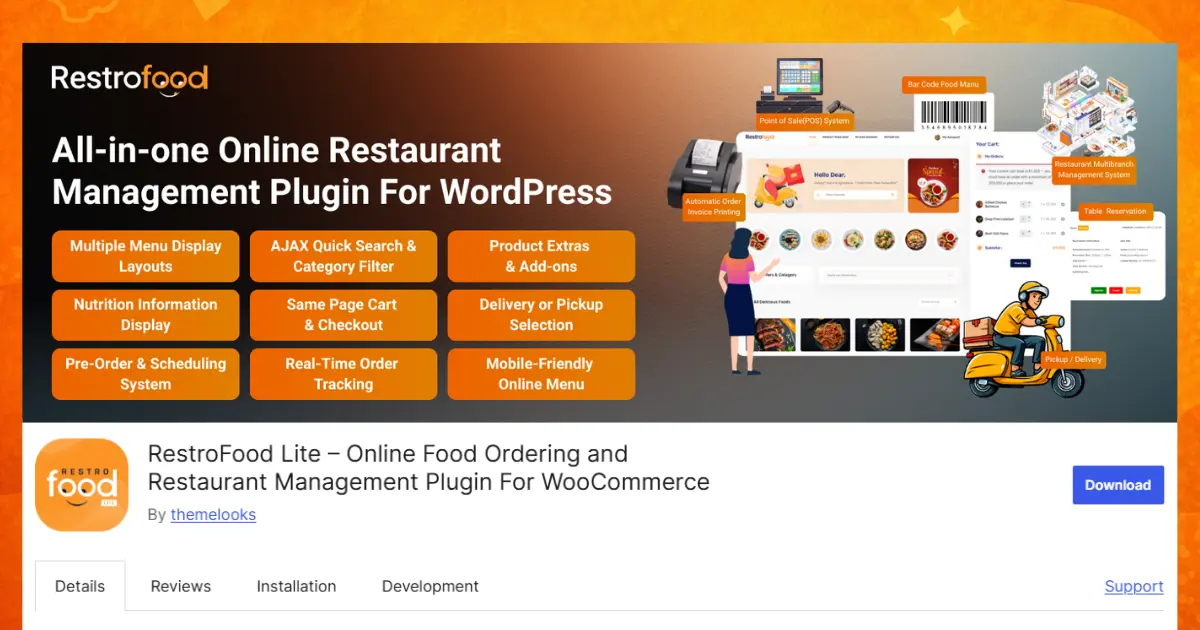
Below are the main features explained in simple language.
Key Features of RestroFood In-Restaurant Order Add-on
The RestroFood In-Restaurant Order Add-on makes ordering food inside a restaurant simple and organized. Before placing an order, the customer selects their table number. The system then saves the order with that table. This helps the kitchen and waiters know exactly where the food should go. They do not have to ask which table ordered the meal because the information is already there. It saves time, reduces confusion, and helps customers receive their food faster, even during busy lunch or dinner hours.
Some restaurants have one location, while others have many branches in different places. RestroFood supports both. Restaurant owners can create different table numbers for each branch, and the system keeps every branch separate. Even if two branches both have a Table 5, the plugin knows which restaurant the order belongs to. This makes it much easier to manage growing restaurant businesses without mixing up orders from different locations.
Every order automatically includes the customer’s table number inside WooCommerce. Restaurant managers and staff can see this information in both the order list and the order details page. They do not need to search for extra notes or ask employees which table placed the order. During busy meal times, this feature helps everyone work faster and keeps the restaurant well organized. It also makes serving food to the correct table much easier.
When customers place an order, the kitchen and restaurant staff can see it immediately. This real-time tracking helps cooks start preparing food without delay. Everyone knows what needs to be cooked and which orders should be completed first. Faster communication between the dining area and the kitchen means customers spend less time waiting for their meals. It also helps restaurant staff work together more smoothly throughout the day.
The RestroFood dashboard shows every dine-in order in one place. Restaurant managers do not have to check different pages or paper notes to find information. They can quickly view active orders, monitor restaurant activity, and answer customer questions. Having everything inside one dashboard saves time, improves organization, and helps managers solve problems more quickly, especially during busy hours.
The Pro version includes QR code ordering for a modern dining experience. Every table has its own QR code. Customers simply scan the code with their smartphone camera to open the digital menu. They can browse food items, choose what they want, and place their order directly from their phone. There is no need to wait for a paper menu or a waiter to take the order. This creates a faster, cleaner, and more convenient ordering process.
Each restaurant table receives a unique QR code. When a customer scans the code, the system automatically knows which table they are sitting at. The customer does not need to enter a table number manually. This helps prevent mistakes and makes sure every order goes to the correct table. It also makes restaurant operations more organized and provides a better experience for both customers and staff.
Many people do not want to install a new mobile app just to order food. RestroFood solves this problem by letting customers order directly through their web browser. They only scan the QR code, and the ordering page opens instantly. No app download, account creation, or complicated setup is required. This makes ordering quick, simple, and easy for almost anyone with a smartphone.
Writing orders by hand or taking them verbally can sometimes lead to mistakes. A waiter may hear the wrong menu item, or the kitchen may receive incorrect information. With RestroFood, customers choose their meals directly from the digital menu, which reduces human error. More accurate orders mean happier customers, fewer complaints, less food waste, and smoother restaurant operations. It also helps restaurants save time and money by avoiding the need to prepare replacement meals.
The RestroFood In-Restaurant Order Add-on offers a powerful free version that includes all the basic features needed for table-based restaurant ordering. Restaurant owners can assign table numbers, receive dine-in orders, and track every order in real time from the admin dashboard. This helps staff know which table placed each order and allows the kitchen to start preparing food without delay. For many small restaurants, cafés, and food businesses, the free version provides everything needed to manage daily dine-in orders quickly and accurately.
For restaurants that want to offer a more modern and contactless dining experience, the Pro version includes advanced QR code ordering features. Each table gets its own unique QR code that customers can scan with their smartphone to open the digital menu instantly. They can browse food items and place their order directly from their phone without downloading an app or waiting for a waiter. The Personal Pro plan starts at a one-time payment of $75, making it an affordable upgrade for restaurants that want faster service, fewer ordering mistakes, and a smoother experience for both customers and staff.
One of the biggest reasons to choose the RestroFood In-Restaurant Order Add-on is its value. While many restaurant ordering plugins charge for features like multi-branch support, RestroFood includes multi-branch table management in the free version. This makes it a great option for both small restaurants and businesses with several locations.
The plugin is also designed to work smoothly with WooCommerce, making it easy for WordPress users to set up and manage their restaurant without needing complicated tools or coding knowledge.
Orderable includes a dine-in ordering mode as part of its restaurant ordering plugin.
Key features:
Orderable handles dine-in as one of its order fulfillment types. Customers can indicate their table number during checkout. It does not include a dedicated QR code generator per table or a separate kitchen-side view for dine-in orders.
WPCafe supports dine-in ordering within its restaurant management plugin.
Key features:
WPCafe includes dine-in as a fulfillment type alongside delivery and pickup. Its table ordering tools are basic, and table selection appears during checkout, but without dedicated QR codes or a real-time kitchen order display.
QR Ordering System by Foood is a WordPress plugin focused specifically on QR code-based table ordering.
Key features:
Food’s plugin is designed around the QR scan-to-order experience. It handles QR code generation and the customer-side ordering flow. Documentation and active development support are more limited compared to major restaurant plugins.
TablePlus adds table-based ordering functionality to WooCommerce-based restaurant sites.
Key features:
TablePlus covers the core table ordering workflow and is straightforward to configure. It does not include multi-branch table management or real-time kitchen tracking dashboards.
| Feature | TablePlus | QR Ordering (Food) | WPCafe | Orderable | RestroFood In-Restaurant |
| Table number-based ordering | Yes | No | Yes | Yes | Yes |
| QR code per table | Yes | Yes | No | URL param | Yes (Pro) |
| Custom QR per table | No | Yes | No | No | Yes (Pro) |
| Multi-branch table management | No | No | No | No | Yes |
| Real-time order tracking | No | No | No | No | Yes |
| Table number in the admin order list | No | No | No | Notes | Yes |
| Free version available | No | No | Yes | No | Yes |
| WooCommerce native | Yes | Yes | Yes | Yes | Yes |
| No app download for customers | Yes | Yes | Yes | Yes | Yes |
| Kitchen panel for dine-in orders | No | No | No | No | Yes |
Real-time order tracking and multi-branch table management are the standout gaps across most plugins. RestroFood add-on is also the only free option with multi-branch table support included from the start. QR Ordering by Food and TablePlus covers QR code ordering well for single-location setups.
Table number ordering: Each table has a unique number. When customers sit down, they enter their table number in the ordering interface. The order submits to WooCommerce with the table number attached, and the admin and kitchen panels display which table each order belongs to. This method works on any device and requires no QR scanner.
QR code ordering: Each table gets a unique QR code (a printed card or sticker) that links to the restaurant’s menu with that table’s identifier pre-loaded. Customers scan with their phone camera, the digital menu opens in the browser, and they order. No app download is needed; the menu runs in the browser.
Real-time kitchen visibility: When an in-restaurant order lands in WooCommerce, kitchen staff see the table number, items, and any special instructions immediately. With the RestroFood kitchen manager panel, the kitchen view is separate from the full WooCommerce admin, reducing clutter and focusing attention on active orders.
Multi-branch considerations: For restaurants with multiple locations, each branch needs its own set of table numbers. If a customer at Branch A submits Table 7 and so does a customer at Branch B, the system needs to distinguish between them. RestroFood add-on handles multi-branch table numbering natively.
Choosing the right in-restaurant ordering plugin can make running a restaurant much easier. It helps staff take orders faster, reduces mistakes, and gives customers a better dining experience. Among all the plugins in this comparison, RestroFood In-Restaurant Order Add-on stands out because it offers many useful features in its free version, including table number ordering, real-time order tracking, and multi-branch table management. The Pro version adds QR code ordering, allowing customers to scan a code, view the digital menu, and place orders directly from their phones without downloading an app. This saves time for both customers and restaurant staff. Whether you own a small café, a family restaurant, or a large restaurant with many branches, RestroFood is a smart and affordable choice. It is easy to use, works perfectly with WooCommerce, and helps restaurants serve food faster while keeping every order organized and accurate.
RestroFood In-Restaurant Order Add-on is free and includes table number-based ordering, real-time admin tracking, and multi-branch table management. The QR code functionality upgrades to a paid plan. WPCafe also has a free version with basic dine-in ordering support.
A QR code table ordering system generates a unique QR code for each table. The code links to the restaurant’s digital menu with the table identifier pre-loaded. When a customer scans it, the menu opens in their phone browser, and the order they place automatically carries that table’s identification. RestroFood In-Restaurant Order Add-on’s Pro version includes per-table QR code generation.
Yes. RestroFood In-Restaurant Order Add-on shows all dine-in orders in the WooCommerce admin panel with real-time updates. Kitchen managers see the orders in their dedicated panel as they come in. Order status changes are visible across the system without page refresh delays.
With the RestroFood In-Restaurant Order Add-on, the table number appears directly in the WooCommerce admin orders list and in the individual order detail page. This allows staff to quickly identify which table an order belongs to without opening each order separately.
RestroFood In-Restaurant Order Add-on supports multi-branch table management, so each branch has its own set of table numbers and orders route to the correct location. Most other in-restaurant ordering plugins for WordPress are designed for single-location use.
No. WordPress-based in-restaurant ordering systems, including RestroFood add-on, Orderable, and WPCafe, run in a mobile browser. Customers access the menu by scanning a QR code or entering the restaurant’s web address. No app download or account creation is required.
Table number ordering requires the customer to manually select or type their table number in the ordering interface. QR code ordering pre-loads the table identification by encoding it in the QR code. When the customer scans, the table is already set. QR code ordering reduces input steps but requires printed QR materials at each table. RestroFood In-Restaurant Order Add-on supports both methods.
Our FAQs cover the most common questions about ThemeLooks. If you need personalized advice or have a unique query, our team is ready to help. Contact us!

Mohammad Nur Alam is a Technical Content Writer at ThemeLooks Ltd., specializing in WordPress, SaaS, SEO, and web development. He writes practical tutorials, product reviews, and technical guides that help users make the most of WordPress tools and plugins. Passionate about digital marketing and emerging technologies, he enjoys creating helpful content and staying up to date with the latest industry trends.





 ChatGPT
 Grok
Grok Claude
 Perplexity
 Google AI


