
Table of Contents
The best online ordering and delivery mobile app for restaurant owners depends on how much control they want over their business. RestroFood is the best overall choice because it helps restaurants accept online orders, manage deliveries, control delivery zones, assign drivers, and avoid third-party commission fees, all from their own WordPress website.
Restaurant owners often compare RestroFood with GloriaFood, Toast, Upserve, and ChowNow when choosing an online ordering solution.
Among these options, RestroFood stands out because it combines online ordering, delivery scheduling, distance- and zip code-based delivery management, real-time order tracking, and multi-branch support in one complete system. Instead of paying ongoing subscription or commission fees, restaurants own their ordering platform and keep more of every sale. RestroFood has become a trusted solution for restaurants looking to grow with a scalable online ordering and delivery system.
Every restaurant owner today needs a reliable Best Online Ordering and Delivery Mobile App for Restaurant Owners to keep up with customer demand and stay ahead of rising delivery-app fees. Customers expect to order food from their phone, track their driver in real time, and get their meal fast. The right system decides how much money a restaurant actually keeps from every order. This guide compares RestroFood with other popular tools like GloriaFood, Toast, Upserve, and ChowNow, so restaurant owners can choose the option that fits their business best.
Online delivery now brings in more money for most restaurants than dine-in does. This means the ordering system a restaurant picks has a direct effect on how much money it keeps from every sale.
Big delivery apps like UberEats and DoorDash charge a fee on every order. This fee is usually somewhere between 15% and 30% of the order total. According to industry reporting from the National Restaurant Association, these fees are one of the biggest pressures on restaurant profit margins today.
Here’s what that looks like in real life. Say a restaurant sells a $20 meal through a delivery app. If the app charges 25%, the restaurant only keeps $15. Do that for hundreds of orders a month, and the lost money adds up fast.
A WordPress plugin like RestroFood works differently. You pay for it once. After that, you keep 100% of every order, minus your own delivery costs.
Picture a restaurant with 3 branches. If it uses a delivery app, it pays a commission on every single order, every single month, forever. If it uses a plugin it owns, it pays once and keeps the rest. Over a year, that difference can be thousands of dollars.
A strong delivery system needs 5 basics: easy menu browsing, fast checkout, delivery zone control, live order tracking, and driver management. Miss any one of these, and restaurants lose orders or upset customers.
Here are the 5 must-haves:
If a system is missing even one of these, customers tend to get frustrated and stop ordering.
Restaurant owners have several strong choices for ordering and delivery today. RestroFood leads the list as a WooCommerce-based restaurant management plugin for WordPress that runs delivery without third-party fees, while GloriaFood, Toast, Upserve, and ChowNow round out the top 5 with their own strengths.
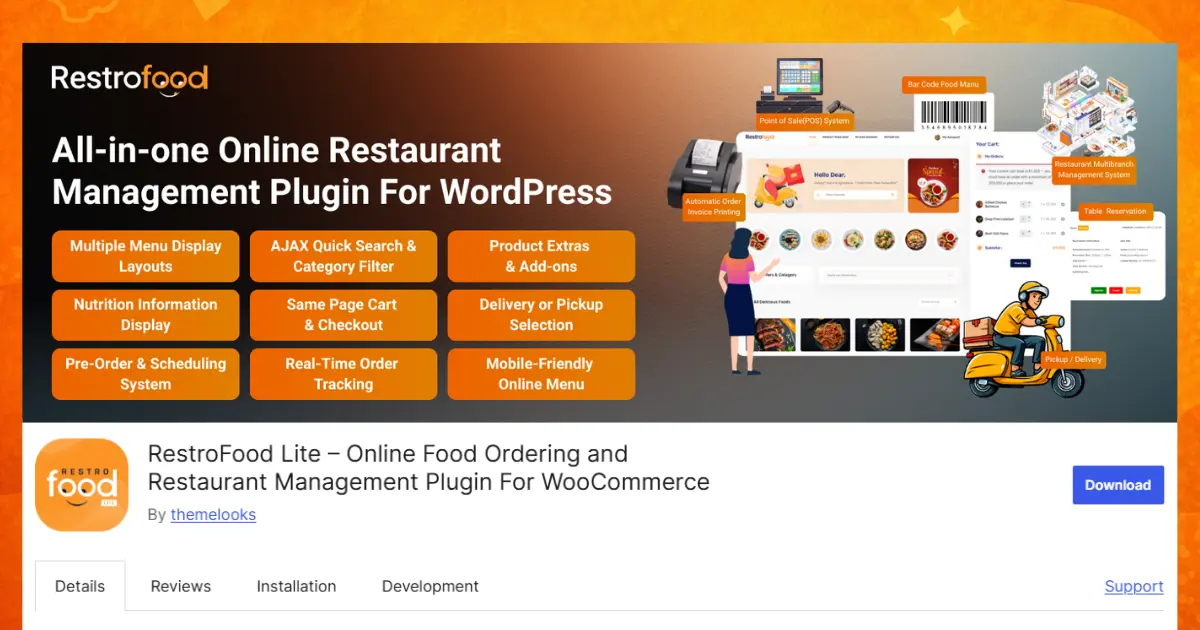
RestroFood is a WooCommerce-based restaurant management plugin for WordPress. It lets a restaurant run its own delivery system without paying a third-party app a fee on every order. Other tools like GloriaFood, Toast, Upserve, and ChowNow take different approaches, and it helps to know how each one actually works before picking one.
Delivery is where most restaurants lose money to fees, so RestroFood builds its delivery tools around control over zones, pricing, timing, and drivers.
Knowing where you can deliver:
Controlling when orders come in:
Keeping customers and drivers connected:
Setting your own delivery price:
For restaurants that want delivery fees to change based on distance instead of one flat rate, the Multi-delivery Fees add-on layers on:
Here’s a real-world example. A restaurant with customers spread across a city might charge $2 for nearby zones and $5 for zones further out. Without zone-based pricing, that restaurant either overcharges nearby customers or loses money delivering far away. The Multi-delivery Fees add-on solves this by letting fees scale with real distance or zip code, instead of guessing at one flat number.
Together, these tools let a restaurant handle delivery zones, pricing, scheduling, and driver tracking all without needing a separate app or paying anyone else a cut. You can see the full setup on the RestroFood delivery management page.
GloriaFood is a free, widget-based ordering system that can be added to almost any website, not just WordPress. It runs as a cloud (SaaS) service, meaning the ordering system lives on GloriaFood’s own servers rather than inside the restaurant’s own site. Because it doesn’t require WooCommerce, it’s often the fastest option to get a restaurant owner to add the widget to an existing website in a short amount of time.
This speed comes with trade-offs. Since GloriaFood is a widget rather than a plugin built into the site itself, restaurants get less control over deep customization, like how delivery zones interact with the rest of their website design or how staff dashboards are organized. It tends to suit very small, single-location restaurants that want a quick, free way to accept orders without managing a full system.
Toast is an all-in-one restaurant management suite that combines online ordering with a full point-of-sale (POS) system. Instead of just handling orders, it also covers:
Pros: Toast bundles online ordering and POS together, plus built-in customer management, so a restaurant can run its front-of-house and back-of-house from one system.
Cons: Pricing tends to climb for larger restaurants, since Toast is built as a full management suite rather than a simple ordering add-on.
This makes Toast a strong fit for restaurants that want one system to run tables, inventory, and orders together, rather than a lighter, ordering-only tool.
Upserve is a full-service restaurant management tool that also pairs online ordering with an integrated POS system. Like Toast, it covers:
Pros: Upserve is an all-in-one management tool, so online ordering, POS, and customer management all live in one place.
Cons: As with Toast, pricing tends to be higher for larger restaurants, since it’s a full management suite rather than a single-purpose ordering plugin.
Upserve suits restaurants that want a complete management platform rather than adding a standalone ordering tool onto a site they already run.
ChowNow is a US-focused ordering app and website builder that markets itself around avoiding commission fees. Unlike RestroFood, it isn’t a WordPress plugi,n it runs as its own paid subscription platform, building and hosting the ordering experience for the restaurant.
This suits restaurants that don’t want to manage their own website or WordPress installation at all, and would rather hand that responsibility to a service provider. The trade-off is the same one that comes with any rented platform: the restaurant pays an ongoing subscription instead of owning the system outright.
Each of these tools solves the ordering problem in its own way, some as WordPress plugins, some as all-in-one management suites, some free, some subscription-based. The right one depends on how much control, customization, and delivery detail a restaurant actually needs, and whether it wants ordering built into its own website or run through a separate management platform.
A side-by-side comparison shows the real differences between these tools: what platform they run on, how much delivery-fee control they give, whether they charge commission, and who actually owns the system.
| Feature | RestroFood | GloriaFood | Toast | Upserve | ChowNow |
| Platform | WordPress/WooCommerce | Standalone widget | Standalone POS suite | Standalone POS suite | Standalone SaaS |
| Delivery zone/fee control | Yes, Zip code + distance-based | Basic | Not delivery-specific | Not delivery-specific | Basic |
| Order/driver tracking | Yes, Real-time | No | Not specified | Not specified | Limited |
| Per-order commission | No, One-time cost | No, Free tier | No, Subscription/hardware fees | No, Subscription fees | No, Subscription fee |
| Multi-branch delivery | Yes, With Multibranch add-on | No | Table/inventory focused | Table/inventory focused | Limited |
The table shows a clear pattern. RestroFood stands out for restaurants that need close control over delivery zones, fees, and driver tracking, especially across more than one branch. Toast and Upserve, by comparison, are built more broadly around running the whole restaurant – tables, inventory, and customers – rather than deep delivery-specific tools. Restaurants with simpler needs, like a single small shop, may not need that much detail and could do fine with a lighter tool like GloriaFood.
A WordPress plugin is bought once and owned forever. A SaaS app is rented every month, and the company behind it can raise prices or change the rules at any time.
When a restaurant owns its ordering system, it keeps full control of its website design, its customer data, and its delivery rules. Nobody outside the restaurant can suddenly change the fees or shut off access. Compare that to a rented app or management suite like Toast or Upserve, where the restaurant is always depending on someone else’s platform and pricing.
You can view current plans on the RestroFood pricing page to see what owning a delivery system looks like in practice.
Choosing the right delivery system comes down to 4 quick questions about your budget, your website, how complex your delivery needs are, and how you plan to grow.
If the answer to most of these leans toward “yes, and I want more control,” a plugin like RestroFood tends to be the stronger fit. If a restaurant wants a full management suite that covers tables and inventory too, Toast or Upserve may be worth the higher price. If a restaurant just wants the simplest possible setup with no website work at all, a tool like GloriaFood may be enough.
In 2026, more restaurants are moving toward owning their delivery systems directly. Zone-based pricing and multi-branch delivery tools are becoming standard instead of extra add-ons.
Two trends stand out:
Choosing the right online ordering and delivery mobile app system shapes how much money a restaurant keeps and how smoothly its kitchen and drivers work together. Renting an app is quick to set up, but the ongoing fees add up fast, especially as order volume grows. Owning a system like RestroFood costs more thought upfront, but it pays off through zone-based pricing, real-time driver tracking, and full control over delivery rules, all without giving away a cut of every sale. Tools like GloriaFood, Toast, Upserve, and ChowNow each work well for specific needs, from free quick setups to full restaurant management suites. The best choice always comes down to how much control a restaurant wants over its own delivery system and long-term costs.
Ready to see it in action? Explore RestroFood pricing →
The best choice depends on what a restaurant needs. For restaurants that want full control over delivery zones, pricing, and driver tracking without paying commission, a WordPress plugin like RestroFood works well. For a very simple, free setup, GloriaFood is a common pick. For restaurants that want a full management suite covering tables and inventory too, Toast or Upserve are common choices.
Yes, GloriaFood offers a free tier that works as a widget added to a restaurant’s website. It runs on a cloud-based model rather than as a WordPress plugin.
Yes, WordPress has food ordering plugins built for WooCommerce, including RestroFood. Unlike RestroFood, tools like Toast and Upserve are standalone management platforms rather than WordPress plugins.
The cheapest long-term option is usually a one-time-purchase plugin like RestroFood, since it avoids ongoing commission fees. Free tools like GloriaFood are cheaper upfront but may offer less customization. Full suites like Toast and Upserve tend to cost more, especially for larger restaurants.
Yes. Restaurants can avoid per-order commission fees by using their own ordering system, such as a WooCommerce plugin, instead of a third-party delivery app that charges a percentage per order.
A delivery plugin, like RestroFood, is installed directly on a restaurant’s own website and is owned by the restaurant. A management suite, like Toast or Upserve, bundles online ordering with POS, table management, and inventory tools as a paid subscription service.
Yes. With the Multibranch add-on, RestroFood can manage delivery zones, fees, and driver tracking separately for each restaurant branch from one central dashboard.
No. RestroFood is designed to be set up through simple settings panels inside WordPress, without needing to write any code.
Our FAQs cover the most common questions about ThemeLooks. If you need personalized advice or have a unique query, our team is ready to help. Contact us!
Mohammad Nur Alam is a Technical Content Writer at ThemeLooks Ltd., specializing in WordPress, SaaS, SEO, and web development. He writes practical tutorials, product reviews, and technical guides that help users make the most of WordPress tools and plugins. Passionate about digital marketing and emerging technologies, he enjoys creating helpful content and staying up to date with the latest industry trends.
