The best WordPress plugins for restaurant POS system are RestroFood POS Add-on, WooCommerce Point of Sale by Automattic, FooSales, Jovvie, and OpenPOS. These plugins turn a WooCommerce store into a functional point-of-sale system with order processing, payment handling, and invoice generation, though they differ significantly in multi-counter support, offline capability, and restaurant-specific features.
Table of Contents
| Feature | OpenPOS | Jovvie | FooSales | WC POS | RestroFood POS |
| Multiple counters | No | No | No | No | Yes |
| Multi-branch management | No | No | No | No | Yes |
| Offline POS mode | No | No | No | No | Yes |
| Branch-specific products | No | No | No | No | Yes |
| Order hold system | No | Basic | No | No | Yes |
| Barcode generator | No | No | Yes | Yes | Yes |
| Staff access control | No | No | No | No | Yes |
| Online + offline order merge | No | No | No | No | Yes |
| Invoice customization | No | Basic | Basic | Basic | Yes |
| Restaurant-specific design | No | No | No | No | Yes |
Most WooCommerce POS plugins are built for general retail, not food service. The gap becomes clear in areas like multi-counter management, offline mode for busy restaurant periods, and the ability to merge online and counter orders into one view. RestroFood POS is the only option in this comparison built specifically for restaurant operations.
A restaurant POS system does more than process payments. It manages counter orders, assigns them to kitchen staff, generates invoices, tracks sales by branch, and keeps running even when the internet drops. For restaurants already using WordPress and WooCommerce, a POS plugin that integrates natively avoids the cost and complexity of a separate POS hardware subscription.
Third-party POS providers typically charge 3%-15% per transaction or high monthly fees. A WordPress-based POS plugin replaces that with a one-time or annual license, and all transaction data stays in your own WooCommerce database.
The 5 plugins below are evaluated on counter management, offline capability, branch support, invoice generation, and staff access control, the features that determine whether a POS system actually works in a restaurant environment.
The RestroFood POS Add-on is a powerful Point of Sale (POS) solution for WordPress and WooCommerce restaurants. It works with the RestroFood core plugin to help you take orders, accept payments, and manage your restaurant from one simple system.
Whether customers order online or buy food at the counter, all orders appear in the same dashboard. This makes it easy to track sales, reduce mistakes, and serve customers faster. The POS Add-on is perfect for restaurants, cafés, bakeries, food courts, cloud kitchens, and multi-branch businesses.
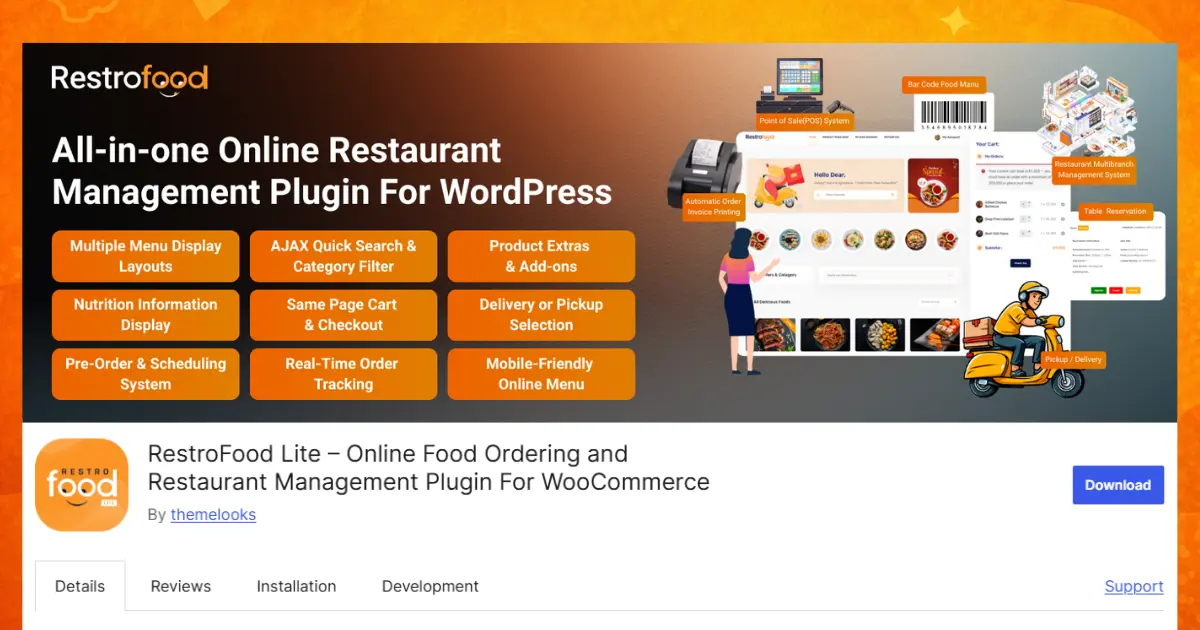
Key POS features:
Set up as many billing counters as your restaurant needs. Each counter can take customer orders and process payments at the same time. This helps serve more people during busy hours and reduces long waiting lines.
Run all your restaurant branches from one simple dashboard. You can check orders, staff, sales, and daily activities for every branch without switching between different systems.
Display only the food and drinks available at a specific branch. If one branch does not sell a menu item, it will not appear there. This helps prevent ordering mistakes and improves customer satisfaction.
Give employees access only to the branch where they work. Staff can see the tools and information they need, while managers keep full control over all branches.
Continue taking orders and payments even when your internet connection is unavailable. Once the internet is back, the system automatically syncs all saved data, so nothing is lost.
View orders from your website, mobile app, and restaurant counter in one place. Staff can prepare and track every order more easily without switching between different screens.
Print clean and easy-to-read invoices with your restaurant logo, contact details, tax information, and order summary. You can customize the invoice to match your restaurant’s branding.
Create unique barcodes for menu items, drinks, or products. Staff can scan barcodes to add items instantly, making billing faster and reducing typing errors.
Put an order on hold when a customer needs more time to decide or wants to add more items later. The saved order can be reopened anytime without starting over.
Accept payments using cash, debit cards, credit cards, mobile banking, digital wallets, gift cards, or split payments. Customers can choose the payment method that works best for them.
Decide what each staff member can see and do in the POS system. For example, cashiers can create orders, while managers can access reports and change important settings. This improves security and reduces mistakes.
View complete records of previous orders, sales, refunds, and payment transactions. Easy-to-read reports help you monitor business performance, identify best-selling items, and make smarter business decisions.
Give customers free menu items, special discounts, coupons, or promotional offers with just a few clicks. This is a great way to reward loyal customers, attract new visitors, and increase customer satisfaction.
The RestroFood POS Add-on requires the RestroFood core plugin and starts at $75 per year for one website. It is an excellent solution for restaurants that want to manage counter sales, online orders, multiple branches, and staff from one easy-to-use WordPress dashboard.
WooCommerce Point of Sale (formerly developed as a standalone plugin, now integrated with WooCommerce) provides a browser-based POS interface for WooCommerce stores.
Key features:
WooCommerce POS works well for simple retail environments. It handles basic counter sales and payment recording. It does not include restaurant-specific features like kitchen displays, offline mode for food service, or multi-branch management.
FooSales is a WooCommerce POS plugin with dedicated iPad and Android tablet apps alongside a web-based interface.
Key features:
FooSales is a solid choice for retail-style food businesses like bakeries or cafes with simple counter operations. The tablet app experience is polished. It does not include multi-branch management, kitchen order routing, or offline mode.
Jovvie is a WooCommerce POS plugin that provides a clean tablet-friendly interface for counter sales.
Key features:
Jovvie suits cafes and quick-service counters that want a straightforward POS without complex backend configuration. It is not built for multi-counter restaurant environments or branch-level reporting.
OpenPOS is a WooCommerce POS plugin that adds a point-of-sale front end to existing WooCommerce stores.
Key features:
OpenPOS is a flexible open-source option for developers who want to build a custom POS experience on top of WooCommerce. It requires more configuration than purpose-built options and lacks out-of-the-box restaurant features like branch management or kitchen panels.
Offline capability: Internet connections drop during peak hours. A POS system that stops working when the network goes down creates immediate service disruption. Offline mode keeps orders flowing and syncs when the connection returns.
Multi-counter support: A restaurant with multiple service points, a main counter, a bar, and a delivery pickup counter needs each counter to operate independently while reporting to the same system.
Order hold: Staff frequently need to hold an order mid-entry (a customer steps away, adds an item, or changes their mind). An order hold system lets a staff member pause the order and serve the next customer without losing the previous entry.
Integrated online and counter orders: When online orders and POS counter orders appear in separate systems, kitchen staff have to check two places. A unified view reduces missed orders and coordination errors.
Access control: Cashiers, managers, and owners need different levels of access. Staff-level POS access should not include full WooCommerce backend access.
Choosing the right WordPress restaurant POS plugin can make running your restaurant much easier. A good POS system helps you take orders, accept payments, print invoices, and track sales from one place. Some plugins only offer basic features, while others include helpful tools like offline mode, multi-branch support, barcode scanning, and staff access control. Before choosing a plugin, think about what your restaurant needs today and what it may need as your business grows. A feature-rich solution like RestroFood POS can help you serve customers faster, reduce mistakes, and save valuable time. With the right plugin, you can improve your daily work, keep everything organized, and give every customer a smooth and enjoyable dining experience.
RestroFood POS Add-on is the most restaurant-specific WooCommerce POS plugin available for WordPress. It includes multi-counter creation, multi-branch management, offline mode, order hold, and staff access control features that general-purpose WooCommerce POS plugins do not include.
Most WooCommerce POS plugins require a constant internet connection. RestroFood POS Add-on includes an offline mode that allows counter orders to continue processing during internet outages, with order data syncing when the connection is restored.
RestroFood POS Add-on allows you to create multiple counter profiles within a single location. Each counter can be assigned to specific staff, display branch-specific products, and track its own order history. Other WooCommerce POS plugins generally support only a single counter configuration.
A WordPress-based POS plugin runs on a tablet or desktop browser and connects to WooCommerce for order processing and payment recording. It supports peripheral hardware like receipt printers, barcode scanners, and cash drawers. For most restaurant types, including cafes, quick-service restaurants, and casual dining, a WooCommerce POS plugin covers standard counter operations at a lower cost than dedicated POS hardware subscriptions.
Pricing varies by plugin and feature set. RestroFood POS Add-on starts at $75/year for 1 site license. FooSales starts at around $99/year. Jovvie and OpenPOS also offer annual pricing. All charge a flat fee with no per-transaction commission, unlike many SaaS POS systems that charge 2%–5% per sale.
RestroFood POS Add-on integrates with the RestroFood online ordering system, so counter orders and online orders both appear in the same WooCommerce order management view. This unified view is not available in general-purpose WooCommerce POS plugins without custom development.
An order hold feature lets a staff member pause an active order and start a new transaction, then return to the paused order later. This is useful when a customer needs time to decide, steps away to check something, or when counter staff need to serve an urgent order before completing the current one.
Our FAQs cover the most common questions about ThemeLooks. If you need personalized advice or have a unique query, our team is ready to help. Contact us!

Mohammad Nur Alam is a Technical Content Writer at ThemeLooks Ltd., specializing in WordPress, SaaS, SEO, and web development. He writes practical tutorials, product reviews, and technical guides that help users make the most of WordPress tools and plugins. Passionate about digital marketing and emerging technologies, he enjoys creating helpful content and staying up to date with the latest industry trends.





 ChatGPT
 Grok
Grok Claude
 Perplexity
 Google AI


