The best personal blog WordPress themes in 2026 are ExoPress, MinaPress, and PBloggers from ThemeLooks. ExoPress suits beginners who want easy Elementor design, MinaPress fits bloggers who want to sell products or write in more than one language, and PBloggers is ideal for crypto and tech blogs.
Your theme decides how readers see your posts. A good one is easy to read, mobile-friendly, and fast. In this guide, we compare all three features, design, and price to help you pick the right one.
Table of Contents
What Makes a Great Personal Blog WordPress Theme?
A great personal blogging WordPress theme is easy to read, works on every screen, and loads fast. It also lets you change colors and layouts without touching code. Here is what to look for:
Easy-to-read text. Big, clear letters and enough space between lines help people read without getting tired.
Works on phones. Most people read blogs on their phones. A responsive WordPress blog theme changes its shape to fit any screen.
Loads fast. Nobody likes waiting. A lightweight blog theme opens quickly, which keeps readers happy and helps Google rank your pages.
Built for search engines. Clean code and proper headings help Google understand your posts.
Simple to change. You should be able to pick colors, fonts, and layouts with a few clicks.
Works with the block editor. WordPress uses blocks to build pages. Your theme should work well with them.
Share buttons and author box. These help readers share your posts and get to know you.
Updates and help. A theme that gets updates stays safe. Good support helps when you get stuck.
Quick Comparison: ExoPress vs MinaPress vs PBloggers
All three are responsive personal blog themes. The main differences are design style, features, and price.
Feature
ExoPress
MinaPress
PBloggers
Price
$29
$49
$49
Best for
Personal, lifestyle, and business blogs
Personal, tech, and crypto blogs; blogs with a shop
Crypto, tech, and service blogs
Design style
Clean, multipurpose, fullscreen slider
Clean, modern, versatile
Modern, fullscreen image background
Mobile-friendly
Yes
Yes
Yes
Page builder support
Elementor + Gutenberg
WPBakery (included)
Visual Composer / WPBakery (included)
Demo layouts
One-click demo install
Updates and support
Lifetime updates, 6 months support
Free updates, 6 months free support
3 Best Personal Blog WordPress Themes to Consider
Below, you will find details about three best personal blog WordPress themes: ExoPress, MinaPress, and PBloggers. Each theme has different features, design options, and tools for bloggers. ExoPress focuses on easy Elementor design, MinaPress offers WooCommerce support, and PBloggers includes useful tools for tech and crypto blogs. Let’s look at their features, benefits, pricing, and best uses.
1. Exopress – Multipurpose Personal Blog WordPress Theme
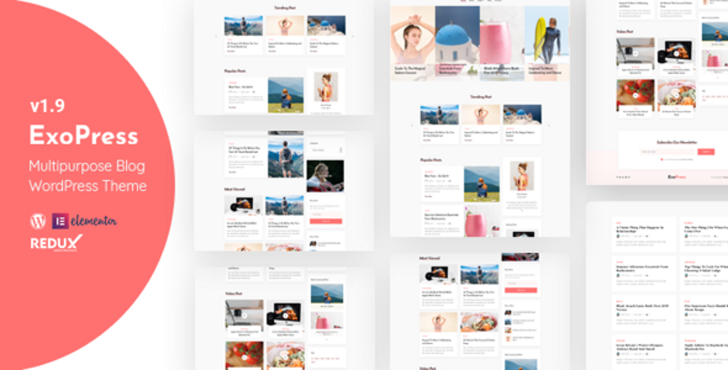
Exopress is a multipurpose personal blog WordPress theme from ThemeLooks. It is built with Elementor, so you can design pages by dragging and dropping, with no coding. It also works with the WordPress block editor (Gutenberg). ExoPress fits solo bloggers, content creators, and small business owners who want a clean blog that is easy to run.
Key features
Elementor drag-and-drop builder. Move parts of your page around with your mouse. No code needed.
One-click demo install. Get the full demo look, sliders, and settings in one click.
Fullscreen post slider. Show your best posts in a big, eye-catching slider at the top of your blog.
MailChimp signup forms. Collect email subscribers right from your blog to grow your audience.
Four post styles. Share posts as standard, gallery, video, or audio.
Flexible layouts. Pick full width, left sidebar, or right sidebar for your blog and pages.
Unlimited colors and 850+ Google Fonts. Make your blog match your own style.
Easy settings panel. Change the preloader, breadcrumbs, menus, and more from one dashboard.
Styled contact form. Readers can reach you through a ready-made Contact Form 7 form.
Child theme included. Make safe changes that stay after updates.
Pros
Very beginner-friendly thanks to Elementor and one-click demo setup
Lifetime updates at no extra cost
Fully responsive and retina-ready, so it looks sharp on phones and big screens
Rated 5.00 out of 5 by buyers
Things to keep in mind
Support lasts 6 months, even though updates are for life
It has many options, so it may take a little time to explore them all
Price: $29 on sale, down from the regular price of $58.
Best for: personal and lifestyle blogs, business blogs, creators who share video, audio, or gallery posts, and bloggers building an email list.
2. Minapress – Responsive Personal Blog WordPress Theme
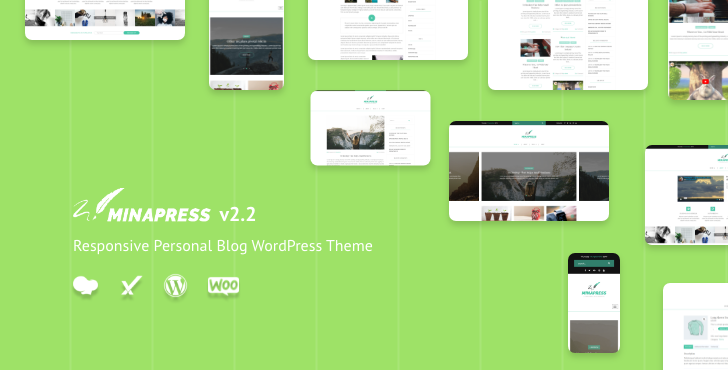
Minapress is a responsive personal blog WordPress theme from ThemeLooks. “Responsive” means your blog looks just as good on a small phone as on a big computer screen. It works for personal, technology, cryptocurrency, and software blogs. It comes with the WPBakery page builder, so you can build pages by dragging and dropping.
Key features
WPBakery Page Builder included. Drag and drop parts of your page to build any layout, no code needed.
One-click demo install. Add the demo content, sliders, and settings in one click.
WooCommerce ready. Open a small online shop and sell products right from your blog.
MailChimp signup forms. Readers can join your email list without the page reloading.
Translation ready. Comes with .pot files, so you can turn your blog into other languages.
Flexible layouts. Pick full width, left sidebar, or right sidebar for your blog, pages, and shop.
Unlimited colors and Google Fonts. Match the look of your blog to your own style.
Easy settings panel. Change colors, fonts, headers, and more from one dashboard.
Styled contact form. A ready-made Contact Form 7 form lets readers reach you.
Child theme included. Make safe changes that stay after updates.
Pros
Built-in WooCommerce support if you want to sell things
Ready for blogs in other languages
15+ widgets and 15+ shortcodes to add extra parts to your pages
Popular choice, with 172 sales
Things to keep in mind
It uses WPBakery, not Elementor, so Elementor fans may need time to learn it
Demo photos are not included in the download
It has no buyer reviews yet
Price: $49, with 6 months of free support and free updates
Best for: personal bloggers, tech and crypto bloggers, professional writers, and bloggers who want to sell products with WooCommerce.
3. PBloggers – Responsive Personal Blogging WordPress Theme
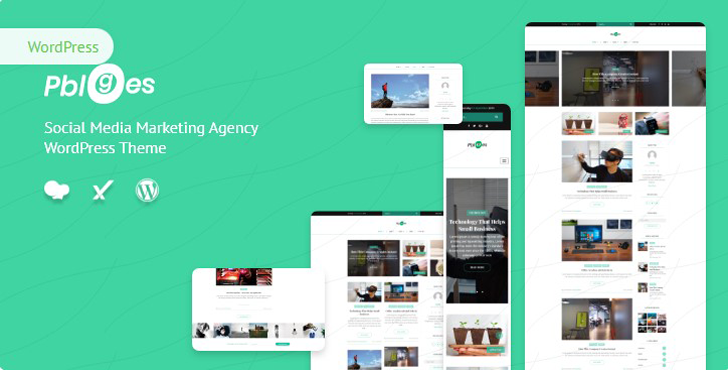
PBloggers is a responsive personal blogging WordPress theme from ThemeLooks. It works for personal, tech, software, and cryptocurrency blogs. What makes it special is its built-in crypto tools, like live coin prices and a coin calculator. It also comes with Visual Composer, a drag-and-drop page builder, so you never have to write code.
Key features
Crypto tools built in. Show live coin prices with the Crypto Compare widget, plus a coin calculator that works with all world currencies.
Visual Composer included. Build pages by dragging and dropping blocks, no code needed.
One-click demo install. Get the demo content, sliders, and settings in one click.
4 custom post types. Add sliders, photo galleries, services, and service pricing tables.
Fullscreen image background. Make your homepage bold with a big, full-screen picture.
WooCommerce ready. Sell products or services right from your blog.
Social share buttons. Readers can share your posts on Facebook, Twitter, Instagram, and Pinterest.
MailChimp signup forms. Grow your email list without the page reloading.
Page settings for every page. Turn on a page loader, pick a header, change the menu, or upload a logo, page by page.
Translation-ready and child theme included. Write in other languages and make safe changes that stay after updates.
Pros
The only theme of the three with crypto price tools
Service and pricing post types, great if you offer services
15+ widgets and 15+ shortcodes to add extra parts to your pages
Trusted by many buyers, with 153 sales
Things to keep in mind
It uses Visual Composer (WPBakery), not Elementor
Demo photos are not included in the download
It has no buyer reviews yet
The crypto tools are extras you may not need for a simple diary blog
Price: $49, with 6 months of free support and free updates
Best for: crypto and tech bloggers, software review blogs, and bloggers who want to show services with prices or sell with WooCommerce.
The right WordPress theme for bloggers depends on what you write and the look you like. Use this simple guide:
Choose ExoPress if you want easy drag-and-drop design with Elementor, a big post slider, and built-in email signup forms.
Choose MinaPress if you want to sell products with WooCommerce or write your blog in more than one language.
Choose PBloggers if you run a crypto or tech blog and want live coin prices, or want to show your services with prices.
Still not sure? Open the live demo of each theme. Click around, read a sample post on your phone, and pick the one that feels most like you.
How to Install Your Personal Blog Theme
Installing a WordPress blog theme takes only a few minutes. You upload it, turn it on, and add the demo content. Here are the basic steps:
Buy and download the theme. You will get a .zip file. Keep it zipped.
Log in to WordPress. Go to Appearance, then Themes, then click Add New.
Upload the theme. Click Upload Theme, choose the .zip file, and click Install Now.
Activate it. Click Activate to make it your blog’s new look.
Install the plugins it asks for. Many themes suggest helper plugins. Follow the message at the top of your dashboard.
Import the demo. This copies the demo layout to your site, so it looks just like the preview.
Make it yours. Add your logo, pick your colors, and set up your menu.
Each theme may have small differences, so check its guide on ThemeLooks for exact steps.
Tips to Get the Most Out of Your Blog Theme
A good theme is a great start, but a few small habits make your blog even better:
Shrink your pictures. Big photos slow your blog down. Make them smaller before you upload them.
Use an SEO plugin. Tools like Yoast or Rank Math help you pick good titles and descriptions for each post.
Keep things updated. Update your theme and plugins often. Updates fix problems and keep your blog safe.
Use a child theme for code changes. A child theme is a safe copy. Your changes stay even after the main theme updates.
Check your blog on the phone. Look at every new post on your phone before you share it.
Conclusion
Choosing from the best personal blog WordPress themes depends on what you want to do with your blog. A simple lifestyle or personal blog may need a clean design and an easy page builder. A blogger who wants to sell products may prefer WooCommerce support, while a tech or crypto blogger may need special tools. ExoPress, MinaPress, and PBloggers each offer useful features for different blogging needs.
Before choosing a theme, check its design, mobile experience, customization options, and support. It is also a good idea to open the live demo and test it on your phone. The right theme can help you create a blog that looks professional and gives your readers a better experience.
Frequently Asked Questions
What is the best personal blog WordPress theme?
The best personal blog WordPress theme is easy to read, works on phones, and loads fast. ExoPress, MinaPress, and PBloggers from ThemeLooks are all built for personal blogs and are great places to start.
Are these blog themes mobile-friendly?
Yes. MinaPress and PBloggers are responsive themes, which means they fit any screen. ExoPress is fully responsive and retina-ready too. Your readers can enjoy your posts on phones, tablets, and computers.
Do these themes work with Gutenberg or Elementor?
ExoPress works with both. It is Gutenberg-optimized and built with Elementor. MinaPress uses the WPBakery page builder, which comes included. PBloggers includes Visual Composer, the older name for WPBakery. Most modern WordPress themes work with the block editor, so you can build pages with simple drag-and-drop blocks.
Can I use these themes for a travel or food blog?
Yes. A personal blog theme works for almost any topic, including travel, food, fashion, or daily life. Just add your own photos, pick your colors, and write posts about what you love.
Will I get updates and support after I buy?
ExoPress comes with lifetime updates and 6 months of support. MinaPress and PBloggers both give you free updates and 6 months of free support. Updates keep your blog safe, and support helps you fix problems quickly when you get stuck.
Is a premium theme better than a free one?
A premium theme usually gives you more designs, more features, and real support. Free themes can work, but they often have limits. If you plan to blog for a long time, a premium theme is worth it.
Still Have Questions?
Our FAQs cover the most common questions about CoxWall. If you need personalized advice or have a unique query, our team is ready to help. Contact us!
Mohammad Nur Alam is a Technical Content Writer at ThemeLooks Ltd., specializing in WordPress, SaaS, SEO, and web development. He writes practical tutorials, product reviews, and technical guides that help users make the most of WordPress tools and plugins. Passionate about digital marketing and emerging technologies, he enjoys creating helpful content and staying up to date with the latest industry trends.
Subscribe to our newsletter to receive news and tutorials about our themes and WordPress.
Follow Us On
We use cookies to ensure that we give you the best experience on our website. If you continue to use this site we will assume that you are happy with it.