
Running a restaurant can get very busy, especially when many customers want to order at the same time. A good online ordering system can make this work easier. The best restaurant pickup and takeaway wordpress plugins help customers order food online, choose a pickup time, and pay before they arrive.
They also help restaurant staff manage orders, control busy time slots, and prepare food on time. In this guide, we will look at five popular WordPress plugins: RestroFood, FoodBook, Orderable, WPCafe, and RestroPress.
Each plugin has different features for pickup, takeaway, scheduling, payments, and order management. We will compare their features, benefits, limitations, and best uses. By the end, you will understand how to choose the best restaurant pickup and takeaway wordpress plugins for your restaurant.
Table of Contents
A restaurant pickup and takeaway system is a tool that lets customers order food online and collect it themselves. Customers choose their food, pick a time, and pay. Then they come to the restaurant, grab their order, and leave.
“Pickup” and “takeaway” mean almost the same thing. Both words describe food that the customer carries out of the restaurant. In the USA, people often say “pickup” or “takeout.” In the UK and Australia, people often say “takeaway.” A good system lets you use the word your customers know best.
Here is a simple example. Mia wants tacos for lunch. She opens her favorite taco shop’s website on her phone. She picks 3 tacos, chooses a 12:30 PM pickup time, and pays by card. At 12:30 PM, she walks in, says her name, and takes her bag. She does not wait in line or talk on the phone.
On a WordPress website, a restaurant pickup and takeaway system usually comes as a plugin. A plugin is an add-on program that gives your website new powers. Many of these plugins run on WooCommerce. WooCommerce is a free tool that turns a WordPress site into an online shop.
A restaurant pickup and takeaway system works in a few simple steps. The customer orders online, picks a pickup time, and pays. The kitchen gets the order, cooks the food, and marks it ready. Then the customer collects it.
Here is the full journey of one order:
Let’s see this in real life. Sam owns a small burger shop. At 5:00 PM, 4 orders come in for a 6:00 PM pickup. Sam’s kitchen screen shows all 4 orders with the names and items. The cook starts them at 5:40 PM. By 6:00 PM, the bags sit on the counter with name labels. Every customer gets hot food and leaves in under 1 minute.
The best restaurant pickup and takeaway system does most of this work by itself. The staff only needs to cook and hand over the food.
The main difference is who travels. With pickup, the customer comes to the restaurant to get the food. With delivery, the restaurant or a driver takes the food to the customer’s home. Pickup costs less and needs fewer staff.
This table shows the key differences side by side:
| Point | Pickup / Takeaway | Delivery |
| Who travels? | The customer | A driver |
| Extra staff needed? | No drivers needed | Drivers needed |
| Delivery fee? | No | Usually yes |
| Food temperature | Often hotter, because the trip is short | Can cool down on long trips |
| Best for | Small shops, cafés, busy lunch spots | Restaurants with drivers and a delivery area |
For a small restaurant, pickup is often the easier place to start. You do not need to hire drivers or buy bikes or cars. You do not need to worry about bad weather or wrong addresses.
Many restaurants offer both options. A good WordPress plugin lets customers choose pickup or delivery at checkout. It also lets you turn delivery off if you only want pickup.
Restaurants need a pickup and takeaway plugin to take orders without phone mistakes, control the kitchen rush, and keep more money from each sale. A plugin also lets customers order any time, even when staff are busy.
Here are the biggest reasons a restaurant pickup and takeaway Plugin helps:
Most restaurant owners don’t notice this at first: the real problem is not the number of orders. The problem is when all the orders arrive at once. A lunch rush of 30 orders is fine if they come over 2 hours. The same 30 orders in 15 minutes can break a small kitchen. A restaurant pickup and takeaway plugin with time slots and order limits solves this problem.
The best pickup and takeaway systems for a WordPress restaurant are RestroFood, FoodBook, Orderable, WPCafe, and RestroPress. RestroFood has the most detailed pickup scheduling. Orderable and RestroPress have free starting versions. WPCafe combines ordering with table booking.
Before you read about each plugin, look at this quick comparison. It shows which plugins include the pickup tools that matter most to a busy restaurant.
| Feature | RestroFood | FoodBook | Orderable | WPCafe | RestroPress |
| Pickup and delivery | Yes | Yes | Yes | Yes | Yes |
| Pickup time slots | Yes | Yes | Partial | Partial | Yes |
| Order limit per time slot | Yes | Yes | Partial | Partial | Partial |
| Break time and holiday settings | Yes | Yes | Partial | Partial | Partial |
| “Ready to Pickup” order tracking | Yes | Yes | Partial | Partial | Partial |
| Separate kitchen dashboard | Yes | Yes | Partial | Partial | Partial |
| POS for counter orders | Yes | Partial | No | Partial | Partial |
| Multi-branch control | Yes | Partial | Partial | Partial | Partial |
| Needs WooCommerce | Yes | Yes | Yes | Yes | No |
The table shows a clear pattern. All 5 plugins handle basic pickup ordering. The big differences show up in scheduling tools, like order limits per slot and break times. These tools decide whether your kitchen stays calm on a busy night.
Choosing the right restaurant pickup and takeaway WordPress plugin can make online ordering easier for both customers and staff. These plugins offer different features for pickup, takeaway, delivery, scheduling, checkout, and order management. Below, we’ll explain 5 Best WordPress restaurant ordering plugins: RestroFood, FoodBook, Orderable, WPCafe, and RestroPress and highlight their key features, pros, limitations, and best use cases.
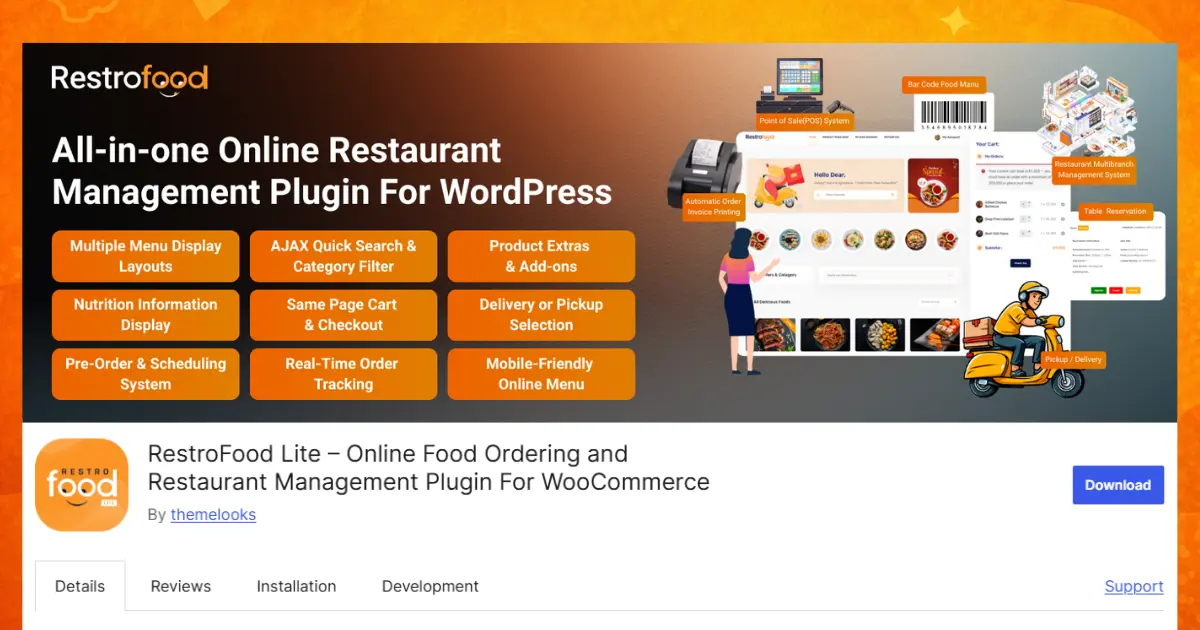
RestroFood is the best restaurant pickup and takeaway wordpress plugins because it covers the whole pickup journey in one place. Customers choose a pickup time and pay online. Then they track their order until it says “Ready to Pickup.”
RestroFood is a WooCommerce-based restaurant management plugin for WordPress. WooCommerce is a free tool that turns a WordPress site into an online shop. RestroFood adds the parts a restaurant needs for pickup, such as pickup times, a kitchen panel, and order tracking.
Pickup and takeaway options
Pickup scheduling
Pickup order updates
Kitchen tools for pickup orders
Quick checkout for pickup customers
Add-ons that help pickup and takeaway
These add-ons are sold separately or included in Bundle plans. They are not part of the Single plan.
Pros
Limitations
Best for
RestroFood is the best restaurant pickup and takeaway wordpress plugins if you want full control over pickup times and kitchen workload. It also suits growing restaurants that may add counter takeaway sales or new branches later.
FoodBook is a food ordering plugin for WordPress restaurants. It works with WooCommerce and lets customers browse a menu, order online, and choose pickup or delivery. It fits restaurants that want a simple setup without many extra tools.
What FoodBook offers
Pros: Focus on the core job of food ordering, WooCommerce checkout, and an easier learning curve than bigger systems.
Limitations: FoodBook has no built-in POS and fewer advanced tools, like multi-branch control. Check how often the plugin gets updated before you buy.
Best for: Small restaurants and cafés that want basic online ordering with pickup and delivery.
Orderable is a WooCommerce plugin built for local restaurants and takeaways. It has a free version on WordPress.org and a paid Pro version. Customers can order online and choose pickup or delivery.
What Orderable offers
Pros: A free version to try first, clean ordering layouts, and a WooCommerce base.
Limitations: Key scheduling tools need the paid Pro version. Orderable has no built-in POS for counter sales. Check the official site for current plans.
Best for: Small local restaurants and takeaways that want to start free and upgrade later.
WPCafe is a WordPress restaurant plugin that combines food menus, table reservations, and online ordering. It works with WooCommerce and offers pickup and delivery.
What WPCafe offers
Pros: Reservations and ordering in one plugin, strong page builder support, and a free version on WordPress.org.
Limitations: Many advanced tools, like multi-location, need Pro. Reservations are a big focus, so pickup is one feature among many. Check the current documentation for POS support.
Best for: Dine-in restaurants that take table bookings and also want pickup orders.
RestroPress is a free food ordering plugin that works on its own, without WooCommerce. It has its own cart and checkout. Customers choose pickup or delivery and pick a service time. Extra features come from paid add-ons.
What RestroPress offers
Pros: A free core plugin, no WooCommerce needed, and many add-ons.
Limitations: You cannot use WooCommerce extensions or payment plugins with it. The cost of paid add-ons can add up. Check the current add-on list for POS and order tracking.
Best for: Restaurants that want a food ordering system that does not depend on WooCommerce.
To choose a WordPress pickup and takeaway plugin, check 6 things: pickup time slots, order limits, order status updates, payment options, a kitchen view, and room to grow. Pick the plugin that fits your restaurant’s size and budget today.
Use this checklist before you buy:
In practice, the difference between a good and a bad restaurant pickup and takeaway wordpress plugins shows up on your busiest night, not on a quiet Tuesday. So test the demo like a hungry customer. Place an order on your phone. Count the taps. Then look at the staff side and ask, “Could my cook understand this in 5 seconds?”
You can set up a restaurant pickup and takeaway system on WordPress in about 10 steps. Install WooCommerce and a pickup plugin, add your menu, set your pickup times and limits, connect payments, and test an order before going live.
This example uses RestroFood, but most WooCommerce plugins follow similar steps:
Here is a helpful tip from real kitchens: set your first order limit lower than you think you need. It is easy to raise a limit after a smooth week. It is hard to win back a customer after a 40-minute wait.
The most common problems with a restaurant pickup and takeaway system are order rushes, orders after closing time, missed orders, cold food, and long counter lines. Most of these problems have simple fixes in the right plugin settings.
Too many orders at the same time
A flood of orders for 6:00 PM can overwhelm a small kitchen. Fix: Set an order limit for each time slot. When a slot is full, customers pick the next open time.
Orders placed after closing time
Some systems let customers order for a time when the restaurant is closed. Fix: Use closing time detection, so customers can only pick times inside your opening hours.
Orders during the kitchen’s break
Orders that arrive during a staff break sit untouched. Fix: Add break times to your schedule, so customers cannot choose those times.
Missed new orders
A busy cook may not look at the screen for 10 minutes. Fix: Turn on new order notifications with sound, so every order gets noticed right away.
Cold food or long waits
Customers who arrive too early wait. Customers who arrive too late get cold food. Fix: Send an email when the order status changes to “Ready to Pickup,” so customers know the right time to come.
Wrong or missing extras
A customer asks for extra sauce, and the kitchen forgets it. Fix: Let customers add extras on the product page, and print a clear order slip for the kitchen.
Long lines at the counter
Walk-in customers and pickup customers crowd the same counter. Fix: Use a POS system for walk-in orders. RestroFood’s POS add-on can hold an order and finish it later, which keeps the line moving.
A Restaurant Pickup and Takeaway Plugin can make online food ordering simple for both customers and restaurant staff. Customers can order from their phones, choose a pickup time, pay online, and collect their food without waiting too long. Restaurants can manage orders, control busy time slots, and reduce mistakes caused by phone orders.
The 5 plugins discussed in this guide offer different features, pricing options, and ways to manage pickup orders. Before choosing a plugin, check important features such as pickup scheduling, order limits, payment options, kitchen management, and future growth options.
The right choice depends on your needs. Choose FoodBook for a simple start. Choose Orderable to begin free. Choose WPCafe if table booking matters most. Choose RestroPress if you want to skip WooCommerce. Choose RestroFood if you want detailed pickup scheduling, kitchen tools, and room to grow into counter sales or more branches.
RestroFood offers the most detailed pickup scheduling among the 5 plugins in this guide. It includes pickup time slots, order limits per slot, break times, holidays, and a “Ready to Pickup” tracking step. Other good choices exist too. Orderable and RestroPress have free starting versions. WPCafe works well for restaurants that also take table bookings. The best choice depends on your menu size, budget, and plans to grow.
Yes, pickup and takeaway mean almost the same thing. Both describe food that the customer collects and carries out of the restaurant. People in the USA often say “pickup” or “takeout.” People in the UK and Australia often say “takeaway.” A good restaurant pickup and takeaway system lets you use whichever word your customers know best, so your website feels familiar to them.
Yes, many plugins let customers schedule pickup for a later day. In RestroFood, customers can choose pickup today or schedule it for another day. The Pre-Order System also lets customers order ahead for a set date and time. This feature helps with party orders, office lunches, and holiday meals, because your kitchen knows about the order early and can plan ahead.
Yes, you can offer only pickup. RestroFood has 3 modes: pickup and delivery, only pickup, and only delivery. The “Only Pickup” mode helps restaurants that have no delivery drivers. Customers will not see a delivery option at checkout. You can switch delivery on later if you hire drivers or start working with a delivery service.
Set an order limit for each pickup time slot. In RestroFood, the Order Limit On Time Slot feature caps how many orders each slot accepts. When a slot fills up, customers get asked to pick another time. This setting spreads orders across the evening, so your kitchen does not get 20 orders in the same 5 minutes.
It depends on the plugin you choose. RestroFood, FoodBook, Orderable, and WPCafe all need WooCommerce. WooCommerce is free and adds a cart, checkout, and payments to WordPress. RestroPress works without WooCommerce and uses its own checkout. The trade-off is that RestroPress cannot use WooCommerce extensions or WooCommerce payment plugins.
Customers learn about their order through status updates. In RestroFood, customers can follow each step: Order Placed, Cooking, Cooking Completed, and Ready to Pickup. They also get an email when the status changes. You can design a custom email for each status, so the “Ready to Pickup” message can include your address or parking tips.
Yes, you can print pickup orders. RestroFood prints order slips in 1 click on thermal or receipt printers, with your logo on top. The Automatic Order Invoice Printing add-on goes further. It prints every new order by itself through PrintNode, so staff do not need to open the dashboard. This add-on costs extra or comes in Bundle plans.
Our FAQs cover the most common questions about ThemeLooks. If you need personalized advice or have a unique query, our team is ready to help. Contact us!

Mohammad Nur Alam is a Technical Content Writer at ThemeLooks Ltd., specializing in WordPress, SaaS, SEO, and web development. He writes practical tutorials, product reviews, and technical guides that help users make the most of WordPress tools and plugins. Passionate about digital marketing and emerging technologies, he enjoys creating helpful content and staying up to date with the latest industry trends.


 ChatGPT
 Grok
Grok Claude
 Perplexity
 Google AI


