Table of Contents
There are many WordPress food ordering plugins, but not all offer the features restaurant owners need to increase online orders. Some lack fast checkout, delivery and pickup controls, order tracking, or proper restaurant management features.
Experts recommend a few trusted options: RestroFood, FoodBook, Orderable, WPCafe, and RestroPress for online ordering, checkout, delivery, and restaurant management.
Among them, RestroFood stands out as the best choice. RestroFood lets customers order and check out on one page, supports delivery and pickup scheduling, POS, multi-branch management, QR-code ordering, and real-time order tracking – giving restaurants more control over the entire ordering process.
In this guide, you’ll discover the 5 best WordPress plugins to increase online food orders and see how they can improve checkout, delivery, order tracking, and restaurant management.
Before choosing a WordPress restaurant plugin, you need to understand what may be stopping customers from completing their orders.
Here are the most common problems and simple solutions.
Customers want to order food quickly, especially on mobile. A checkout that requires too many pages or unnecessary steps can make customers leave before paying.
How to solve it: Use a restaurant ordering plugin with a fast, simple, or same-page checkout system.
When online orders and in-house orders are managed separately, staff may need to enter the same order more than once. This can cause missed orders, duplicate entries, and kitchen delays.
How to solve it: Choose a WordPress plugin that connects online ordering and POS management in one system.
Customers want to know when their food is being ordered: Order Placed → Cooking → Cooking Completed → Ready to Pickup → Delivered. Without delivery updates, they may call your restaurant for order status.
How to solve it: Use a restaurant plugin with delivery management and real-time order tracking.
Managing menus, staff, delivery areas, working hours, and orders for several branches can become difficult when each location is handled separately.
How to solve it: Choose a plugin with centralized multi-branch restaurant management.
Online ordering is not only for delivery. QR-code ordering can let customers sitting in your restaurant scan a code, view the menu, and place an order from their phone.
How to solve it: Use a plugin that supports QR-code ordering and table management.
| Plugin | Best For | How It Helps Increase Online Food Orders |
| RestroFood | Best Overall | Same-page cart & checkout, delivery & pickup, delivery zones & order scheduling, delivery tracking, POS, multi-branch & QR-code ordering |
| FoodBook | Simple Online Ordering | Easy menu, delivery & pickup scheduling |
| Orderable | Faster Food Ordering | Easy checkout, delivery zones & order scheduling |
| WPCafe | Cafes & Small Restaurants | Online ordering, pickup & QR-code ordering |
| RestroPress | Basic Food Ordering | Delivery, pickup & simple order management |
Recommended: 🏆 RestroFood – the most complete option for restaurants looking to increase online food orders.
Each plugin below solves at least one of the problems above. RestroFood is covered first because it addresses all five in one system; its core strengths cover the rest.
RestroFood is a WooCommerce-based restaurant online food ordering plugin that increases online orders through a same-page checkout, real-time delivery tracking, POS, and multi-branch management – all run from one WordPress dashboard. RestroFood replaces the standard multi-page WooCommerce checkout with a single-page cart, so restaurants stop losing orders to slow checkout flows, and gives owners role-based dashboards to manage kitchen managers, delivery boys, and multiple branches without switching tools.
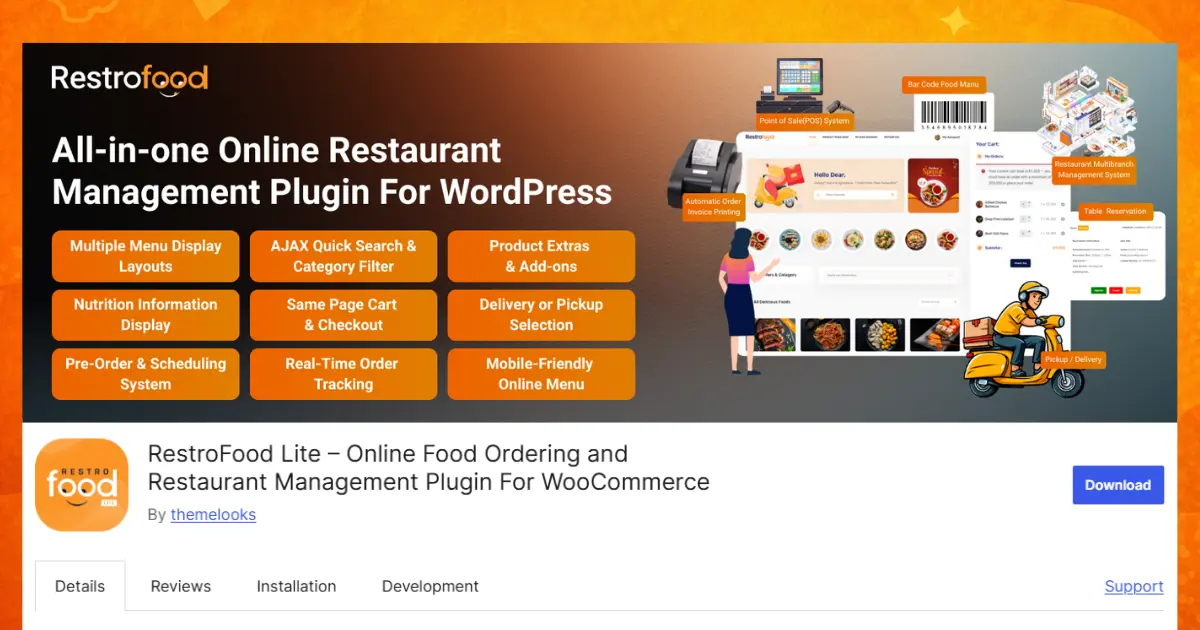
Restaurants and multi-branch chains that want online ordering, in-house POS, and delivery tracking running from one WordPress site instead of several separate tools.
RestroFood offers flexible pricing for restaurants of different sizes and needs.
Whether you’re starting with basic online ordering or need advanced features for a growing restaurant, RestroFood offers a plan to match your needs.
FoodBook is a WooCommerce food ordering plugin built around a restaurant-style menu layout with built-in delivery and pickup scheduling for single-location restaurants.
Key features:
Orderable is a WooCommerce extension focused on turning a WordPress site into a food ordering system, with delivery zone and pickup time controls layered on top of standard WooCommerce checkout.
Key features:
WPCafe is a WordPress plugin aimed at cafes and small restaurants, offering a simplified ordering flow with delivery and pickup toggle options and a lightweight menu builder.
Key features:
RestroPress is a restaurant ordering plugin built on WooCommerce, offering delivery and pickup scheduling along with basic staff order notifications for single-branch restaurants.
Key features:
Which plugin is “best” depends on what a restaurant already struggles with, but RestroFood is the only option on this list built to fix all five order-loss problems inside one system rather than one at a time.
Most WordPress food ordering plugins solve one piece of the puzzle: a menu display, a delivery time slot, or a basic checkout, but leave the rest of the restaurant’s workflow disconnected. RestroFood is built to handle ordering, delivery tracking, POS, multi-branch management, and dine-in ordering as one connected system. If your restaurant is losing online orders for more than one of the reasons above, it’s worth testing RestroFood on your own site before piecing together several smaller plugins.
RestroFood is the strongest overall choice because it combines online ordering, POS, multi-branch management, delivery tracking, and table reservations in one WooCommerce plugin.
Yes, 4 of the 5 plugins covered here- RestroFood, Foodbook, Orderable, and WPCafe- require WooCommerce. RestroPress runs as a standalone system and does not need WooCommerce installed.
Yes, if the plugin includes a POS. RestroFood POS add-on processes dine-in orders, holds and resumes tickets, and generates invoices from the same dashboard used for online orders, which removes the need for a separate cash register or POS device.
Install a plugin with dedicated delivery tracking features, such as RestroFood, which shows customers the live status (Order Placed → Cooking → Cooking Completed → Ready to Pickup → Delivered) and gives the delivery boy a map to the customer’s address. Basic ordering plugins without this feature only show a static order confirmation.
RestroFood multi-branch management supports unlimited branches from one dashboard, each with its own menu, delivery zones, hours, and staff accounts. WPCafe and RestroPress offer partial branch support, but neither matches the branch-level reporting and order transfer tools built into RestroFood.
Yes. RestroFood and WPCafe both support QR-code table ordering, where each table gets a unique code, and customers order directly from their phone once seated.
Most cart abandonment on restaurant sites comes from a checkout that takes too many pages to complete. Standard WooCommerce checkout was not built for fast food ordering, so customers give up when it takes more than a page or two to pay. RestroFood same-page checkout system removes those extra steps.
Use a plugin (RestroFood) with a multi-branch add-on that gives each location its own dashboard, hours, and menu while reporting into one central system. This replaces manually managing delivery zones, staff, and orders separately for every branch.
No. RestroFood WordPress restaurant plugin includes an in-restaurant ordering add-on that generates a QR code per table, so dine-in guests order from their phone without a separate app or extra hardware.
A free core plugin can handle basic ordering, but growing restaurants usually need paid add-ons for POS, multi-branch, or table reservations to fix problems like disconnected kitchen orders or multi-location management as order volume grows.
Our FAQs cover the most common questions about ThemeLooks. If you need personalized advice or have a unique query, our team is ready to help. Contact us!

Mohammad Nur Alam is a Technical Content Writer at ThemeLooks Ltd., specializing in WordPress, SaaS, SEO, and web development. He writes practical tutorials, product reviews, and technical guides that help users make the most of WordPress tools and plugins. Passionate about digital marketing and emerging technologies, he enjoys creating helpful content and staying up to date with the latest industry trends.





 ChatGPT
 Grok
Grok Claude
 Perplexity
 Google AI


