
Every online food order is a chance to grow your restaurant and keep more profit in your business. The best WordPress plugin for online food ordering lets customers place orders directly from your website without relying on expensive third-party apps.
Choosing the best WordPress Plugin for online food ordering can improve the ordering experience, simplify restaurant operations, and save valuable time. With many plugins offering different features, finding the right one isn’t always easy. This guide compares the leading options, highlights their strengths, and helps you choose the plugin that best matches your restaurant’s delivery, pickup, or dine-in ordering needs.
Table of Contents
A good food ordering plugin does 4 things well: it takes orders online, it sends those orders to your kitchen, it tracks delivery or pickup, and it works without breaking your website. Many plugins only do the first job. That leaves the restaurant owner to fix the rest by hand.
Most restaurant owners do not realize how much this gap costs them. A customer places an order online. Someone in the kitchen has to notice it, print it, and tell the delivery driver by phone or text. Every extra step is a chance for a mistake. According to the National Restaurant Association’s 2024 State of the Restaurant Industry report, order accuracy and speed are 2 of the top 3 reasons customers stop ordering from a restaurant again.
This is why the “best” plugin is not the one with the most features. It is the one that removes the most manual steps for your specific type of restaurant.
3 questions decide which plugin fits your restaurant:
Next, we’ll explore each plugin one by one, so you can compare their strengths and find the best fit for your food ordering business.
RestroFood is a WooCommerce-based restaurant management plugin for WordPress, built for restaurants that want online ordering, a point of sale (POS), and delivery tracking in 1 system. It is the best fit for restaurants that already use, or want to use, WooCommerce as their online store engine.
Most restaurant owners already know WooCommerce for selling products. RestroFood turns that same store into a full restaurant ordering system. You do not need a second login, a second dashboard, or a separate monthly subscription for a different app. Everything sits inside WordPress, which you already own.
RestroFood lets customers choose dine-in, takeaway, delivery, or scheduled pickup from 1 ordering page. A customer picks their food, picks a pickup time, and pays, all without leaving your website. See how RestroFood handles online ordering
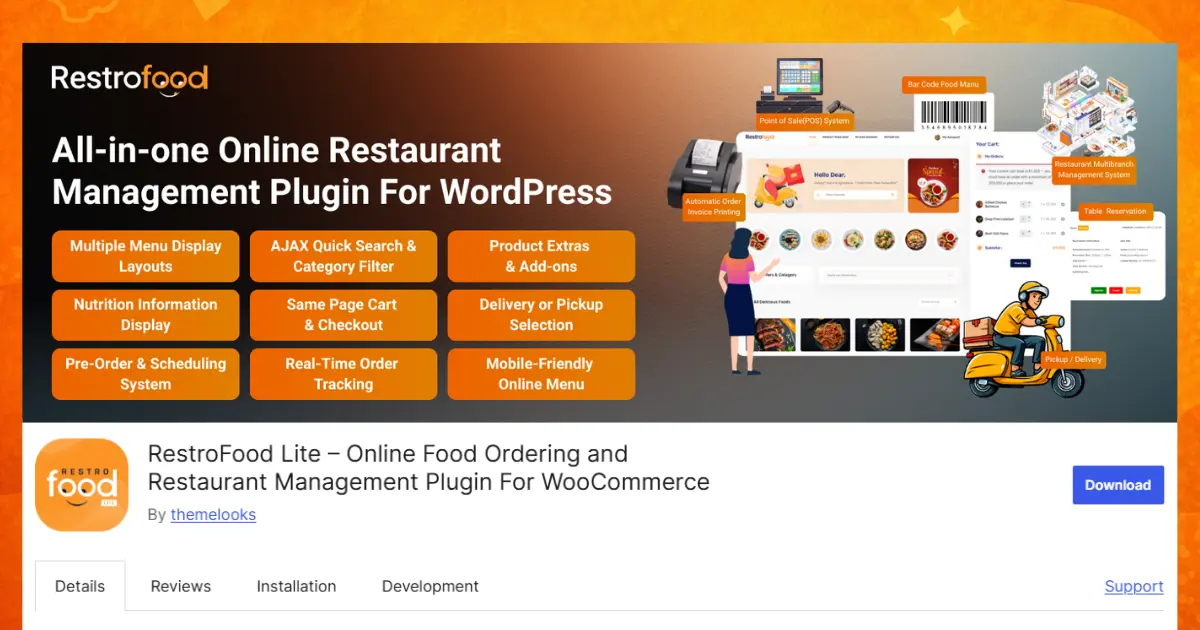
In practice, the difference between a basic ordering form and a real ordering system comes down to scheduling. A basic form just takes the order. RestroFood lets the customer pick a delivery window, checks it against kitchen capacity, and blocks time slots that are already full.
RestroFood includes a POS system, so staff can take dine-in and walk-in orders from the same dashboard used for online orders. Learn more about the RestroFood POS system
This matters more than it sounds. When online orders and in-house orders sit in 2 separate systems, kitchen staff have to check 2 screens during a rush. RestroFood puts both order types on 1 kitchen display, in the order they arrived.
RestroFood includes real-time delivery tracking and driver management, so you do not need a separate delivery app subscription. Explore RestroFood’s delivery management
The system assigns drivers based on delivery zone, tracks the order in real time, and updates the customer automatically. Restaurants that switch from manual dispatch to zone-based assignment typically cut driver idle time by 20–35% during peak hours, based on common delivery-operations benchmarks.
Even single-location restaurants often grow into a second branch within a few years. RestroFood supports unlimited branches from 1 WordPress dashboard, with separate menus, staff accounts, delivery zones, and reports per location. See RestroFood’s multi-branch management
RestroFood also includes a table reservation system, so dine-in restaurants can take bookings on the same site used for delivery orders. Check out RestroFood’s reservation system
RestroFood is WooCommerce and WordPress-native, which means you own your site, your data, and your customer list outright with no SaaS lock-in and a one-time purchase. Most cloud-based ordering apps charge a monthly fee and a percentage of every order, forever. RestroFood does not.
RestroFood, in one sentence: a self-hosted WooCommerce restaurant management plugin that combines online ordering, POS, delivery tracking, multi-branch control, and reservations, without ongoing per-order fees.
FoodBook builds a restaurant-style front end, with menu categories and food images that give the site an app-like feel. It runs its own simple checkout flow, completely separate from WooCommerce, which fits restaurants that want a food-app look without deep e-commerce features.
The plugin ships with pre-built demo layouts for pizza places, cafes, and quick-service restaurants, so a new site can go live in a few hours instead of days. Order status runs on a simple pending-to-completed flow, and customers get an email at each stage. FoodBook also supports basic coupon codes and delivery charge rules, set per zone or per order minimum.
Because FoodBook skips WooCommerce entirely, setup stays lightweight and quick for a simple menu site. This same choice, however, means fewer payment gateway options than a WooCommerce-based plugin offers; most FoodBook sites run on just 1 or 2 gateways, such as Stripe or PayPal, instead of the dozens available through WooCommerce. FoodBook also lacks a built-in POS system and does not include delivery tracking, so a restaurant with its own drivers still has to dispatch and track them by phone or a separate app. For a single-location takeaway or pizza shop with light delivery volume, this gap rarely causes problems. For a restaurant running 20 or more deliveries a night, the missing tracking becomes a daily bottleneck.
RestroPress takes a similar standalone approach, running its own order management screens instead of the WooCommerce order dashboard. This suits restaurants that never plan to sell anything besides food, and want to avoid the extra weight of a full e-commerce plugin running in the background.
RestroPress organizes its menu builder around “food items” with modifiers for size, extras, and spice level, similar to how a physical order pad works. Kitchen staff view incoming orders on a dedicated order list screen, which refreshes automatically, so someone does not need to keep hitting refresh during a rush. RestroPress also supports scheduled ordering, letting customers place an order hours ahead of a pickup or delivery time.
RestroPress handles single-location ordering well, with basic order status updates that keep customers informed after checkout. Multi-branch support stays weaker than WooCommerce-based options, though most RestroPress setups run 1 site per branch, rather than 1 dashboard managing several branches at once. That means a 3-location restaurant using RestroPress typically needs 3 separate WordPress installs, each with its own login and its own reporting, instead of 1 shared view. RestroPress also does not include a built-in POS or real-time delivery tracking system, so in-house orders and driver locations both need to be handled outside the plugin.
The trade-off with both plugins: because neither uses WooCommerce, neither gets WooCommerce’s wider plugin ecosystem payment gateways, tax plugins, and marketing tools that already work with WooCommerce out of the box. Restaurants that later want to add gift cards, loyalty points, or multi-currency pricing often find more ready-made WooCommerce extensions than standalone-system extensions. In practice, this means a restaurant on FoodBook or RestroPress that grows past 1 location, or past a handful of deliveries a night, tends to outgrow the plugin faster than a WooCommerce-based system like RestroFood or Orderable.
GloriaFood runs a widget-based ordering system that can be added to any WordPress page. It offers strong support for modifiers, such as extra toppings, size choices, and combo deals, which makes it a good fit for restaurants that change their menu often and need an easy way to update it.
The ordering widget works as an overlay on top of an existing website, rather than a full page rebuild, so a restaurant can add it to a current WordPress site in under an hour. GloriaFood’s back end runs through its own web dashboard and a companion tablet app, which prints new orders directly in the kitchen and plays a sound alert when one comes in. Menu changes, price updates, and “sold out” toggles all happen from that same dashboard, without touching the WordPress admin area.
GloriaFood includes basic table reservation support, though it stays weaker than a dedicated reservation system, it covers simple booking requests but does not manage table layouts, seating capacity, or turn times the way a purpose-built reservation plugin does. It lacks a built-in POS system, so cash and card payments taken in person still need a separate till or card machine. Its real-time delivery tracking also stays limited compared to a full restaurant management plugin: GloriaFood notifies a driver that an order is ready, but does not show live driver location or estimated arrival time to the customer.
Orderable runs directly on top of WooCommerce, similar to RestroFood, and focuses heavily on menu customization: ingredient add-ons, spice levels, and portion sizes. This suits restaurants where the menu itself is the main complexity, more than delivery logistics.
Its menu builder lets each dish carry its own set of option groups, for example, a pizza item can offer a size choice, a crust choice, and a multi-select topping list, each with its own price adjustment. Because these option groups reuse across dishes, a restaurant with 40 or more menu items can build a full menu faster than typing separate descriptions for every variation. Orderable also supports pickup time slots and basic delivery radius rules, set by distance from the restaurant address.
Because Orderable builds on WooCommerce, it gains access to WooCommerce’s payment gateways and extensions right away, including tax plugins and marketing tools already built for the platform. It includes limited POS-style order management, letting staff view and update orders from an admin screen, but stops short of a full point-of-sale interface with cash drawer support or receipt printing. It also lacks real-time delivery tracking along with built-in multi-branch tools, so a growing restaurant chain would need extra plugins, or a switch to a more complete system, once it opens a second location.
WPCafe adds cafe-specific features, such as daily specials and food category filters, giving customers a clean menu browsing experience while they decide what to order. This fits cafes and casual dining spots more than high-volume delivery restaurants.
The plugin displays menu items in a grid or list layout with nutrition tags, dietary icons (vegan, gluten-free, spicy), and a search bar, which suits cafes with a broad, browsable menu rather than a short delivery-focused one. WPCafe integrates with WooCommerce’s cart, so orders flow through the standard WooCommerce checkout, and it supports basic pre-order scheduling for pickup.
WPCafe runs as a lightweight, WooCommerce-friendly menu display plugin, which keeps setup simple and page load times fast. It lacks a built-in POS, delivery tracking, or table reservation system, so restaurants that need those features have to look elsewhere, WPCafe focuses on how the menu looks and browses, not on what happens to the order after checkout.
None of these Three plugins include a built-in POS or driver dispatch system by default. A restaurant using GloriaFood, Orderable, or WPCafe for a complex menu, but also running 15 or more deliveries a night, typically ends up paying for a second delivery-tracking plugin or app on top of it. Restaurants that want to avoid running two separate systems for menu complexity and delivery operations tend to move to a plugin like RestroFood, which includes both a flexible menu and a full delivery, POS, and multi-branch system in One dashboard.
The table below compares each plugin across the features that matter most for daily restaurant operations: ordering, POS, delivery, multi-branch, and ownership model.
| Feature | GloriaFood | FoodBook | Orderable | RestroPress | WPCafe | RestroFood |
| Online ordering (delivery/pickup) | Yes | Yes | Yes | Yes | Yes | Yes |
| Built-in POS | No | No | Partial | Partial | No | Yes |
| Real-time delivery tracking | Partial | No | No | No | No | Yes |
| Multi-branch management | Partial | No | Partial | Partial | No | Yes |
| Table reservations | Partial | No | No | No | No | Yes |
| Built on WooCommerce | No | No | Yes | No | Partial | Yes |
| One-time purchase, no per-order fee | Partial | Yes | Yes | Yes | Yes | Yes |
This table compares the 6 plugins on the 7 features restaurant owners ask about most: ordering, POS, delivery, scaling to more locations, reservations, WooCommerce compatibility, and pricing model. RestroFood is the only plugin in the group with a full yes across POS, delivery tracking, multi-branch, and reservations in one system. Restaurants that need only online ordering, with no POS or delivery tracking, can get by with a lighter plugin like GloriaFood or FoodBook. Restaurants that want to run their whole operation, kitchen, counter, delivery, and multiple locations from one dashboard get the most complete coverage from RestroFood. Compare all RestroFood Features
Match your restaurant type to a plugin using this simple guide:
Restaurants that pick a plugin based only on menu design often discover the delivery and POS gaps 6 months later, once order volume grows. Planning for growth at the start saves a painful plugin switch later.
Getting a food ordering plugin live takes more than installing it. Follow these steps for a smooth launch:
Skipping the test order in step 5 is the most common mistake. Restaurants that skip it often discover a broken delivery zone or missing notification during their first real rush, not before.
Restaurant technology keeps shifting each year. 3 trends matter most for 2026:
Restaurants that adopt automation early tend to handle order spikes holidays, big game nights, local events with less staff stress than restaurants still coordinating updates by phone.
Choosing a plugin built for these trends now avoids a forced migration later, when customer expectations catch up to what competitors already offer. See RestroFood’s pricing →
Choosing the right WordPress Live Food Order Notification Plugin can make your restaurant faster and more organized. A good plugin helps you receive new orders instantly, so your team can start preparing food without delay. This improves customer satisfaction and helps you avoid missing important orders. Every plugin has different features, so pick one that matches your restaurant’s size and needs. If you want an all-in-one solution, RestroFood is a great choice. It offers live order notifications, online ordering, POS, delivery management, QR code menus, and table reservations in one plugin. Compare the options in this guide and choose the plugin that helps your restaurant provide quicker service and a better experience for every customer.
RestroFood is the best WordPress plugin for online food ordering for most restaurants, because it combines ordering, POS, and delivery tracking in One WooCommerce-based system. Restaurants that want a system independent of WooCommerce may prefer FoodBook or RestroPress instead.
No, WooCommerce is not required for every plugin, but it does unlock more built-in features. RestroFood and Orderable are both WooCommerce-based, which gives you access to WooCommerce’s payment gateways and extensions. FoodBook and RestroPress work as standalone systems without WooCommerce.
Yes, WordPress can handle full delivery tracking through a plugin like RestroFood. RestroFood adds real-time driver tracking and zone-based delivery assignment directly to your WordPress site, without a separate delivery app subscription.
Yes, in most cases. A WordPress plugin like RestroFood uses a one-time purchase model, while many delivery apps charge a monthly fee plus a percentage of every order. Restaurants processing a high volume of orders save the most by avoiding per-order fees.
Yes, RestroFood supports unlimited branches from One WordPress dashboard, with separate menus, staff, and reports per location. Plugins like FoodBook and WPCafe are built mainly for single-location restaurants and offer weaker multi-branch support.
RestroFood is the strongest choice for restaurants that need both reservations and online ordering, since both features share one dashboard. GloriaFood offers limited reservation support, while FoodBook, Orderable, RestroPress, and WPCafe focus mainly on ordering.
Most restaurants can set up a basic ordering system in 2-4 hours, including menu setup and payment gateway connection. Adding delivery zones, staff accounts, and a full test order typically takes one full day before a smooth public launch.
Our FAQs cover the most common questions about ThemeLooks. If you need personalized advice or have a unique query, our team is ready to help. Contact us!
Mohammad Nur Alam is a Technical Content Writer at ThemeLooks Ltd., specializing in WordPress, SaaS, SEO, and web development. He writes practical tutorials, product reviews, and technical guides that help users make the most of WordPress tools and plugins. Passionate about digital marketing and emerging technologies, he enjoys creating helpful content and staying up to date with the latest industry trends.
