
Table of Contents
Restaurants without the right food delivery tools often face high marketplace commissions, expensive flat delivery fees, out-of-zone deliveries, manual dispatching, wrong customer addresses, inefficient driver management, delayed deliveries, and constant “Where is my order?” calls. These everyday problems increase delivery costs, reduce profit margins, waste staff time, and make delivery operations harder to manage during busy hours.
A complete WordPress restaurant plugin like RestroFood solves these problems with powerful features such as own-site ordering, distance-based and zip code-based delivery fees, delivery zone restrictions, delivery availability checking, automatic address detection, driver management, delivery time slots, pre-orders, order tracking, status change notifications, multi-branch delivery management, and order transfer. These features help restaurants reduce delivery costs, automate daily operations, improve delivery efficiency, prevent unprofitable orders, and provide a better experience for both customers and staff.
In this guide, you’ll discover the 7 best WordPress plugins to reduce food delivery costs and learn how each plugin helps solve common delivery challenges, lower operating expenses, improve delivery management, and increase restaurant profits.
Food delivery helps restaurants reach more customers, but it can also cost a lot of money. High delivery fees, fuel costs, and marketplace commissions can reduce profits. The good news is that the right WordPress plugin can help lower these costs and make delivery easier. In this guide, you will discover the 7 best WordPress plugins to reduce food delivery costs. Each plugin offers useful features to save money, improve deliveries, and help your restaurant earn more from every order.
Delivery is the most expensive way to sell a meal. Every delivered order carries a driver cost, a fuel cost, a packaging cost, and often a marketplace commission on top. The food cost stays the same, so the extra spend comes out of your profit.
Delivery is also no longer optional. Off-premises orders now make up the majority of restaurant traffic. That covers delivery, takeout and drive-thru, according to the National Restaurant Association’s 2024 State of the Restaurant Industry report. At the same time, most restaurants run on pretax profit margins in the low single digits. A thin margin plus an expensive channel is a hard combination.
Here is a $25 delivery order, split into its real parts:
| Cost line | Typical share of a $25 order |
| Food and packaging | $8–$9 |
| Driver pay for one drop | $4–$7 |
| Fuel and vehicle wear | $1–$2 |
| Marketplace commission at 20% | $5 |
| Card processing | $0.75 |
| Left for rent, staff and profit | $1–$6 |
The numbers move with your city and your menu. The shape does not change. Two lines-commission and driver pay-decide whether the order makes money.
Third-party food marketplaces commonly charge restaurants 15–30% per order, based on the published rate cards of the major platforms. On 400 orders a month at $25 each, a 20% rate costs $2,000. That fee repeats every month, and it grows as you grow.
Your own ordering website works the other way. You pay for a plugin once or on a fixed plan, and the cost stays flat whether you sell 100 orders or 1,000. Every order you move to your own site keeps that 15–30% in your bank account.
Most restaurant owners track food cost every week and never calculate cost per drop the full cost of getting one bag to one door. Add driver pay, fuel, packaging and commission, then divide by the number of drops. In practice, that single number tells you more than any other delivery metric. Once you know it, you can set a delivery fee and a minimum order amount that covers it.
Most delivery losses come from repeatable operational leaks, not from expensive food. Nine leaks show up in almost every restaurant. The 4 biggest are marketplace commission, flat delivery fees, out-of-zone orders and single-order driver trips.
Run this list as a delivery cost leak audit. Mark every line that happens in your restaurant this week.
| # | Delivery cost leak | What it costs you |
| 1 | Marketplace commission on every order | 15–30% of order value |
| 2 | One flat delivery fee for every distance | Far orders delivered at a loss |
| 3 | Accepting orders outside your delivery range | Fuel and driver hours, then a refund |
| 4 | Wrong or incomplete addresses | Failed drop, second trip, cold food |
| 5 | Manual dispatch by phone and paper | Overlapping routes, idle drivers |
| 6 | One driver trip for one small order | The highest possible cost per drop |
| 7 | Orders trickling in all day | No chance to batch trips |
| 8 | Orders sent from the wrong branch | Long dead-mile delivery runs |
| 9 | “Where is my order?” phone calls | Staff time on every single order |
Read the table again and the leaks split into 2 groups. Leaks 2, 3, 6 and 8 are pricing and zone problems, and software settings fix them permanently. Leaks 4, 5 and 9 are communication problems, and automation fixes them. Only leak 1 needs a business decision from you.
A single flat fee looks fair and simple. It is neither. Charge $3 for every order and a 1 km drop earns you money while an 8 km drop loses it. Your driver spends 3 times longer on the far order. Your customer pays the same. You cover the gap out of your margin, order after order.
Peak hours look like your best hours. Check the cost per drop and Friday often looks worse than Tuesday. Orders arrive faster than drivers return. Someone dispatches by shouting across the kitchen. Two drivers cross the same street 10 minutes apart. Late orders turn into refunds and free desserts. Volume without control raises your cost per drop instead of lowering it.
These 7 WordPress plugins each cut a different part of your food delivery cost. One covers the whole operation, 2 handle fee pricing only, 3 handle ordering, and 1 handles drivers. The list starts with the most complete option.
RestroFood is a WooCommerce based restaurant management plugin for WordPress. One plugin covers ordering, delivery pricing, zones, time slots, drivers and customer updates. That is why it closes more cost leaks than any other tool on this list. A free theme is included.
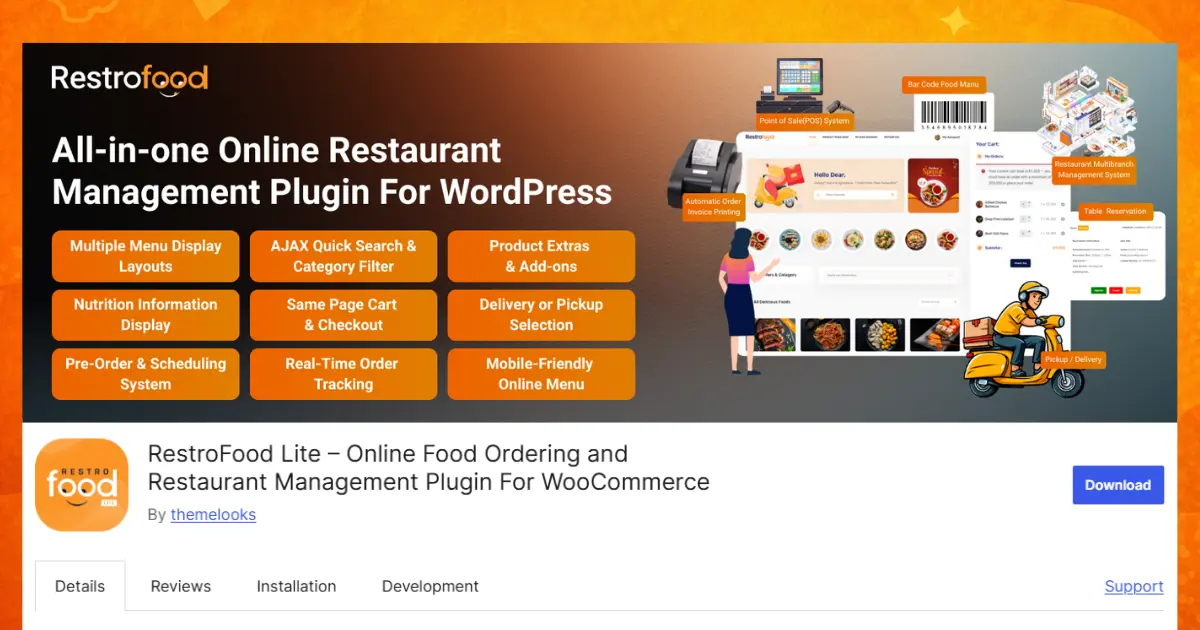
Add-ons – POS, Multibranch, Multi-delivery Fees, Table Reservation, In-Restaurant Order, Automatic Order Invoice Printing and Tip Management.
Best for: restaurants, cafes, cloud kitchens and multi-branch chains that want the whole delivery operation in WordPress. The next section shows how each feature fixes a specific cost leak.
FoodBook is a food ordering plugin for WordPress. It gives your restaurant its own menu, cart and checkout. It also takes table bookings.
How it cuts your cost: it fixes leak 1, marketplace commission. Customers order straight from your website, so no platform takes a cut. Move 200 orders a month off a marketplace and you keep about $1,000, based on a $25 average order and a 20% rate.
Pricing model: sold as a marketplace plugin, so check the current listing before you plan a budget.
Best for: a single restaurant that wants online ordering and table booking in one place.
Watch out: delivery fee rules are where ordering plugins differ most. Test how it handles distance fees and zip-code zones before you buy. If it only supports one flat fee, leak 2 stays open.
This is an official WooCommerce extension. It sets your delivery fee by how far the customer lives, using Google Maps.
How it cuts your cost: it fixes leak 2, the flat fee trap. Say a far drop costs you $6 and you charge $3. You lose $3 every time. On 60 far orders a month, that is $180 walking out the door. Distance rates close the gap.
Pricing model: a paid extension with a yearly licence. Check the current price on the WooCommerce site.
Best for: a store that already takes orders well and only needs smarter delivery pricing.
Watch out: this is a shipping calculator, nothing more. There is no kitchen screen, no driver panel and no time slots. Leaks 5, 6 and 7 stay open.
Another official WooCommerce extension. Instead of measuring distance, you build a table of rules and the plugin picks the matching fee.
How it cuts your cost: it fixes leak 2 and part of leak 3, out-of-zone orders. You set a fee per area, so nearby customers pay $2 and far customers pay $5. Leave an area out of the table and orders from there cannot go through.
Pricing model: a paid extension with a yearly licence, sold on the WooCommerce site.
Best for: restaurants with clear neighbourhood zones rather than a smooth radius.
Watch out: the tables take longer to set up than distance rates. There is still no driver dashboard and no live order tracking.
RestroPress is a food ordering plugin listed in the WordPress plugin directory. The core plugin is free to install, which makes it a low-risk first step.
How it cuts your cost: it fixes leak 1 and leak 9, status phone calls. Orders arrive on your own site, and customers get status updates by email instead of calling your counter.
Pricing model: free core plugin, with paid add-ons for extra features.
Best for: a small restaurant testing online ordering with almost no upfront cost.
Watch out: count the add-ons you need before you compare prices. A free core plus 4 paid add-ons can cost more than one complete plugin.
Orderable is a WooCommerce ordering plugin built around delivery timing. Its strongest feature is control over when orders arrive.
How it cuts your cost: it fixes leaks 3, 6 and 7. Time slots let one driver run cover 3 nearby drops instead of 1. That is the single biggest cut you can make to cost per drop.
Pricing model: a free version, plus a paid subscription for the advanced tools. Include the yearly renewal in your comparison.
Best for: restaurants that get slammed at peak hours and need to spread demand out.
Watch out: it schedules orders well, but driver tools and fee depth are lighter. Check both against your delivery volume.
This plugin does one job. It manages your drivers.
How it cuts your cost: it fixes leak 5, manual dispatch. Your drivers stop calling the kitchen to ask what is next, and you stop guessing who is where.
Pricing model: a free version, with a paid upgrade for the full driver tools.
Best for: a restaurant with 3 or more drivers and no dispatch system.
Watch out: it is dispatch only. Fees, zones and time slots all have to come from another plugin, so budget for 2 tools.
The table below compares all 7 plugins on the capabilities that move delivery cost. General feature counts are left out, because they do not change your cost per drop.
| Capability that lowers cost | RestroFood | FoodBook | Woo Distance Rate | Woo Table Rate | RestroPress | Orderable | Delivery Drivers |
| Own-site ordering, no commission | Yes | Yes | No | No | Yes | Yes | No |
| Distance-based delivery fee | Yes | Partial | Yes | Partial | Partial | Partial | No |
| Zip-code or zone fee | Yes | Partial | Partial | Yes | Partial | Yes | No |
| Maximum delivery distance block | Yes | Partial | No | Partial | Partial | Yes | No |
| Time slots with order caps | Yes | Partial | No | No | Partial | Yes | No |
| Driver dashboard and route map | Yes | Partial | No | No | Partial | Partial | Yes |
| Customer order tracking | Yes | Partial | No | No | Yes | Partial | Partial |
| Multi-branch zones and fees | Yes, add-on | Partial | No | No | Partial | Partial | No |
| Built-in POS | Yes, add-on | Partial | No | No | No | Partial | No |
Legend: “Yes” included · “Partial” or add-on · “No” not available. Plugins ship updates often, so confirm the current feature list before you buy.
Three conclusions come out of this table. Shipping-rate extensions fix pricing and stop there. Ordering plugins fix commission but vary widely on zone control. A full restaurant management system fixes pricing, zones, batching and dispatch together, which is where most of the savings sit.
RestroFood closes 8 of the 9 cost leaks with settings rather than extra staff. It prices delivery by distance, blocks out-of-zone orders before payment, batches orders into time slots, and moves dispatch and status updates off the phone.
The table below maps every leak to the feature that fixes it. Details follow underneath.
| Leak | Problem | RestroFood fix |
| 1 | Marketplace commission | Own-site ordering on WooCommerce |
| 2 | Flat fee for every distance | Kilometer-Based and Zip Code-Wise Delivery Fees |
| 3 | Out-of-zone orders | Distance Restrictions, Zip Code Based Delivery |
| 4 | Bad addresses | Auto-Detect Customer Address, Delivery Availability Checker |
| 5 | Manual dispatch | Delivery Man Admin Panel, directions map |
| 6 | One trip per order | Order Limit On Time Slot, Pre-Order System |
| 7 | Unscheduled demand | Delivery Time Slot Settings |
| 8 | Wrong-branch deliveries | Branch-Based Distance Restriction, Order Transfer System |
| 9 | Status phone calls | Order Tracking System, status emails |
Eight of the 9 fixes are configuration, not new headcount. That is why the savings arrive in the first month. Here is how each fix works.
One thing most operators miss. The difference between a $4 drop and a $7 drop is rarely the distance. It is the 6 minutes a driver waits while someone finds the address and decides who takes it.
Distance-based fees and zone limits stop the losses before the driver leaves.
Set up low-cost delivery by measuring your profitable radius first, then locking that radius into your plugin settings. Seven steps cover the whole job: distance limit, zip codes, zone fees, order minimums, time slots and driver accounts.
Check the numbers again after 30 days. Open Orders Statistic, compare your zones, and move any fee that still runs below cost.
Reducing food delivery costs does not have to be difficult. The right WordPress plugin can help you save money, improve delivery, and give customers a better experience. Some plugins reduce marketplace commissions, while others help with delivery zones, distance-based fees, driver management, and order scheduling. Choose the plugin that matches your restaurant’s needs and budget. If you want one complete solution, RestroFood stands out by combining ordering, delivery management, pricing, time slots, and customer tracking in one place. Small changes, such as setting delivery zones or using time slots, can make a big difference over time. Start with the right tool today, lower your delivery costs, and keep more profit from every order your restaurant receives.
Every order delivered at the right fee, in the right zone, on one trip is the margin you keep. Explore RestroFood pricing
Most restaurants spend $6–$14 to deliver one order, before commission. Driver pay is the largest part, followed by fuel, packaging and card fees. Add a 20% marketplace commission on a $25 order and the total delivery cost reaches $11–$19. Calculate your own number by adding every delivery expense for a month and dividing by the number of drops.
Fix your zones and your trips first. Set a maximum delivery distance so you stop serving unprofitable addresses. Price each zone by distance instead of using one flat fee. Use delivery time slots so one driver run covers several drops. These 3 changes cost nothing per order and take about an hour to configure in a WordPress plugin.
Charge by distance whenever your delivery radius passes about 3 km. A flat fee only works when every drop takes a similar time. That is true for a tight city radius and false for anything wider. Distance-based fees keep far orders profitable and let you keep a low fee for nearby customers, who order most often.
Yes. WordPress with WooCommerce and a restaurant plugin handles menus, checkout, delivery zones, fees, time slots, driver assignment and order tracking. You own the customer data and pay no per-order commission. You do need to arrange your own drivers, because a plugin manages the delivery, it does not supply the labour.
Set the minimum at roughly 3 times your cost per drop. If one drop costs you $6, an $18–$20 minimum keeps the order profitable after food cost. Restaurants with a high average order value can set it lower. Review the number every quarter, because driver pay and fuel prices move.
Time slots let you batch orders into one trip instead of running one trip per order. When customers pick a slot, you know how many drops are coming and where. A driver leaves with 3 bags for 3 nearby addresses. Fuel and driver hours drop by 25–40% on the same order volume, and the food arrives hotter.
For most restaurants, yes. A plugin costs a fixed amount, while commission takes 15–30% of every order forever. At 400 orders a month averaging $25, a 20% rate costs about $2,000 monthly. A plugin licence and hosting usually cost a small fraction of that. Marketplaces still earn their fee when they bring new customers, so many restaurants run both channels.
Yes, kilometre-based and zip-code-wise fees come from the Multi-delivery Fees add-on. The core plugin includes a custom delivery fee, free shipping above an order amount, zip-code-based delivery and distance restrictions. Start with the core settings. Add the fee add-on when your radius grows wide enough that one flat fee costs you money.
Our FAQs cover the most common questions about ThemeLooks. If you need personalized advice or have a unique query, our team is ready to help. Contact us!
Mohammad Nur Alam is a Technical Content Writer at ThemeLooks Ltd., specializing in WordPress, SaaS, SEO, and web development. He writes practical tutorials, product reviews, and technical guides that help users make the most of WordPress tools and plugins. Passionate about digital marketing and emerging technologies, he enjoys creating helpful content and staying up to date with the latest industry trends.
